
Learn about production scrap report templates, PDF formats, and digital tools that help manufacturers reduce waste and act on quality data faster.
Key Takeaways
- A production scrap report captures rejected materials, defect types, and root causes to help manufacturers reduce costs and improve first-pass yield.
- Effective scrap report templates include fields for part number, quantity scrapped, defect code, responsible operator, machine ID, and shift details.
- PDF templates are portable and printable, but they are static. They cannot feed live dashboards or trigger real-time corrective action workflows.
- Mobile apps replace paper and PDF scrap forms by capturing data at the point of occurrence, routing it automatically, and feeding live dashboards without the manual consolidation.
- Alpha TransForm helps manufacturing teams digitize scrap report forms in minutes, with offline capability, barcode scanning, and instant reporting dashboards.
Why Production Scrap Reports Matter on the Shop Floor
A production scrap report is a structured record of what was rejected, why, and where in the process the failure occurred, giving manufacturers the data they need to cut waste, protect margins, and meet quality targets. An effective template captures part numbers, defect codes, scrap quantities, responsible operators, machine IDs, and shift details so quality teams can trace recurring patterns back to specific root causes.
How that data gets captured matters as much as what's in it. This guide covers standard template formats, downloadable PDF options, and digital tools that automate the entire process from capture to corrective action.
|
Alpha TransForm: Digital Solutions to Collect, Analyze, and Act on Data Turn Paper Forms Into Mobile Apps in Minutes | No IT Team Required | Works Offline | Trusted by Manufacturing & Field Teams  Why Business Leaders Choose Alpha TransForm: ✓ Built-in custom dashboards and workflows to trigger business activity✓ Seamless integration with existing business systems ✓ Replace Excel with digital data collection and analysis ✓ Rapid digitization—build apps in days without IT bottlenecks ✓ Proven ROI with scalable start-small approach ✓ Trusted by manufacturing, construction, and healthcare leaders From Paper to Digital in 3 Steps 1. Upload your paper form or start from scratch2. Customize fields and logic as needed 3. Deploy to mobile devices and start collecting data instantly Stop losing time with paper processes. Start delivering business value today.
|
What Should a Production Scrap Report Include?

A production scrap report should capture identification details, defect information, and accountability fields to trace and resolve quality issues.
A production scrap report links each scrap event to a specific operator, machine, shift, and defect type, enabling quality teams to identify recurring patterns and address root causes before they compound into larger problems. The format you choose matters less than the data you capture, and every template should cover a core set of fields.
1. Identification & Production Details
Every scrap event needs to be tied to a specific production context. That means including the part number and description, the work order or batch number, and the production line or workstation where the rejection occurred. Without this information, quality teams cannot trace defect patterns back to a specific process or material lot.
2. Scrap Quantity & Defect Information
The heart of the report is what went wrong and how much it cost. Capture quantity produced versus quantity scrapped, defect code or rejection reason (such as dimensional out-of-spec, surface defect, or material contamination), and disposition status. Many manufacturers also include a cost-per-unit-scrapped field to attach a direct dollar value to each event, making the business case for corrective action far easier to communicate upward.
3. Accountability & Sign-Off
A complete scrap report must also document the responsible operator or team, the shift date and time, and a supervisor's signature or sign-off line. These fields support ISO compliance and audit readiness by creating a clear chain of accountability for every rejected unit. A notes or corrective action section rounds out the template by giving quality reviewers space to document root cause findings and next steps.
Standard Production Scrap Report Formats
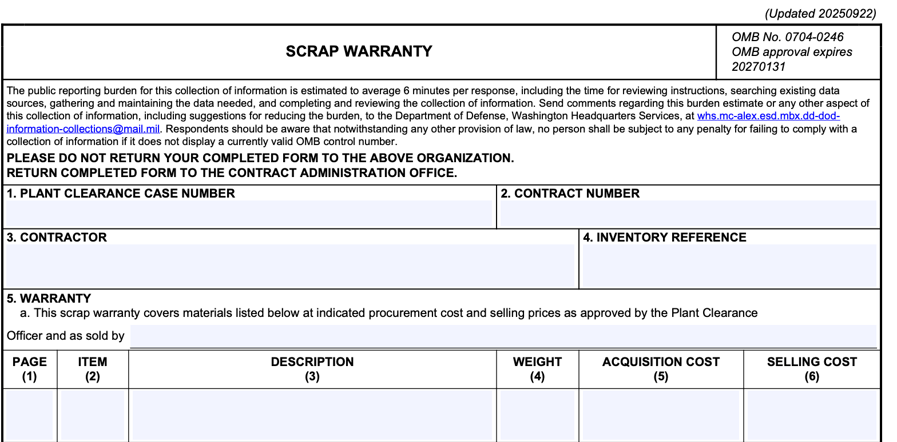
Standard scrap report formats range from paper logs and Excel sheets to PDF templates like the DoD's DD Form 1639 Scrap Warranty.
Paper & Excel Templates
Two common scrap report formats are paper log sheets and Excel spreadsheets. Paper templates require no setup and are immediately available on the floor, but they introduce serious downstream problems: handwriting that quality reviewers cannot read, fields left blank under production pressure, and data that remains in a binder until someone manually enters it into a system.
Excel templates add structure and allow for basic charts and pivot tables, but they depend entirely on accurate, timely manual entry. Version control becomes an issue when multiple supervisors maintain separate files, and there is no mechanism to consolidate data across shifts or lines in real time.
PDF Templates
PDF scrap report templates are widely used because they are easy to distribute, preserve formatting reliably, and can be stored in a document management system or emailed to a supervisor after a shift. A well-designed PDF template should include clearly labeled data fields, checkboxes for common defect codes, a signature line for supervisory sign-off, and a notes section for corrective action documentation.
The core limitation of the PDF format is its static nature. Even fillable PDF forms require someone to review, extract, and re-enter data into a separate reporting system. If your goal is to track scrap trends across shifts, feed data into an ERP, or surface real-time alerts when scrap rates breach acceptable thresholds, PDFs quickly become a bottleneck rather than a solution.
Downloadable PDF Scrap Report Templates
The U.S. Department of Defense publishes DD Form 1639 (Scrap Warranty), which provides a structured format for documenting scrap materials, procurement costs, and disposal authorization. While this form is designed for government property accountability rather than production quality tracking, its layout provides a useful reference for manufacturers building their own scrap report templates. The Defense Acquisition University's Scrap Procedure Worksheet provides a complementary procedural framework for identifying, segregating, verifying, and disposing of scrap, steps that align closely with internal manufacturing scrap-handling processes.
At the state level, agencies like the Georgia Environmental Protection Division publish scrap tracking manifests and quarterly reporting forms for scrap tire management. These environmental compliance forms demonstrate how public agencies structure mandatory scrap documentation with fields for generator identification, material type, quantities, transportation details, and certified sign-off.
Which Software Options Automate Scrap Reporting for Manufacturing Teams?
Manufacturing teams can automate scrap reporting with software like Alpha TransForm, GoCanvas, and SafetyCulture for real-time data capture.
Automating scrap reporting means replacing paper or PDF forms with a digital tool that captures data at the point of occurrence, routes it to the right people, and populates a live dashboard without manual consolidation. Several software platforms handle this, each with different strengths.
1. Alpha TransForm
Alpha TransForm is built specifically for manufacturing and field operations teams that need to digitize forms and deploy them to mobile devices without writing code or waiting on IT. For scrap reporting, apps built with Alpha TransForm support barcode scanning to pull part numbers directly from inventory records, photo capture to document defects as they are identified, mandatory fields to prevent incomplete submissions, and conditional logic to trigger supervisor alerts when scrap volume exceeds a set threshold.
Apps built with our platform work fully offline and sync automatically when connectivity returns. This is important for warehouses, remote lines, or basement production floors where Wi-Fi is unreliable. Built-in dashboards surface shift-by-shift trends without any manual report building, and integration with existing ERP and quality management systems keeps scrap data flowing into the tools your team already uses.
2. GoCanvas
GoCanvas offers a manufacturing scrap report mobile app template that replaces paper-based scrap logs with digital forms on smartphones and tablets. The platform supports photo capture, digital signatures, and PDF report generation. GoCanvas works for teams that want flexible mobile forms with multimedia support.
3. SafetyCulture (formerly iAuditor)
SafetyCulture is a mobile-first inspection and checklist platform with a large template library that covers manufacturing quality checks, safety audits, and operational inspections. Teams can convert existing paper scrap report forms into digital checklists, assign follow-up actions, and generate instant reports.
Production Scrap Report Automation: At-a-Glance Comparison
|
Feature |
Alpha TransForm |
GoCanvas |
SafetyCulture |
|
Offline-First Capability |
Full offline with auto-sync |
Works offline |
Works offline |
|
Barcode Scanning |
Built-in |
Available |
Available |
|
Photo Capture for Defects |
Yes |
Yes |
Yes |
|
Manufacturing-Specific Templates |
Yes (Production Inspection) |
Yes |
General inspection templates |
|
No-Code Setup by Business Users |
Yes |
Yes |
Yes |
|
ERP/System Integration |
Yes (built-in) |
Available via integrations |
Available via integrations |
Why Alpha TransForm Is Built for Scrap Report Automation

Alpha TransForm empowers manufacturing teams to digitize scrap reporting with no coding, no IT delays, just fast mobile deployment.
Efficient scrap reporting requires moving beyond static paper logs and manual data entry. Manufacturing teams use Alpha TransForm to build custom mobile apps that capture defect photos, barcode scans, and digital signatures instantly. This no-code platform allows quality managers to deploy professional tools without waiting for technical support or IT resources.
Automated workflows trigger immediate alerts when scrap levels exceed thresholds, which enables faster corrective actions on the shop floor. These apps function entirely offline and sync data automatically to update live business dashboards. Contact a solutions consultant today to see how Alpha TransForm can modernize your quality documentation and reduce production waste.
FAQs
What is the difference between a scrap report and a defect report?
How often should production scrap reports be submitted?
What is a scrap rate, and how is it calculated?
Can scrap report data be used for ISO compliance documentation?
How does Alpha TransForm simplify scrap reporting for manufacturing teams?
*Note: Alpha TransForm is a no-code app builder developed by Alpha Software. Product features, availability, pricing, and results referenced are for informational purposes only and subject to change; actual capabilities and outcomes may vary based on configuration and use case. To confirm current offerings and pricing, talk to a Solutions Consultant.






Comment