
Find out what belongs in a manufacturing NCR template, review real examples by use case, and compare digital options that speed up quality resolution.

Key Takeaways
- A non-conformance report (NCR) is a formal quality document that records any product, process, or material that fails to meet defined manufacturing standards.
- Effective NCR templates include defect descriptions, root cause analysis, corrective and preventive actions, disposition decisions, and formal sign-off fields.
- Downloadable NCR templates from the U.S. Army Corps of Engineers, Department of Defense, and FDA provide starting points that can be built upon.
- Digital NCR tools eliminate paper delays and give quality teams real-time visibility into open issues, and the right platform lets business users build and deploy solutions without waiting on IT.
- With Alpha TransForm, manufacturers can convert paper NCR forms into mobile apps in minutes, with no IT team required, and with offline capability built in for shop-floor use.
Why Non-Conformance Reports Matter in Manufacturing Quality Control
An effective NCR template structures the full resolution cycle, covering defect description, root cause analysis, corrective action, disposition, and sign-off, so that issues are closed systematically rather than repeated. Without that structure, non-conformances get documented inconsistently, root causes go unaddressed, and the same defects resurface in the next production run.
The right template format depends on the operation: basic templates work for smaller facilities, ISO 9001 templates satisfy audit requirements, supplier templates hold vendors accountable, and in-process templates support fast documentation on the production floor. Increasingly, manufacturers are replacing paper NCR workflows with digital tools that capture data at the point of discovery, automatically route actions, and surface trends in real time.
This piece breaks down what every NCR template must include, walks through examples for each use case, reviews downloadable government-published forms, and compares digital NCR platforms built for manufacturing environments.
|
Alpha TransForm: Digital Manufacturing Solutions to Collect, Analyze, and Act on Data Turn Paper Forms Into Mobile Apps in Minutes | No IT Team Required | Works Offline | Trusted by Manufacturing & Field Teams  Why Business Leaders Choose Alpha TransForm: ✓ Built-in custom dashboards and workflows to trigger business activity✓ Seamless integration with existing business systems ✓ Replace Excel with digital data collection and analysis ✓ Rapid digitization—build apps in days without IT bottlenecks ✓ Proven ROI with scalable start-small approach ✓ Trusted by manufacturing, construction, and healthcare leaders From Paper to Digital in 3 Steps 1. Upload your paper form or start from scratch2. Customize fields and logic as needed 3. Deploy to mobile devices and start collecting data instantly Stop losing time with paper processes. Start delivering business value today.
|
What Should an NCR Template Include?
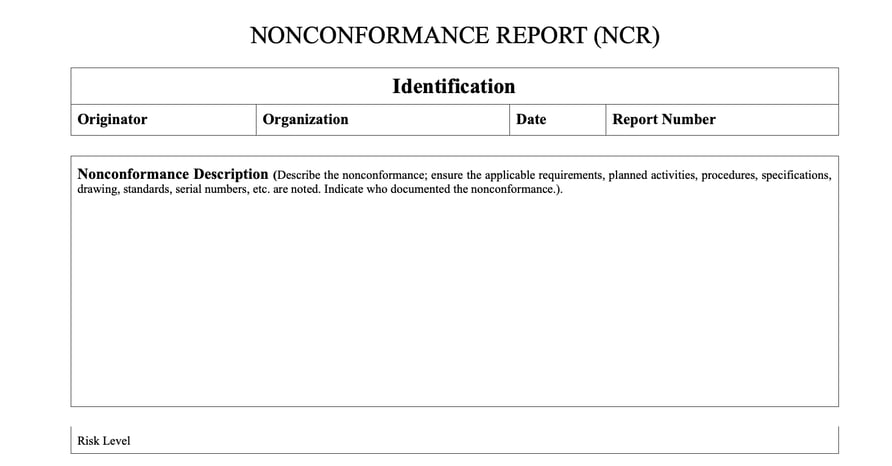
A well-structured NCR template should include identification fields, defect descriptions, root cause analysis, CAPA, disposition, and sign-off sections.
A well-structured NCR template guides the quality team through a complete resolution cycle. Skipping or vaguely filling in fields is one of the most common reasons non-conformances recur. The core sections every NCR template should contain are outlined below.
- Identification fields: establish the administrative record: NCR number, date of discovery, reporting individual, department, and the product or part number affected. These fields anchor every subsequent step to a traceable event.
- Defect description: captures what was observed, what standard or specification was violated, and how many units or batches are affected. Visual evidence is critical here: photo documentation at the point of discovery removes ambiguity and supports faster decisions by quality leads who weren't present.
- Root cause analysis: moves the investigation beyond symptoms. This section should prompt the team to use a structured method, such as a 5-Why analysis or an Ishikawa (fishbone) diagram, and to document the findings clearly before moving on to corrective action.
- Corrective and preventive action (CAPA): defines what will be done to fix the root cause and prevent recurrence. Each action item must include an assigned owner and a target completion date. Open CAPA items with no owner or deadline are a leading indicator of quality system breakdown.
- Disposition: records the decision made about non-conforming material: rework, scrap, return to supplier, or acceptance under a formal deviation. This field is essential for inventory accuracy and for demonstrating controlled handling during audits.
- Approval and sign-off: formally closes the NCR. Electronic or handwritten signatures from quality and operations leadership create accountability and mark the event as resolved in the system of record.
Examples of Downloadable NCR Templates
Manufacturers can reference NCR forms published by U.S. government agencies. These templates have been developed for regulated environments with strict documentation requirements, making them useful benchmarks for any quality team looking to validate their own forms against proven formats.
U.S. Army Corps of Engineers (USACE) — The Corps publishes a generic NCR template through its Environmental Management System resources. The form includes sections for identification, a detailed nonconformance description, risk level, steps to prevent inadvertent use, planned corrective and preventive actions with completion dates and responsible staff, independent verification, and formal sign-off fields for closing the nonconformance. It is available as a downloadable .doc file at corpslakes.erdc.dren.mil.
U.S. Department of Defense, Office of the Under Secretary for Acquisition & Sustainment (OUSD (A&S)) — The DoD provides a Contract Non-Conformance Report template designed for use in defense procurement and construction contracts. It is hosted on the official OUSD(A&S) website and can be downloaded at acq.osd.mil. This template is particularly relevant for manufacturers supplying to defense programs who need to align their NCR documentation with federal contracting requirements.
U.S. Food and Drug Administration (FDA): MDSAP Nonconformity Forms — For medical device manufacturers, the FDA publishes a full set of MDSAP assessment procedures and forms, including the Nonconformity Grading and Exchange Form and the AO Nonconformity Report Form. These forms are designed for regulatory audits under the Medical Device Single Audit Program.
Which Digital Tools Help Manufacturers Manage NCRs?
Digital NCR tools eliminate paper delays, improve data accuracy, and give quality teams real-time visibility into trends and open issues on the floor. The right platform depends on the size of the operation, the complexity of the quality system, and the level of IT support available.
1. Alpha TransForm
Alpha TransForm is a no-code platform built specifically for operations teams that need to digitize paper-based processes quickly without relying on IT. Quality managers and business users can convert existing NCR paper forms into fully functional mobile apps in days, not months. The platform replaces paper-based processes that delay defect identification, allowing teams to detect issues and initiate responses in real time.
What sets our platform apart for manufacturing NCR use is its patented offline functionality. Apps built with our platform remain fully functional on the factory floor, even without WiFi or cellular coverage, and data synchronizes automatically once connectivity is restored.
It supports photo capture with markup, barcode scanning for part identification, electronic signatures, conditional logic for CAPA routing, and custom dashboards that give quality managers live visibility into open NCRs. It also integrates with existing ERP and MES systems to ensure data flows across the enterprise.
2. SafetyCulture (formerly iAuditor)
SafetyCulture is a mobile-first inspection and audit platform widely used across construction, manufacturing, facilities management, and hospitality. It enables teams to digitize audits, checklists, and safety inspections for compliance and inspection tracking. The platform includes a visual template builder for creating custom NCR and inspection forms, photo annotation, corrective action assignment, and automatic report generation.
3. ComplianceQuest
ComplianceQuest is a Salesforce-native, enterprise-grade quality management system (EQMS) built for regulated industries, including medical devices, pharmaceuticals, aerospace, and defense. Its Nonconformance Management Solution automates nonconformance management workflows to identify, document, and prevent nonconformances, with a specific focus on high-risk nonconformances.
The platform includes AI-powered failure mode identification, integrated risk assessment, 5-Why collaborative whiteboards for root cause analysis, and direct links between NCRs and CAPA, supplier management, audit management, and document control modules.
Digital Options for NCR: Comparison Summary
|
Feature |
Alpha TransForm |
SafetyCulture |
ComplianceQuest |
|
Best For |
Operations replacing paper NCRs without IT support |
Teams needing a general inspection and audit platform |
Regulated enterprises requiring a full EQMS |
|
Setup Approach |
No-code; business users build and deploy apps in minutes |
Visual template builder; quick setup |
Enterprise deployment requires configuration and onboarding |
|
Offline Capability |
Patented full offline with auto-sync |
Offline mode with sync-on-connect |
Mobile access; offline capability varies by module |
|
NCR-Specific Features |
Photo capture, barcode scanning, e-signatures, conditional CAPA logic, custom dashboards |
Photo annotation, corrective action assignment, automated reports |
AI failure mode identification, 5-Why whiteboards, integrated risk assessment, CAPA linkage |
|
ERP/MES Integration |
Yes, connects to existing ERP and MES systems |
Integrations available via API and partners |
Native Salesforce; integrates with SAP and other enterprise systems |
|
IT Dependency |
None, built for business users |
Low. Minimal IT involvement |
Moderate to high, requires IT and admin support |
Why Alpha TransForm Is the Smarter Way to Manage NCRs
Alpha TransForm lets quality teams digitize NCR forms and deploy mobile apps in minutes without writing code.
A non-conformance report is only as useful as the system behind it. The templates covered here give quality teams a solid structural foundation, but paper-based execution still introduces the delays, transcription errors, and visibility gaps that let issues recur. The goal is a closed-loop process that captures defects at the point of discovery, routes CAPA automatically, and surfaces trends before they become audit findings.
That is what Alpha TransForm is built to deliver. Quality managers and operations leads convert their existing NCR forms into mobile apps themselves, in days, without writing code or waiting on IT. Every app works offline by default, so inspectors can complete and submit NCRs anywhere on the floor.
Barcode scanning handles part identification, photo capture documents defects at the source, conditional logic routes the right CAPA fields automatically, and custom dashboards give quality leads a live view of every open issue.
Start with a handful of forms, prove the value, and scale at your own pace. No long implementation cycles, no IT bottlenecks, no recurring non-conformances slipping through the cracks.
FAQs
What is the difference between an NCR and a CAPA in manufacturing?
How long should a manufacturer retain NCR records?
Can NCR templates be used for supplier quality management?
What makes an NCR compliant with ISO 9001?
How does Alpha TransForm help manufacturers quickly digitize NCR processes?
*Note: Alpha TransForm is a no-code app builder developed by Alpha Software. Product features, availability, pricing, and results referenced are for informational purposes only and subject to change; actual capabilities and outcomes may vary based on configuration and use case. To confirm current offerings and pricing, talk to a Solutions Consultant.





Comment