
Find out the must-have fields for production shift handover templates, guidance for building them, and three digital alternatives to automate handovers.

Key Takeaways
- Most production facilities lose critical shift information to verbal updates, handwritten logs, or incomplete PDFs, and the gap only shows up after something goes wrong.
- Government bodies like the UK's HSE and OSHA in the US publish guidance that shapes what effective shift handover templates should include.
- Three digital platforms built for shift handover automation include Alpha TransForm, SafetyCulture, and Connecteam, each providing no-code form builders, photo capture, and automated alerts to replace static PDFs.
- A well-built handover template captures operator IDs, equipment status, pending tasks, production metrics, safety observations, and sign-off fields, covering everything the next shift needs to start without delay.
- Alpha TransForm lets production teams turn paper handover forms into mobile apps in minutes, collect data offline, and automate workflows without IT.
Why Do Shift Handovers Still Break Down on the Production Floor?
Production shift handovers fail because most facilities rely on verbal updates, handwritten logs, or static PDFs that cannot enforce required fields, trigger alerts, or feed data into dashboards. Closing that gap starts with a handover template that captures the right fields: operator IDs, equipment status, pending tasks, production metrics, safety observations, and sign-off confirmations.
Government frameworks from the UK's HSE and OSHA in the US reinforce what those fields should cover, treating shift handover as both a safety-critical communication event and a compliance requirement. Even a well-designed template has limits when it lives on paper. Digital platforms like Alpha TransForm, SafetyCulture, and Connecteam solve these problems by turning handover forms into mobile apps with offline capability, conditional logic, automated alerts, and built-in dashboards.
This guide covers the essential fields every handover template needs, the government guidance that should shape it, and three digital alternatives that replace static PDFs permanently.
|
Alpha TransForm: Digital Solutions to Collect, Analyze, and Act on Data Turn Paper Forms Into Mobile Apps in Minutes | No IT Team Required | Works Offline | Trusted by Manufacturing & Field Teams  Why Business Leaders Choose Alpha TransForm: ✓ Built-in custom dashboards and workflows to trigger business activity✓ Seamless integration with existing business systems ✓ Replace Excel with digital data collection and analysis ✓ Rapid digitization—build apps in days without IT bottlenecks ✓ Proven ROI with scalable start-small approach ✓ Trusted by manufacturing, construction, and healthcare leaders From Paper to Digital in 3 Steps 1. Upload your paper form or start from scratch2. Customize fields and logic as needed 3. Deploy to mobile devices and start collecting data instantly Stop losing time with paper processes. Start delivering business value today.
|
Fields Every Shift Handover Template Needs

Every shift handover template should include operator identification, equipment status, pending tasks, production metrics, safety observations, and sign-off fields.
A handover template is only as useful as the information it captures. Too few fields and critical details slip through. Too many operators stop filling it out. The goal is to balance thoroughness with speed so the form gets completed on every shift, without exception. The fields that consistently prove their worth are:
- An operator identification section that records the names or IDs of both outgoing and incoming personnel, along with date, time, shift designation (Day, Swing, or Night), and the specific production line or area. This header information anchors every handover to a clear moment in time and a clear pair of responsible individuals.
- Equipment and machine status is the next important section. Outgoing operators should document which machines are running normally, which have active issues, and which are down for maintenance.
- Pending tasks and open work orders need their own dedicated section so the incoming crew knows exactly what was started but not finished.
- Production metrics from the outgoing shift, including units produced, scrap counts, and downtime minutes, give the next team context on progress against targets.
- Safety observations and incidents should never be optional. A dedicated field for hazards spotted, near-misses reported, or incidents logged ensures safety awareness carries over between crews.
- Finally, a sign-off section with signatures or digital confirmations from both parties creates accountability and a verifiable record.
What Government Guidance Should Shape Your Shift Handover Template?
Government safety bodies do not typically publish ready-to-use shift handover PDFs, but they do publish frameworks and research that define what an effective handover must include. Building your template around these standards helps with both safety outcomes and regulatory compliance.
HSE (UK): Structured Communication as a Safety-Critical Task
The UK's Health and Safety Executive (HSE) treats shift handover as a safety-critical communication event. The HSE's guidance document HSG48, Reducing Error and Influencing Behaviour, dedicates a section to effective shift communication. It identifies common communication failures, including missing, inaccurate, or unnecessary information, and provides practical steps for improving handover communication, such as carefully specifying what key information needs to be communicated, using both written and verbal channels, allowing sufficient time for shift handover, encouraging two-way communication, and developing communication skills across the workforce.
The HSE has documented major accidents, including the Piper Alpha disaster and the 1983 Sellafield beach contamination incident, where failures of communication at shift handover were identified as contributing factors. Their guidance emphasizes that handovers should be both verbal and written, conducted face-to-face, and given enough time and resources to be done properly.
OSHA (US): Process Safety & Shift Communication
OSHA's Process Safety Management (PSM) standard (29 CFR 1910.119) requires companies handling highly hazardous chemicals to maintain written operating procedures, hot work permits, and process safety documentation. While the standard does not specifically mandate shift change logs, its requirements for documented procedures and communication effectively make shift handover documentation a compliance best practice in covered facilities.
3 Digital Alternatives for Shift Handover Automation
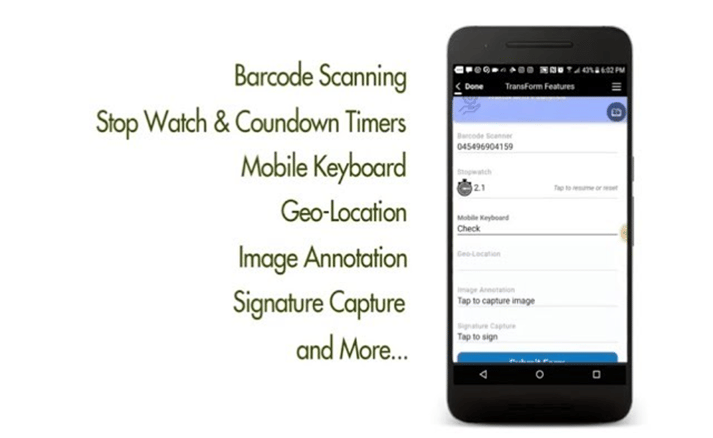
Alpha TransForm, SafetyCulture, and Connecteam are three digital platforms built to replace static PDF shift handover processes.
Moving from static PDFs to a digital workflow means capturing data, enforcing completeness, and routing information to the right supervisors automatically, without adding steps for the operator. Here are three platforms built to handle shift handovers digitally.
1. Alpha TransForm
Alpha TransForm is a no-code platform we built that lets business users, not IT, turn any paper or PDF handover form into a mobile app. Our platform is built offline-first, meaning operators on factory floors, in warehouses, or at remote sites can complete handovers without an internet connection. Data syncs automatically once connectivity returns.
Alpha TransForm apps include photo capture for documenting equipment issues, barcode scanning, GPS and timestamps, digital signatures, conditional logic that shows follow-up questions only when relevant, and automated alerts that notify supervisors the moment a critical issue is submitted.
Custom dashboards can give operations leaders real-time visibility into shift performance, recurring problems, and open tasks across all lines and locations. Teams can start small by digitizing one handover form, see results within days, and scale across the operation without waiting on IT.
2. SafetyCulture
SafetyCulture is a mobile-first platform for inspections and checklists used across manufacturing, construction, and field operations. It offers thousands of pre-built templates, including several for shift handovers, which teams can customize with logic, required fields, and photo attachments. SafetyCulture supports offline inspections with data syncing when back online, and it includes analytics dashboards for tracking compliance and recurring issues.
3. Connecteam
Connecteam is an all-in-one workforce management platform that combines digital forms, communication tools, scheduling, and task management. Teams can build custom shift handover forms with various field types, attach photos and files, and use GPS verification. Connecteam also includes team chat, an employee knowledge base, and training tools, making it useful for organizations that want handover reporting bundled with broader operations management.
Digital Shift Handover Alternatives: Summary Table
|
Feature |
Alpha TransForm |
SafetyCulture |
Connecteam |
|
Best For |
Manufacturing and field operations teams |
Inspections-heavy teams across industries |
General workforce management |
|
No-Code Form Builder |
Yes |
Yes |
Yes |
|
Offline Capability |
Full offline-first with auto-sync |
Offline inspections with sync |
No offline support |
|
Photo Capture & Annotation |
Yes |
Yes |
Yes (no annotation) |
|
Conditional Logic |
Yes |
Yes |
Limited |
|
Automated Alerts |
Yes |
Yes |
Yes |
|
Barcode Scanning |
Yes |
Yes |
No |
|
Digital Signatures |
Yes |
Yes |
Yes |
Why Alpha TransForm Simplifies Shift Handover Automation
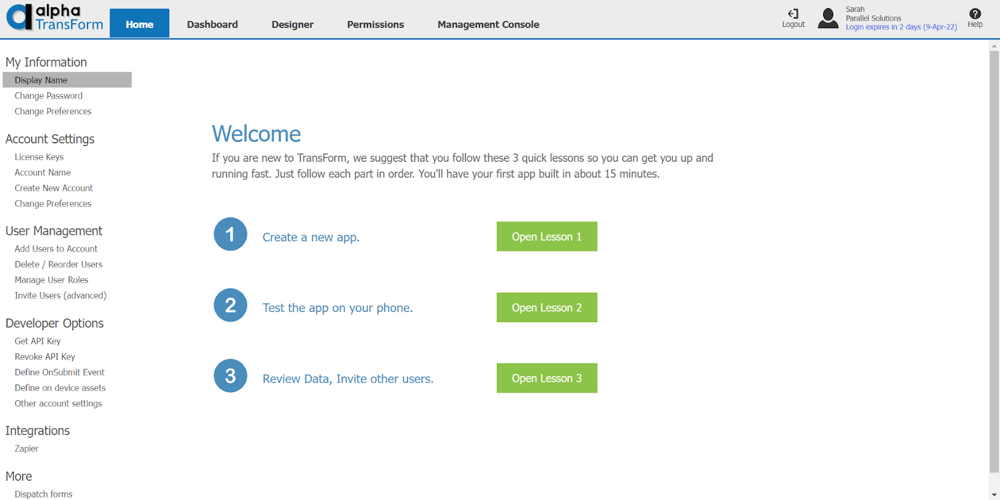
Alpha TransForm's no-code platform lets business users digitize shift handover forms into mobile apps with offline capability and real-time dashboards.
Reliable production handovers demand precise data and uniform reporting to prevent safety incidents and operational delays. Traditional paper logs frequently fail to capture machine status or pending tasks, creating communication gaps between outgoing and incoming crews. Alpha TransForm converts static handover templates into functional mobile applications that work in any industrial environment.
The platform features photo capture, digital signatures, and automated alerts to ensure every report meets compliance standards. Operations leaders gain immediate visibility into facility performance through real-time dashboards that track recurring issues and production metrics across all lines. Contact a solutions consultant today to see how Alpha TransForm can modernize your facility documentation and improve team accountability.
FAQs
What should a production shift handover template include?
Do government agencies provide shift handover templates?
What are the limitations of using PDF templates for shift handovers?
How long does it take to digitize a paper handover form?
What makes Alpha TransForm a strong choice for shift handover apps?
*Note: Alpha TransForm is a no-code app builder developed by Alpha Software. Product features, availability, pricing, and results referenced are for informational purposes only and subject to change; actual capabilities and outcomes may vary based on configuration and use case. To confirm current offerings and pricing, talk to a Solutions Consultant.






Comment