
Find vehicle incident report templates, downloadable PDF examples, and digital options that help fleet and operations teams capture accurate data faster.
Key Takeaways
- A strong vehicle incident report template captures driver details, vehicle information, damage descriptions, witness accounts, and photo evidence in one structured document.
- PDF templates offer a quick starting point, but they limit real-time data sharing, are prone to errors, and can't enforce required fields or automate workflows.
- Digital incident reporting apps reduce response times by enabling drivers to submit reports from the scene, including photos, GPS timestamps, and electronic signatures.
- The top digital alternatives to paper and PDF incident reports are Alpha TransForm, SafetyCulture/iAuditor, and Samsara.
- Alpha TransForm lets business users turn any paper incident report into a mobile app in minutes, with offline capability, photo capture, and built-in dashboards for immediate visibility.
Why Vehicle Incident Reports Matter for Fleet Operations
A complete vehicle incident report should capture driver and vehicle identification, time-stamped location data, damage documentation with photos, injury details, witness statements, and insurance information, and how you collect that data directly affects how fast claims resolve and whether you can spot fleet-wide safety patterns.
Government agencies like the GSA and several state DOTs publish free PDF templates such as Standard Form 91 that cover these essentials, but PDFs cannot enforce required fields, attach photos inline, capture GPS coordinates, or route serious incidents for immediate review. Digital reporting platforms, including Alpha TransForm, SafetyCulture, and Samsara, solve those gaps by walking drivers through structured reports on a phone or tablet at the scene, syncing data to dashboards in real time, and eliminating the manual re-entry that delays claims and introduces errors.
|
Alpha TransForm: Digital Solutions to Collect, Analyze, and Act on Data Turn Paper Forms Into Mobile Apps in Minutes | No IT Team Required | Works Offline | Trusted by Manufacturing & Field Teams  Why Business Leaders Choose Alpha TransForm: ✓ Built-in custom dashboards and workflows to trigger business activity✓ Seamless integration with existing business systems ✓ Replace Excel with digital data collection and analysis ✓ Rapid digitization—build apps in days without IT bottlenecks ✓ Proven ROI with scalable start-small approach ✓ Trusted by manufacturing, construction, and healthcare leaders From Paper to Digital in 3 Steps 1. Upload your paper form or start from scratch2. Customize fields and logic as needed 3. Deploy to mobile devices and start collecting data instantly Stop losing time with paper processes. Start delivering business value today.
|
What Should a Vehicle Incident Report Template Include?
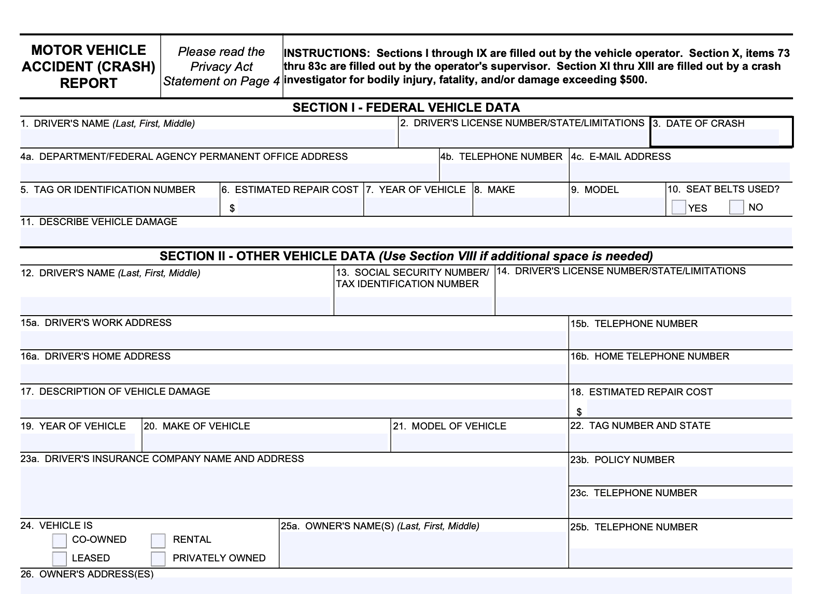
A reliable vehicle incident report template should capture driver details, damage, injuries, and insurance information for compliance.
A reliable vehicle incident report template needs to capture enough detail to support insurance claims, internal investigations, and regulatory compliance. At a minimum, the template should cover the following areas:
- Driver and vehicle identification: Full name, driver's license number, vehicle make, model, year, and plate number.
- Date, time, and location: Exact time and GPS coordinates or address of the incident for verification purposes.
- Incident narrative: A clear, step-by-step description of what happened from each driver's perspective.
- Road and weather conditions: Surface type, visibility, precipitation, and any contributing environmental factors.
- Damage documentation: Descriptions and photos of damage to all vehicles, equipment, and property involved.
- Injury information: Details for all parties, including type and severity of injuries and any medical treatment provided.
- Witness details: Names, phone numbers, and statements from anyone who observed the incident.
- Insurance information: Policy numbers and carrier details for all parties involved.
- Photos, diagrams, or sketches: Visual evidence of vehicle positions, damage, and the surrounding scene.
Beyond these basics, templates used in fleet and field operations benefit from additional fields. Digital signatures confirm that the report was completed by the right person. Timestamps create an auditable trail that proves when the report was filed. The more structured and complete the template, the fewer follow-up calls and disputes you deal with later.
Common Vehicle Incident Report Examples
1. Basic Driver Accident Report
This is a widely used format. It covers the essentials: who was driving, what vehicles were involved, what happened, and what damage occurred. Most state DMVs provide versions of this form, and many organizations adapt them for internal use.
The basic report works for straightforward incidents like parking lot collisions or minor fender-benders, but it often lacks the depth needed for fleet compliance or detailed root-cause analysis.
2. Fleet-Specific Incident Report
Fleet operations typically require more detail than a standard driver report. A fleet-specific template adds fields for vehicle unit numbers, odometer readings, driver assignment history, and maintenance status at the time of the incident.
It may also include sections for supervisor review, corrective actions, and follow-up tracking. This format supports both insurance claims and internal safety programs by connecting incident data to broader fleet performance metrics.
3. Equipment or Property Damage Report
Not every vehicle incident involves a collision with another car. Warehouse forklifts, construction equipment, and delivery vehicles frequently cause property damage, from loading dock strikes to fence collisions on job sites.
Equipment damage reports focus on the asset involved, the type of damage, estimated repair costs, and the operational impact. Organizations with mixed fleets often maintain separate templates for on-road and on-site incidents to capture the right details for each scenario.
Where Can You Find Downloadable PDF Templates?
PDF vehicle incident report templates are easy to distribute and familiar to most teams. Several government agencies provide free, standardized forms that fleet managers and safety coordinators can download and put to use immediately.
The U.S. General Services Administration publishes Standard Form 91 (SF-91), the federal Motor Vehicle Accident (Crash) Report used across government agencies. It covers driver details, crash location, vehicle information, witness statements, and a diagram section, making it one of the more complete free templates available.
The Washington State Patrol Motor Vehicle Collision Report is another solid option, required for any collision in Washington resulting in injury or property damage exceeding $1,000. The Connecticut Department of Administrative Services Vehicle Incident/Accident Report provides a fleet-oriented format with fields for towing status, police report details, and witness contact information. Pinal County, Arizona, also provides an Employee Vehicle or Equipment Incident Report tailored for government fleet operations that must be completed within 24 hours.
These PDFs provide a consistent format and a reliable starting point. However, they come with real limitations for operations teams. Paper PDFs get lost, damaged, or submitted incompletely because there is no way to enforce required fields. Even fillable versions lack the ability to attach photos inline, capture GPS data, automatically apply timestamps, or trigger workflow actions such as routing a serious incident to a claims manager.
Data from PDFs must be manually entered into spreadsheets or databases for analysis, which creates delays and introduces transcription errors. For organizations managing more than a handful of vehicles, PDFs quickly become a bottleneck rather than a solution.
Top 3 Digital Alternatives to Paper and PDF Reports
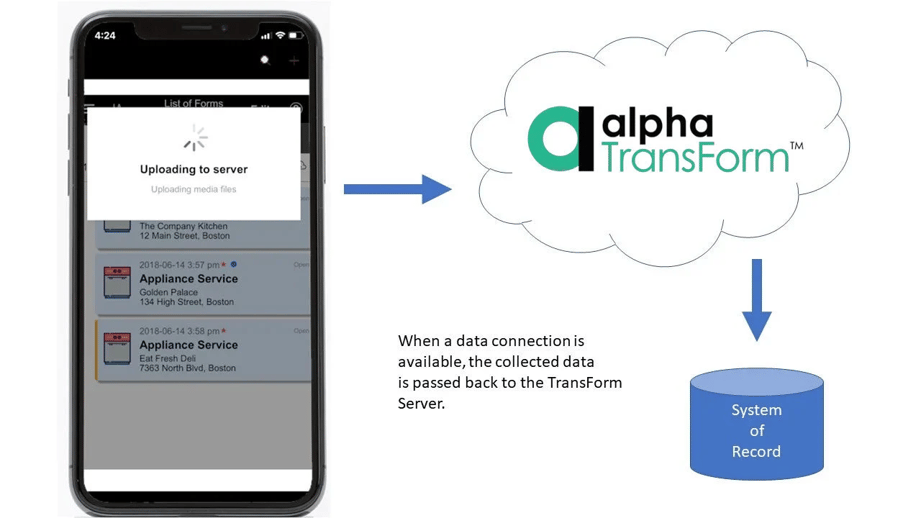
Alpha TransForm enables offline mobile incident reporting, syncing collected field data to your system of record when connectivity returns.
Mobile incident reporting apps solve the problems that PDFs cannot. Instead of handing a driver a paper form after a stressful event, a digital app walks them through each required field on their phone or tablet, right at the scene. Here are three platforms worth evaluating.
1. Alpha TransForm
Alpha TransForm is a no-code platform we built for operations teams that need to capture critical data in tough field conditions without waiting for IT. Our patented offline-first technology means vehicle incident reporting apps built with our platform work flawlessly in parking lots, remote yards, warehouses, and anywhere else connectivity is unreliable.
Business users can turn an existing paper incident report into a fully functional mobile app in minutes, adding photo capture for damage documentation, GPS coordinates, timestamps, digital signatures, and conditional logic that routes serious incidents for immediate review. Built-in dashboards give fleet managers real-time visibility into incident trends and open claims without manual data entry.
Alpha TransForm apps integrate seamlessly with existing fleet management and business systems, and the platform supports a start-small approach, allowing you to digitize one form and scale from there.
2. SafetyCulture (iAuditor)
SafetyCulture is a mobile-first inspection and reporting platform used across industries for digitizing checklists, audits, and incident reports. Teams can build forms using a drag-and-drop template builder or choose from a library of pre-built templates. The app supports offline inspections, photo and video capture, and automated report generation.
3. Samsara
Samsara is a fleet management platform that combines safety incident review, GPS tracking, dash cam footage, and driver coaching tools. Fleet managers can review incidents in real time through the Samsara Fleet App, download HD video evidence, and share it with insurance providers or law enforcement.
Samsara excels for large fleets that need telematics and video-based safety programs, but it is a heavier investment than a no-code form-building tool, and its incident reporting is part of a broader (and more expensive) fleet management suite rather than a standalone solution.
Digital Incident Reporting Solutions: Summary Table
|
Feature |
Alpha TransForm |
SafetyCulture (iAuditor) |
Samsara |
|
Primary Focus |
No-code mobile app builder for field data collection |
Inspection & audit platform |
Full fleet management & telematics |
|
Offline Capability |
Patented offline-first technology |
Offline inspections with sync |
Driver App works offline for HOS and DVIRs; fleet management dashboard and video features require connectivity |
|
Photo Capture & Annotation |
Yes |
Yes |
Dash cam footage; driver-directed photo capture available in DVIRs and custom forms |
|
GPS & Timestamps |
Automatic |
Automatic |
Automatic (vehicle-based) |
|
Digital Signatures |
Yes |
Yes |
Limited |
|
Custom Dashboards |
Built-in, real-time |
Analytics dashboards (Premium) |
Fleet safety dashboards |
|
Form Customization |
Business users build apps without IT |
Drag-and-drop template builder |
Pre-built safety workflows |
|
Best For |
Operations teams are digitizing paper forms fast |
Broad inspection and audit needs |
Large fleets needing telematics + video |
Why Alpha TransForm Leads for Digital Incident Reporting

Alpha TransForm helps digitize vehicle incident reporting, with no IT wait and with real-time fleet visibility.
Static templates and manual processes create delays, incomplete documentation, and reporting gaps that cost fleet operations real money. The longer it takes to capture accurate incident data, the harder it becomes to resolve claims and identify safety patterns.
Alpha TransForm eliminates that friction. Business users can build and deploy mobile incident reporting apps on their own, without IT backlogs or lengthy implementation timelines. Forms can go live in minutes, with data automatically flowing into dashboards and existing systems, and drivers submit complete reports from the scene instead of the office.
If your team is still losing time between an incident and a filed claim, one conversation can show you how quickly that time can be cut.
FAQs
What information should a vehicle incident report include?
When should a vehicle incident report be filed?
Can I use a PDF vehicle incident report for fleet compliance?
What makes digital incident reporting better than paper forms?
How does Alpha TransForm handle incident reporting in areas without internet?
*Note: Alpha TransForm is a no-code app builder developed by Alpha Software. Product features, availability, pricing, and results referenced are for informational purposes only and subject to change; actual capabilities and outcomes may vary based on configuration and use case. To confirm current offerings and pricing, talk to a Solutions Consultant.






Comment