
Learn what a DOT inspection checklist for trucks covers, download free printable templates, and compare digital alternatives that keep your fleet compliant.

Key Takeaways
- A DOT truck inspection checklist covers brakes, tires, lights, coupling devices, frame, exhaust, and driver documentation across a thorough 37-step process.
- The FMCSA publishes free downloadable inspection report forms that any carrier can use as a baseline for annual and pre-trip inspections.
- Paper checklists can't flag a brake issue in real time, attach photos, or feed data to a fleet dashboard — digital inspection apps can, and three platforms worth evaluating are Alpha TransForm, Whip Around, and Fleetio.
- Digital inspection apps capture photos, GPS stamps, and signatures in real time, giving fleet managers instant visibility into compliance status.
- Alpha TransForm lets operations teams convert any paper DOT checklist into a mobile inspection app in minutes, with offline capability and built-in photo capture.
Why DOT Inspection Readiness Starts With a Good Checklist
A structured DOT inspection checklist is the most reliable way to keep commercial trucks compliant and avoid out-of-service orders, fines, and damage to your safety record. The FMCSA's Level 1 inspection is a 37-step review covering brakes, tires, lights, coupling devices, frame integrity, exhaust systems, and driver documentation, and it can happen at any roadside stop without warning.
This guide breaks down exactly what a DOT truck inspection checklist should include across those categories, provides links to free printable government templates from the FMCSA, and compares three digital alternatives that replace error-prone paperwork with real-time photo capture, GPS tracking, and centralized dashboards. Whether you're running a small fleet on paper forms or ready to digitize your compliance workflow, you'll find actionable steps to stay inspection-ready year-round.
|
Alpha TransForm: Digital Solutions to Collect, Analyze, and Act on Data Turn Paper Forms Into Mobile Apps in Minutes | No IT Team Required | Works Offline | Trusted by Manufacturing & Field Teams  Why Business Leaders Choose Alpha TransForm: ✓ Built-in custom dashboards and workflows to trigger business activity✓ Seamless integration with existing business systems ✓ Replace Excel with digital data collection and analysis ✓ Rapid digitization—build apps in days without IT bottlenecks ✓ Proven ROI with scalable start-small approach ✓ Trusted by manufacturing, construction, and healthcare leaders From Paper to Digital in 3 Steps 1. Upload your paper form or start from scratch2. Customize fields and logic as needed 3. Deploy to mobile devices and start collecting data instantly Stop losing time with paper processes. Start delivering business value today.
|
What Should a DOT Truck Inspection Checklist Cover?

A DOT truck inspection checklist covers brakes, tires, lights, coupling devices, and driver documentation across a 37-step procedure.
DOT inspections are governed by the Federal Motor Carrier Safety Administration (FMCSA) and carried out according to standards set by the Commercial Vehicle Safety Alliance (CVSA). The most common and thorough check, the Level 1 North American Standard Inspection, is a 37-step procedure that examines both the driver and the vehicle. It typically takes 60 minutes on average and covers everything from brake components to the driver's commercial license and hours-of-service logs.
Inspections can occur at weigh stations, truck stops, or on the road itself, and drivers generally won't know which level of inspection they'll face until they're stopped. That unpredictability is exactly why having a consistent, thorough checklist matters for day-to-day operations.
1. Brakes, Tires, & Mechanical Systems
Brake-related violations are among the most frequent reasons trucks are placed out of service. Inspectors check service brakes, linings and pads, drums, rotors, parking brakes, air lines, slack adjusters, and the antilock brake system.
Any sign of wear, leaks, or improper adjustment can result in an immediate out-of-service order, making pre-trip brake checks a non-negotiable daily habit. Tires are examined for adequate tread depth, proper inflation, and visible damage, while wheels are checked for cracks or missing lug nuts. The suspension system is inspected for worn or broken components. A single bald tire can pull an entire truck off the road.
2. Lights, Coupling Devices, & Frame
Inoperable lamps are a common vehicle maintenance violation in the FMCSA system. The checklist covers headlights, taillights, brake lights, turn signals, all marker lights, reflectors, and wiring. For tractor-trailers, inspectors verify that coupling devices such as fifth wheels, kingpins, and safety chains are secure. The frame is checked for cracks or bends, and exhaust and fuel systems are examined for leaks that could pose a fire or health risk.
3. Driver Documentation
In a Level 1 inspection, inspectors verify the driver's commercial driver's license, medical examiner's certificate, hours-of-service logs, proof of insurance, vehicle registration, and the most recent annual inspection report.
Free Printable DOT Inspection Checklists
Printable checklists have been the industry standard for decades. The FMCSA publishes an official Annual Vehicle Inspection Report that documents compliance with 49 CFR 396, with columns for "Inspected," "Needs Repair," and "Repaired" along with inspector certification fields. They also provide a Driver's Vehicle Inspection Report for daily pre-trip and post-trip checks. The full FMCSA Safety Planner Forms Library includes additional templates for driver qualifications, hours-of-service records, and more.
Paper templates work as a starting point, especially for smaller operators who want a structured format for pre-trip and annual inspections. However, they come with real limitations. Paper gets lost in cabs, filled out inconsistently, or becomes illegible over time. There's no easy way for a fleet manager to verify that inspections are actually being completed on schedule, and pulling together months of paper records from multiple trucks during audit season is time-consuming and error-prone.
3 Digital Alternatives to Paper DOT Checklists

Digital tools like Alpha TransForm, Whip Around, and Fleetio replace paper DOT checklists with mobile apps and real-time dashboards.
The core problem with paper is the workflow around it. A paper form can't alert a maintenance manager the moment a driver flags a brake issue, attach a timestamped photo of a damaged tire, or feed data into a dashboard showing which trucks are overdue for inspection. These three platforms replace that paper-based workflow with something that actually works in the field.
1. Alpha TransForm
At Alpha Software, we built Alpha TransForm for exactly this kind of challenge: turning paper-based processes into mobile apps that work in real-world field conditions. Our platform lets operations teams upload an existing paper DOT checklist and convert it into a fully functional mobile inspection app in minutes with no IT department required.
Alpha TransForm apps work offline in truck yards, remote highways, and warehouses where cell service is unreliable, syncing data automatically when connectivity returns. Drivers capture photos of problem areas, collect digital signatures, and log GPS-stamped timestamps without a network connection. Fleet managers get built-in dashboards and workflows to monitor compliance across the entire fleet, trigger alerts when issues arise, and integrate with existing business systems.
2. Whip Around
Whip Around is a fleet inspection and maintenance platform where drivers complete DOT-compliant inspections on their phones, with results delivered to a centralized dashboard in real time. It offers customizable inspection templates, photo uploads, OCR-based mileage capture, QR/barcode scanning for vehicles, and AI-powered defect detection from inspection photos.
3. Fleetio
Fleetio is a fleet management platform covering inspections, maintenance, fuel tracking, parts inventory, and asset lifecycle management. Its inspection module includes custom offline forms, an inspection-to-work-order workflow that kicks off repairs immediately, and GPS-based detection of suspicious inspection submissions to prevent pencil-whipping.
DOT Digital Inspection Tools: At-a-Glance Comparison
|
Feature |
Alpha TransForm |
Whip Around |
Fleetio |
|
Best For |
Digitizing paper forms, no-code |
Inspection-first fleet mgmt |
Full-suite fleet management |
|
Offline Mode |
Yes |
Yes |
Yes |
|
Photo Capture |
Yes |
Yes (with AI analysis) |
Yes |
|
Custom Forms |
Upload paper or build from scratch |
Template library + custom |
Fully customizable |
|
Dashboards |
Built into workflows |
Built-in + analytics |
Advanced analytics |
|
No-Code Setup |
Yes (no IT required) |
Low setup effort |
Low setup effort |
|
Integrations |
Existing business systems |
Telematics, GPS, fuel |
Samsara, Geotab, fuel cards |
Why Alpha TransForm Is the Smarter DOT Checklist Solution
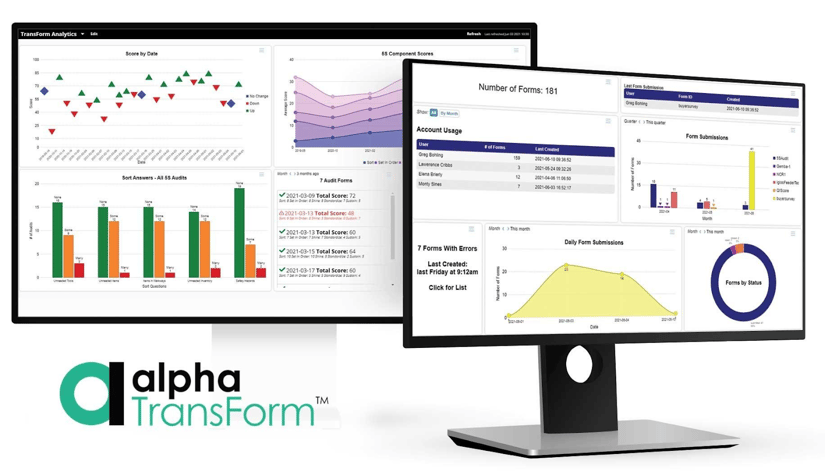
Alpha TransForm lets operations teams convert paper DOT checklists into mobile apps with offline capability in minutes.
The platforms compared in this guide all replace paper with digital inspections, but Alpha TransForm is built for and enables teams that need to move fast without relying on IT. With our platform, business users can convert an existing paper checklist into a working mobile app in minutes and scale from a handful of forms to a full fleet workflow on their own terms.
Where inspection-only tools stop at data collection, Alpha TransForm connects that data to dashboards, alerts, and the business systems your team already runs on. The result is a compliance process that doesn't just capture information but actually drives action.
FAQs
How often is a DOT inspection required for commercial trucks?
What happens if a truck fails a DOT inspection?
What are the most common DOT inspection violations?
Can a Level 1 roadside inspection count as an annual DOT inspection?
How does Alpha TransForm help with DOT inspection compliance?
*Note: Alpha TransForm is a no-code app builder developed by Alpha Software. Product features, availability, pricing, and results referenced are for informational purposes only and subject to change; actual capabilities and outcomes may vary based on configuration and use case. To confirm current offerings and pricing, talk to a Solutions Consultant.






Comment