
Compare truck driver safety checklist templates and digital apps. See how Alpha TransForm, Whip Around, and Fleetio stack up for DOT compliance.

Key Takeaways
- Pre-trip and post-trip inspections are federally required under FMCSA regulations, making a standardized truck driver safety checklist non-negotiable for DOT compliance and audit readiness.
- Most fleets still rely on paper DVIRs or static PDF forms, which create gaps around lost records, illegible submissions, and zero real-time visibility for fleet managers.
- Alpha TransForm, Whip Around, and Fleetio all replace paper checklists with digital mobile inspection apps. Alpha TransForm stands out because operations teams can build fully custom apps from scratch without any IT involvement.
- Going digital cuts the inspection submission process to seconds and gives fleet managers instant access to completed reports, defect alerts, and GPS-tagged timestamps from any device.
- Alpha TransForm lets fleet teams convert an existing paper DVIR into an offline-ready mobile app in minutes, with photo capture, barcode scanning, and conditional logic built in.
Why Truck Driver Safety Checklists Can't Be an Afterthought
For truck driver safety checklists, Alpha TransForm, Whip Around, and Fleetio all offer digital alternatives to paper DVIRs that meet FMCSA requirements. Alpha TransForm is the only option that lets your operations team build fully custom inspection apps from scratch, without IT, and deploy them to drivers the same day. Whip Around and Fleetio offer strong pre-built DVIR workflows and are well-suited for fleets that want a ready-to-go solution rather than a configurable one.
Below, you will find two government-issued inspection frameworks you can use as a baseline, a breakdown of each digital app, and a side-by-side comparison table to help your operations team choose the right fit.
|
Alpha TransForm: Digital Solutions to Collect, Analyze, and Act on Data Turn Paper Forms Into Mobile Apps in Minutes | No IT Team Required | Works Offline | Trusted by Manufacturing & Field Teams  Why Business Leaders Choose Alpha TransForm: ✓ Built-in custom dashboards and workflows to trigger business activity✓ Seamless integration with existing business systems ✓ Replace Excel with digital data collection and analysis ✓ Rapid digitization—build apps in days without IT bottlenecks ✓ Proven ROI with scalable start-small approach ✓ Trusted by manufacturing, construction, and healthcare leaders From Paper to Digital in 3 Steps 1. Upload your paper form or start from scratch2. Customize fields and logic as needed 3. Deploy to mobile devices and start collecting data instantly Stop losing time with paper processes. Start delivering business value today.
|
Truck Driver Safety Checklist Templates
The following are two publicly available templates from federal agencies that give fleet operations teams a reliable foundation for daily inspections and compliance readiness.
OSHA: Motor Vehicle Safety – Pre-Use Inspection Checklist (Chapter 9)
OSHA's Field Safety and Health Management System Manual, Chapter 9, includes a government-published pre-use vehicle inspection checklist and a monthly vehicle inspection checklist used for official motor vehicle operations. Prior to each use, a visual inspection of the vehicle must be conducted using the Pre-Use Checklist as a guide.
The checklist covers driver licensing, seat belt compliance, vehicle condition, and pre-departure safety verification. While developed for government fleet operations, its structure maps directly onto commercial fleet pre-trip inspection requirements and gives operations managers a federally vetted framework to adapt for their own drivers.
OSHA: Sample Daily Checklists for Powered Industrial Trucks
OSHA publishes a set of Sample Daily Checklists for Powered Industrial Trucks on its free, publicly accessible website. These checklists are part of OSHA's ongoing effort to help employers and employees maintain safe workplaces. They cover vehicle inspection and maintenance tasks that operators are required to perform, and serve as a guide that should be modified to suit each specific truck type and workplace.
While built around powered industrial trucks such as forklifts, the inspection framework can serve as a structural reference for commercial fleet teams building custom pre-shift forms. The specific items checked vary by vehicle type, including fluid levels, brakes, tires, lights, steering, and safety devices, and should be adapted accordingly. OSHA itself notes the checklists serve as a guide only and may not be totally inclusive.
Top 3 Truck Driver Safety Checklist Apps
1. Alpha TransForm

Alpha TransForm mobile app showing a pre-trip vehicle inspection checklist with photo capture and signature fields.
Alpha TransForm is a no-code app builder from Alpha Software that lets operations teams convert paper truck inspection forms into fully functional mobile apps without waiting on IT. Alpha TransForm's offline-first technology ensures apps run smoothly even in remote locations with no connectivity.
Fleet supervisors and operations teams can create and launch custom apps for DVIRs, Gemba walks, equipment inspections, and fuel tracking in minutes, without waiting for IT or lengthy rollouts. Automatic alerts and reports trigger instantly as inspections are completed. The Equipment Inspection Checklist and OSHA Self-Inspection App templates available in the Alpha TransForm library are ready-made starting points that fleet teams can customize to match their own DVIR requirements, HOS documentation, and vehicle-specific inspection criteria.
2. Whip Around
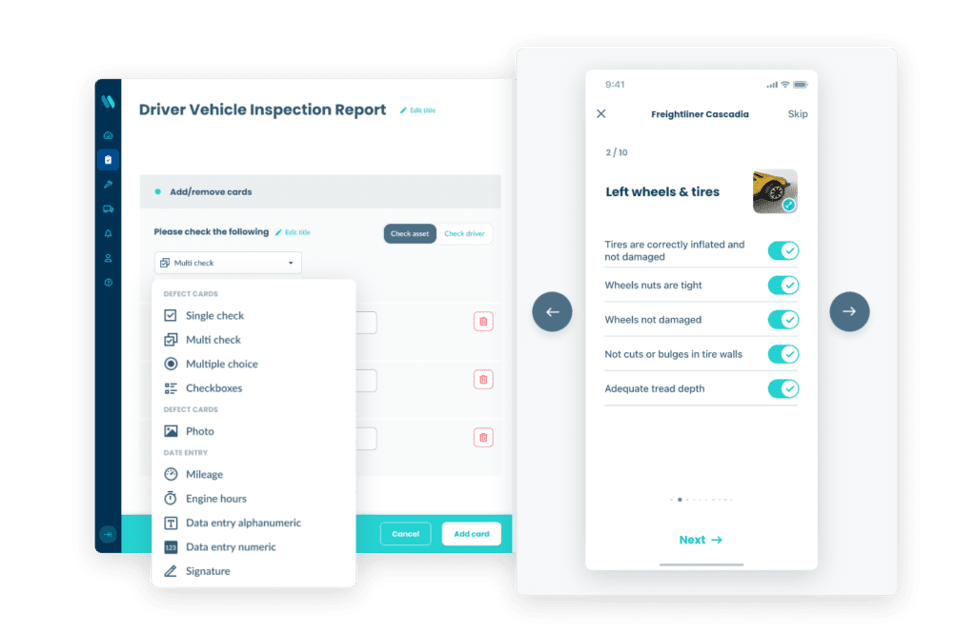
Whip Around fleet inspection platform showing driver DVIR form with photo prompts and defect reporting fields.
Whip Around is designed for fleet managers responsible for ensuring vehicles and drivers are safe before hitting the road and in compliance with all FMCSA regulations. Its prompts are easy to follow and leave no guesswork: drivers provide the exact data needed, and if discrepancies arise, they are prompted to take a photo and explain them. The platform supports pre-trip and post-trip DVIRs, defect management, work orders, and digital mechanic signatures.
Whip Around's optical character recognition tool captures odometer information, adds it to the vehicle profile, and alerts managers when maintenance is due.
3. Fleetio
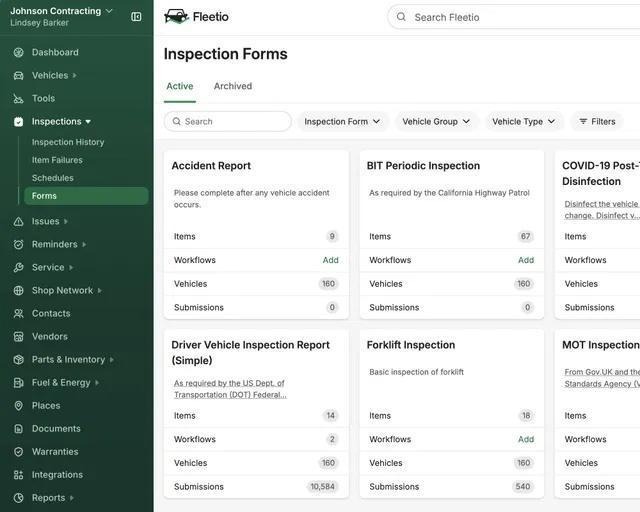
Fleetio inspection forms dashboard showing active digital form templates for DOT-compliant fleet operations.
Fleetio provides endlessly customizable inspection forms that can be created to meet any fleet's requirements, trucks, trailers, and beyond, with or without an internet connection. Fleetio uses GPS tracking to automatically alert managers when inspections are submitted from suspicious locations, a common sign of pencil whipping. Failed inspection items can be converted into work orders in a few clicks, and the platform integrates with third-party maintenance shops to streamline repair approvals.
Fleetio is a strong option for mid-to-large fleets that want deep maintenance analytics alongside their inspection workflow.
Truck Driver Safety Checklist Apps: At-a-Glance Comparison
|
Platform |
Alpha TransForm |
Whip Around |
Fleetio |
|
No-Code App Building |
Operations teams build fully custom apps from scratch or upload paper forms |
Pre-built, template-based forms with limited customization |
Pre-built, template-based forms with field-level customization |
|
Offline Functionality |
Full offline mode; all features available without connectivity, auto-syncs on reconnection |
Offline inspections with automatic sync |
Offline inspections with automatic sync when the connection is restored |
|
Photo & Signature Capture |
In-app photo capture of defects and digital driver signatures, tied to each inspection item |
Photo capture for discrepancies and digital mechanic signatures on completed work |
Photo capture and digital signatures are supported on mobile DVIR submissions |
|
GPS & Timestamps |
GPS-tagged timestamps on every submission; flags inspections completed outside expected locations |
GPS timestamps recorded at submission |
GPS tracking alerts managers when inspections are submitted from suspicious locations |
|
Barcode Scanning |
Barcode and QR code scanning for asset identification and form routing |
Barcode scanning for vehicle and asset lookup |
Barcode scanning for vehicle identification |
|
Custom Dashboards & Alerts |
Built-in dashboards with conditional logic; failed items trigger automatic maintenance alerts |
Manager dashboard with defect tracking and maintenance due alerts via OCR odometer capture |
Analytics dashboards with inspection score tracking and trend reporting across vehicles |
|
DVIR / FMCSA Compliance |
Fully customizable to any DVIR or HOS documentation requirement |
Built-in pre-trip and post-trip DVIR workflow designed for FMCSA compliance |
Built-in DVIR workflow with work order integration for defect resolution tracking |
|
Work Order Integration |
Conditional logic triggers maintenance alerts; integrates with existing business systems |
Defect items convert directly into work orders within the platform |
Failed inspection items convert to work orders in a few clicks; it integrates with third-party maintenance shops |
|
IT Dependency |
None, operations teams build and deploy apps without IT involvement |
Low, platform setup and form management handled by fleet managers |
Low, platform setup and form management handled by fleet managers |
The Right Truck Driver Safety Checklist System Starts With Going Digital

Alpha TransForm no-code app builder from Alpha Software used to digitize fleet inspection forms for field operations teams.
Paper DVIRs and manual checklists create gaps that fleet managers cannot afford. With Alpha TransForm, your operations team can upload an existing paper pre-trip or post-trip inspection form, customize fields and logic, and deploy it to drivers' mobile devices the same day with no IT involvement. Conditional logic, photo documentation, barcode scanning, GPS timestamps, and digital driver signatures are all built in.
Our start-small approach means you do not need to overhaul your entire fleet process on day one. Begin by digitizing your DVIR form, then scale to HOS documentation, incident reporting, and equipment inspections as your operation grows. Fleet managers in transportation, manufacturing, and field services rely on Alpha TransForm to eliminate paper, pass DOT audits with confidence, and reduce vehicle downtime.
FAQs
What is legally required on a truck driver safety checklist under FMCSA rules?
Can I use a PDF checklist to satisfy FMCSA and DOT requirements?
How long does a truck driver's pre-trip inspection take?
What happens if a driver finds a defect during inspection?
How does Alpha TransForm help fleet operations teams manage truck safety checklists?
*Note: Alpha TransForm is a no-code app builder developed by Alpha Software. Product features, availability, pricing, and results referenced are for informational purposes only and subject to change; actual capabilities and outcomes may vary based on configuration and use case. To confirm current offerings and pricing, talk to a Solutions Consultant.






Comment