
Explore field inspection checklist templates, downloadable PDFs from OSHA and state agencies, and digital tools like Alpha TransForm to streamline inspections.

Key Takeaways
- A well-structured field inspection checklist should include site details, equipment condition ratings, photo documentation fields, and sign-off sections to ensure nothing is missed.
- Government agencies like the Occupational Safety and Health Administration (OSHA) and state labor departments offer free downloadable PDF inspection checklists you can adapt for your operations.
- Digital inspection platforms, including Alpha TransForm, SafetyCulture, and Fulcrum, eliminate paper bottlenecks by enabling offline data capture, photo documentation, automated alerts, and instant report generation from the field.
- Transitioning from static PDF templates to mobile inspection apps can save field teams hours per week and create automatic audit trails for compliance.
- Alpha TransForm lets business users turn paper inspection checklists into mobile apps in minutes, with offline capability, photo capture, and real-time dashboards.
How to Structure, Source, & Digitize Field Inspection Checklists
A well-structured field inspection checklist should include site details, categorized inspection items with condition ratings, space for notes and photos, and a sign-off section that creates a reliable audit trail. Government agencies like OSHA, the Minnesota Department of Labor and Industry, and the Georgia State Properties Commission publish free downloadable PDF templates that organizations can adapt for their own operations.
However, paper-based checklists create persistent bottlenecks: lost forms, illegible handwriting, hours of manual data entry, and compliance records that are difficult to retrieve. Digital inspection platforms like Alpha TransForm, SafetyCulture, and Fulcrum solve these problems by enabling mobile data capture, photo documentation, GPS tagging, offline functionality, and real-time dashboard reporting. Alpha TransForm, in particular, lets business users convert paper checklists into mobile apps in minutes without IT support.
|
Alpha TransForm: Digital Solutions to Collect, Analyze, and Act on Data Turn Paper Forms Into Mobile Apps in Minutes | No IT Team Required | Works Offline | Trusted by Manufacturing & Field Teams  Why Business Leaders Choose Alpha TransForm: ✓ Built-in custom dashboards and workflows to trigger business activity✓ Seamless integration with existing business systems ✓ Replace Excel with digital data collection and analysis ✓ Rapid digitization—build apps in days without IT bottlenecks ✓ Proven ROI with scalable start-small approach ✓ Trusted by manufacturing, construction, and healthcare leaders From Paper to Digital in 3 Steps 1. Upload your paper form or start from scratch2. Customize fields and logic as needed 3. Deploy to mobile devices and start collecting data instantly Stop losing time with paper processes. Start delivering business value today.
|
What Makes a Good Field Inspection Checklist Template

A good field inspection checklist template includes site details, categorized items, condition ratings, and a sign-off section for reliable auditing.
The best templates follow a consistent structure that helps inspectors capture complete, accurate information every time. Most effective checklists include a header section for site details (location, date, inspector name, and equipment or asset ID), followed by categorized inspection items grouped by area or system, such as structural, electrical, mechanical, and safety.
Each item should include a condition rating (pass, fail, or needs attention) and space for notes and photo references. The checklist should close with a summary of findings, corrective actions required, a sign-off with the inspector's signature, and a date stamp.
This structure matters because it creates a reliable audit trail. Inspectors can work through items consistently, supervisors can review findings quickly, and compliance teams can retrieve records when regulators come knocking.
Free Downloadable PDF Inspection Checklists From Public Sources
Several government agencies and public institutions publish inspection checklist templates that organizations can download and adapt at no cost. Here are three reliable sources worth bookmarking.
OSHA publishes a Safety and Health Program Implementation Checklist designed to help employers evaluate workplace safety across general industry settings. The checklist covers management leadership, worker participation, hazard identification and assessment, hazard prevention and control, education and training, program evaluation and improvement, and communication and coordination. It is available as a free PDF from OSHA's website and can be customized for site-specific inspections.
The Minnesota Department of Labor and Industry offers a Residential Field Inspection Checklist intended as a general guide for inspecting new residential construction. It covers common building code situations and is available for free download from Minnesota DLI's site. It is particularly useful for construction and building inspection teams that need a quick-start template.
The Georgia State Properties Commission provides a Facility Inspection Checklist in both PDF and Word formats. This short-form template covers general facility condition assessments and is available for download from the Georgia SPC website. Operations teams managing multiple facilities can use this as a baseline for their own inspection workflows.
These PDFs serve as excellent starting points. However, they share a common limitation: once printed, the data they capture stays on paper. That is where digital options come in.
Digital Tools That Replace Paper Inspection Checklists

Digital tools such as Alpha TransForm, a no-code platform that converts paper forms into mobile inspection apps, can turn static PDFs into digital inspection platforms.
Moving from static PDFs to digital inspection platforms solves the problems that paper creates. Digital tools let field teams capture data on smartphones or tablets, attach photos, record GPS coordinates, collect signatures, and sync everything to centralized dashboards in real time, even when working offline. Here are three digital options to consider, starting with the one built specifically for business users in demanding field environments.
1. Alpha TransForm
Alpha TransForm is a no-code platform that we built to let business users and operations leaders turn any paper form into a mobile inspection app in minutes. Unlike tools that require IT involvement or developer skills, Alpha TransForm puts the power in the hands of the people who actually run inspections.
We provide a pre-built OSHA self-inspection app that can be customized to identify and manage specific on-site hazards. The platform supports photo capture with annotation, barcode scanning, GPS tagging, timestamps, digital signatures, conditional logic, speech-to-text notes, and one-tap pass/fail buttons optimized for one-handed use. Every inspection is automatically time-stamped and logged, creating an instant audit trail for stronger compliance, easier reporting, and fewer surprises during audits.
2. SafetyCulture (iAuditor)
SafetyCulture, formerly known as iAuditor, is a mobile-first application that allows teams to digitize inspections, capture consistent data, identify areas of improvement, and share reports. It offers a template builder, scheduling, and analytics dashboards. SafetyCulture works well for organizations already running large-scale audit programs.
3. Fulcrum
Fulcrum is a field-first SaaS platform designed to transform how organizations manage field data collection and inspections for mission-critical operations. It features strong GIS and geospatial capabilities, making it a good fit for utilities, environmental services, and infrastructure teams that need to capture location data alongside inspection findings.
Its strengths lie in geospatial mapping and integration with Esri ArcGIS, though teams focused primarily on straightforward inspections and audits may find the GIS emphasis more than they need.
Digital Inspection Tools: At-a-Glance Comparison
|
Feature |
Alpha TransForm |
SafetyCulture (iAuditor) |
Fulcrum |
|
No-code form building |
Yes — business users build apps themselves |
Template builder with conditional logic |
Visual form builder |
|
Offline capability |
Offline-first architecture |
Offline mode available |
Offline data collection |
|
Photo capture & annotation |
Yes, with markup and speech-to-text |
Yes, with photo evidence |
Yes, with photo documentation |
|
Custom dashboards |
Built-in custom dashboards |
Analytics dashboards |
Reporting and data views |
|
Pre-built inspection templates |
OSHA, building, equipment, and more |
100,000+ template library |
App gallery with sample forms |
|
Best for |
Manufacturing, construction, and field ops needing offline reliability and fast ROI |
Large-scale audit and compliance programs |
Utilities and environmental teams needing GIS |
Why Alpha TransForm Leads for Field Inspection Digitization
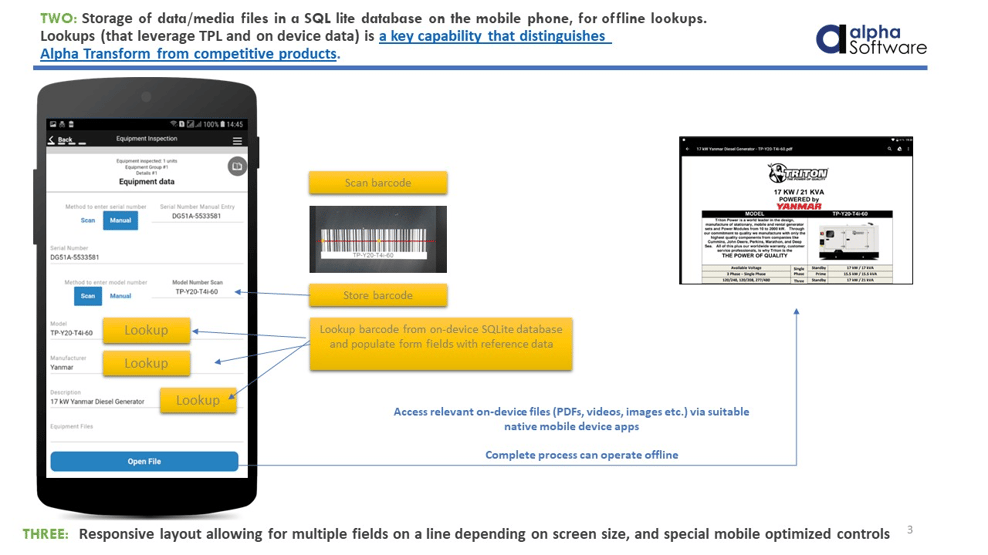
Alpha TransForm’s offline-first design means inspectors capture complete data even in warehouses, construction sites, and remote locations where connectivity drops.
Choosing the right field inspection checklist, whether a downloadable PDF or a fully digital solution, comes down to how your team works and what level of accuracy, speed, and compliance your operations demand.
Alpha TransForm is built for exactly that transition. Business users can convert any paper checklist into a mobile inspection app in minutes, with offline-first reliability, photo capture, barcode scanning, GPS, digital signatures, and custom dashboards that feed directly into your existing workflows. Free sample inspection apps, including pre-built OSHA, building, and equipment templates, are also available to customize and deploy to your team right away, making it easy to test the software before committing.
FAQs
What should a field inspection checklist include?
Where can I download free inspection checklist PDFs?
Can I use inspection checklists offline on a mobile device?
How long does it take to switch from paper checklists to a digital inspection app?
What makes Alpha TransForm different from other inspection tools?
*Note: Alpha TransForm is a no-code app builder developed by Alpha Software. Product features, availability, pricing, and results referenced are for informational purposes only and subject to change; actual capabilities and outcomes may vary based on configuration and use case. To confirm current offerings and pricing, talk to a Solutions Consultant.






Comment