
Learn about compliance checklist templates, how PDF formats work, and the top three digital tools that replace static forms with real-time, audit-ready data.

Key Takeaways
- Compliance checklist templates standardize how teams document and verify regulatory requirements across inspections, audits, and recurring operational processes.
- Government agencies like the Occupational Safety and Health Administration (OSHA) and the Environmental Protection Agency (EPA) publish free PDF compliance checklist templates that serve as strong starting points for internal audit programs.
- Digital alternatives, including Alpha TransForm, SafetyCulture, and GoAudits, replace static PDFs with mobile apps that automatically capture photos, timestamps, and signatures.
- Start with OSHA or EPA's free PDF templates as your regulatory baseline, then evaluate whether a digital tool fits your scale.
- Alpha TransForm enables operations teams to build custom compliance checklist apps in days, with offline capability and no IT bottlenecks, delivering faster ROI than off-the-shelf inspection tools.
What Compliance Checklist Templates Are & How to Move Beyond PDFs
A compliance checklist template is a standardized document that teams use to verify compliance with regulatory requirements during inspections, audits, and recurring processes. Government agencies like OSHA and the EPA publish free PDFs that serve as strong regulatory baselines, covering topics such as workplace safety programs, hazardous waste storage, and construction site inspections.
However, PDF templates have a practical limit: the data stays locked inside each file, requiring manual completion, physical or digital filing, and one-at-a-time access. Digital alternatives from platforms like Alpha TransForm, SafetyCulture, and GoAudits now allow operations teams to replace static forms with mobile apps that automatically capture photos, GPS coordinates, e-signatures, and timestamps, without IT involvement.
|
Alpha TransForm: Digital Solutions to Collect, Analyze, and Act on Data Turn Paper Forms Into Mobile Apps in Minutes | No IT Team Required | Works Offline | Trusted by Manufacturing & Field Teams  Why Business Leaders Choose Alpha TransForm: ✓ Built-in custom dashboards and workflows to trigger business activity✓ Seamless integration with existing business systems ✓ Replace Excel with digital data collection and analysis ✓ Rapid digitization—build apps in days without IT bottlenecks ✓ Proven ROI with scalable start-small approach ✓ Trusted by manufacturing, construction, and healthcare leaders From Paper to Digital in 3 Steps 1. Upload your paper form or start from scratch2. Customize fields and logic as needed 3. Deploy to mobile devices and start collecting data instantly Stop losing time with paper processes. Start delivering business value today.
|
What Does a Compliance Checklist Template Entail?
A compliance checklist template is a standardized document listing the tasks, verifications, or controls a team must complete to meet a defined standard. Templates serve as the repeatable foundation for inspections, audits, and process reviews, ensuring every team member follows the same procedure regardless of location or shift.
Effective templates include fields for date, inspector name, location, item status (pass/fail or yes/no), and notes or corrective actions. More detailed versions add signature blocks, photo attachment prompts, and references to specific regulatory clauses.
In manufacturing, common examples include equipment pre-use checklists, 5S audit forms, and OSHA safety inspection records. In field operations, they appear as site inspection reports, environmental compliance logs, and contractor safety verifications.
Online Sources for Compliance Checklist Templates (PDF)
OSHA Safety and Health Program Implementation Checklist (General Industry)
Published by the Occupational Safety and Health Administration, this checklist helps employers evaluate the maturity and completeness of their workplace safety and health program. It covers hazard identification, prevention and control, worker participation, and management leadership.
EPA Certification of Compliance Audit Checklist for Hazardous Waste Container Storage Areas
The U.S. Environmental Protection Agency provides this fillable PDF template to assist facilities managing hazardous waste in verifying compliance with applicable storage requirements. It covers container storage area conditions, secondary containment, recordkeeping, and regulatory documentation.
EPA NPDES Construction General Permit (CGP) Inspection Report Template
Also from the EPA, this downloadable inspection report template helps construction site operators meet the documentation requirements of the 2022 CGP under the National Pollutant Discharge Elimination System.
These government templates are valuable as regulatory reference points; they are built around actual legal requirements, which helps organizations identify audit gaps before an inspector does. The limitation is that all three are static PDF documents. They are completed manually, filed physically or digitally, and accessed one file at a time, which creates the same workflow friction as any paper-based process
Digital Alternatives to PDF Compliance Checklists
Digital compliance checklist tools replace static PDF forms with mobile apps that guide users through each step, enforce required fields, and automatically capture contextual data. Three platforms are widely used by operations and field teams to make this transition.
1. Alpha TransForm
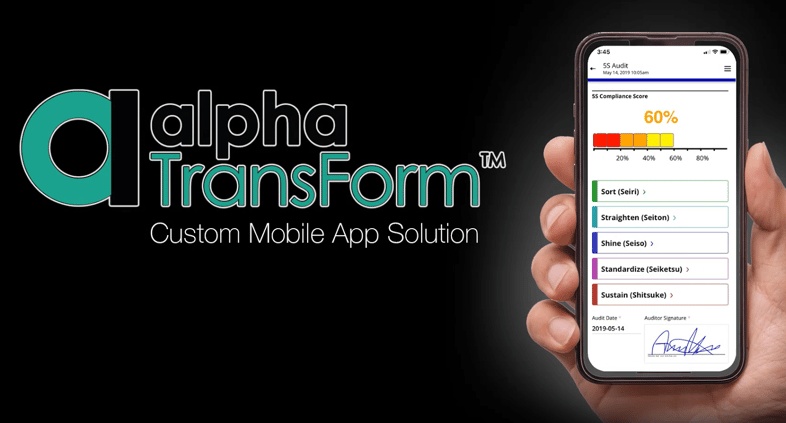
Alpha TransForm turns compliance checklists like this 5S audit into mobile apps with live scoring, categorized inspection steps, and auditor e-signatures, built without IT involvement.
Alpha TransForm is a no-code app builder developed by Alpha Software, built specifically for operations teams that need to digitize compliance checklists without IT involvement. At Alpha Software, we help manufacturing, construction, healthcare, and field operations teams turn their existing paper forms and PDFs into fully functional mobile apps in days.
Our platform supports conditional logic, photo capture, barcode scanning, GPS tagging, e-signatures, offline data collection, custom dashboards, and seamless integration with existing business systems. Apps built with Alpha TransForm work offline-first, making them reliable in environments with inconsistent connectivity: plant floors, oil fields, remote construction sites, and warehouses. Data syncs automatically when connectivity is restored, with no manual re-entry and no lost records.
Business users build and modify their own compliance apps without routing changes through IT, keeping checklists up to date as regulations and processes evolve.
2. SafetyCulture (formerly iAuditor)
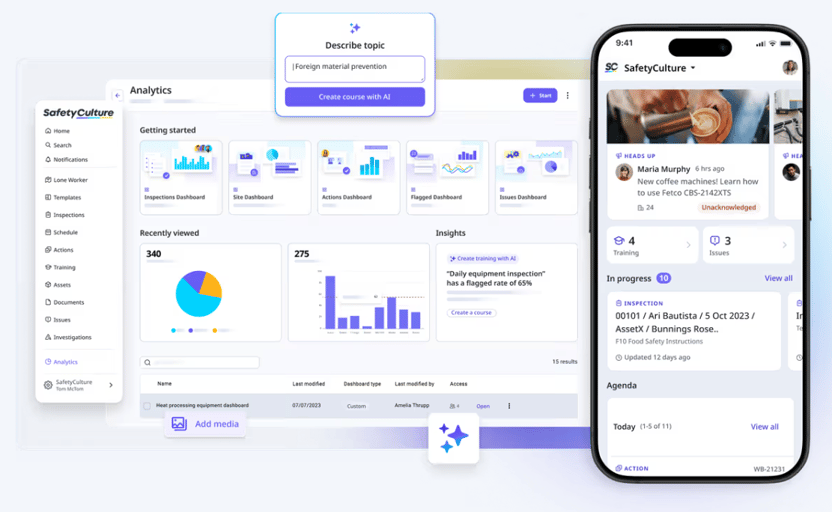
SafetyCulture's analytics dashboard and mobile app give compliance teams visibility into inspections, flagged issues, and in-progress audits across multiple dashboards and locations. (Image source: SafetyCulture)
SafetyCulture is a widely adopted mobile inspection platform that allows teams to digitize checklists, conduct audits, and capture real-time operational data. It provides an extensive template library, photo and video capture, digital signatures, automated corrective action workflows, and offline support for field use.
SafetyCulture is used across construction, manufacturing, hospitality, and retail for compliance documentation and internal audits.
3. GoAudits
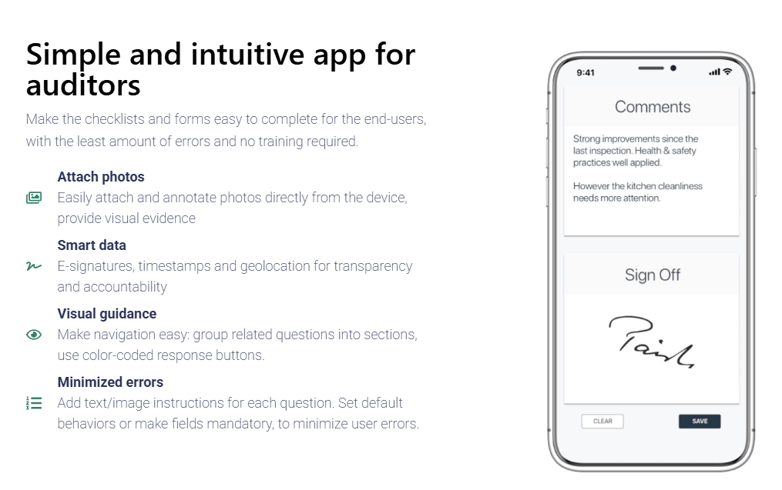
GoAudits keeps audit checklists simple for frontline teams, with photo attachments, e-signatures, timestamps, and geolocation built into every inspection to reduce errors and improve accountability. (Image source: GoAudits)
GoAudits is a mobile-first audit and inspection platform designed for teams running compliance checklists across multiple locations. Its core features include digital checklist creation, offline inspections with automatic sync, instant branded report generation, corrective action assignment, and real-time analytics dashboards.
GoAudits is used by organizations in hospitality, food and beverage, healthcare, manufacturing, and logistics.
Digital Compliance Tools: Comparison Table
|
Feature |
Alpha TransForm |
SafetyCulture |
GoAudits |
|
Best For |
Custom compliance apps for manufacturing & field ops |
Mobile-first inspections across industries |
Audit workflows, multi-location compliance |
|
Offline Capability |
Full offline, auto-sync |
Yes (offline mode) |
Yes (offline mode) |
|
Custom App Builder |
Yes, no-code, no IT required |
Template-based builder |
Template-based builder |
|
Conditional Logic |
Yes |
Yes |
Yes |
|
Photo / Barcode / GPS |
Yes |
Yes |
Yes (photo, annotations & GPS/geolocation) |
|
Dashboards & Reporting |
Custom dashboards, integrations |
Built-in analytics |
Real-time dashboards |
|
No IT Required |
Yes |
Yes |
Yes |
Why Alpha TransForm is Perfect for Compliance Checklist Digitization
Alpha TransForm is a no-code mobile app builder trusted by manufacturing and field operations teams to digitize compliance checklists without IT involvement.
If your team is still relying on PDFs and paper forms for compliance documentation, you are spending more time managing records than acting on them. Alpha TransForm gives operations leaders a faster path: take any existing checklist, turn it into a mobile app, and start capturing audit-ready data from day one, with offline reliability, automatic syncing, and zero IT dependency.
There is no long implementation cycle and no need to overhaul your current process. Start with one checklist, see the results, and scale from there. For teams ready to move beyond static PDF templates, our sample inspection and audit apps are a practical starting point.
FAQs
What should a compliance checklist template include?
Are government compliance checklist templates sufficient for formal audits?
What is the difference between a compliance checklist and a regulatory audit checklist?
How often should compliance checklist templates be reviewed and updated?
How does Alpha TransForm help operations teams manage compliance checklists?
*Note: Alpha TransForm is a no-code app builder developed by Alpha Software. Product features, availability, pricing, and results referenced are for informational purposes only and subject to change; actual capabilities and outcomes may vary based on configuration and use case. To confirm current offerings and pricing, talk to a Solutions Consultant.






Comment