
Get fleet inspection checklist rubrics, free government PDFs, and a comparison of top automation tools including Alpha TransForm, Whip Around, and Fleetio.

Key Takeaways
- A complete fleet inspection checklist covers five rubric categories: safety systems and brakes, exterior condition and lighting, engine compartment and fluids, cab and emergency equipment, and documentation and compliance verification.
- Most teams use paper forms or generic PDFs that lack scoring criteria, which makes inspection quality inconsistent across drivers, shifts, and locations.
- Alpha TransForm, Whip Around, and Fleetio all replace paper checklists with mobile apps. Alpha TransForm stands out for no-code setup and same-day deployment without IT involvement.
- Switching from paper to a digital inspection platform cuts defect-to-repair response time because failed items route directly to maintenance teams in real time rather than traveling by hand from cab to office.
- Alpha TransForm lets fleet teams build and deploy a custom inspection app the same day, with offline functionality, photo capture, and direct integration into existing business systems.
Fleet Inspection Checklist Essentials
Alpha TransForm, Whip Around, and Fleetio each turn paper fleet inspection forms into mobile checklists with photo capture, digital signatures, and real-time defect alerts. Alpha TransForm is the only one of the three that lets operations teams build and deploy a custom app the same day without writing code or waiting on IT. For fleets that also need inspection data feeding directly into existing business systems, that same-day deployment comes with built-in integration support.
Federal agencies provide free, downloadable checklist templates aligned with compliance standards. The FMCSA publishes inspection report PDFs tied to 49 CFR 396, while the GSA and OSHA offer additional templates for government and field fleets. Most operations will need to customize these for their specific vehicles and routes.
For teams moving beyond paper, automation platforms like Alpha TransForm, Whip Around, and Fleetio replace manual forms with mobile checklists, photo capture, digital signatures, and real-time defect routing. Alpha TransForm stands out for its no-code setup, offline-first design, and same-day deployment.
|
Alpha TransForm: Digital Solutions to Collect, Analyze, and Act on Data Turn Paper Forms Into Mobile Apps in Minutes | No IT Team Required | Works Offline | Trusted by Manufacturing & Field Teams  Why Business Leaders Choose Alpha TransForm: ✓ Built-in custom dashboards and workflows to trigger business activity✓ Seamless integration with existing business systems ✓ Replace Excel with digital data collection and analysis ✓ Rapid digitization—build apps in days without IT bottlenecks ✓ Proven ROI with scalable start-small approach ✓ Trusted by manufacturing, construction, and healthcare leaders From Paper to Digital in 3 Steps 1. Upload your paper form or start from scratch2. Customize fields and logic as needed 3. Deploy to mobile devices and start collecting data instantly Stop losing time with paper processes. Start delivering business value today.
|
Rubrics for a Fleet Inspection Checklist

Fleet inspection rubrics ensure consistent vehicle evaluations across drivers, shifts, and locations for safety and compliance.
A rubric, in the context of fleet inspections, is a scoring or evaluation framework that specifies exactly what to check, how to rate it, and what action to take based on the result. Strong rubrics keep inspections consistent across drivers, shifts, and locations.
Without them, one driver might mark a tire as "fine," while another might flag the same wear pattern as a concern. The following rubrics cover the categories every fleet inspection checklist should address.
Safety Systems & Brakes
This rubric evaluates service brakes, parking brakes, trailer brake connections, and emergency stopping systems. Each item should be rated as pass, fail, or needs monitoring. A failed brake component should automatically flag the vehicle as out of service until a certified mechanic clears it. Steering mechanisms and coupling devices also fall under this rubric, as they are commonly cited violations during roadside inspections.
Exterior Condition & Lighting
Inspectors should assess tires (tread depth, pressure, visible damage), all lighting devices and reflectors, mirrors, windshield condition, and body integrity. The rubric should distinguish between cosmetic damage that can be noted for future repair and functional defects that prevent safe operation. Turn signals, emergency flashers, and headlights each need a clear pass/fail designation.
Engine Compartment & Fluids
This rubric covers engine oil, coolant, brake fluid, power steering fluid, and transmission fluid levels. It should also include belt condition, exhaust system integrity, and visible leaks. Fluid checks are a major source of avoidable downtime, especially for vehicles operating in extreme temperatures or off-road environments, so the rubric should prompt inspectors to note specific fluid levels rather than simply marking "OK."
Cab, Interior, & Emergency Equipment
The interior rubric covers seatbelts, horn functionality, windshield wipers, dashboard warning lights, HVAC systems, and the presence of required emergency equipment, such as fire extinguishers, first-aid kits, and reflective triangles. Registration and insurance documentation should also be verified as current and stored in the vehicle.
Documentation & Compliance Verification
This final rubric ensures the inspection itself is properly documented. It includes the vehicle identification number, odometer reading, inspector name and signature, date and time, and any prior defect reports that need review. Under FMCSA rules, carriers must retain DVIRs for three months from the date the report was prepared and certify that any reported defects have been repaired before the vehicle operates again.
Downloadable Fleet Inspection Checklist PDFs
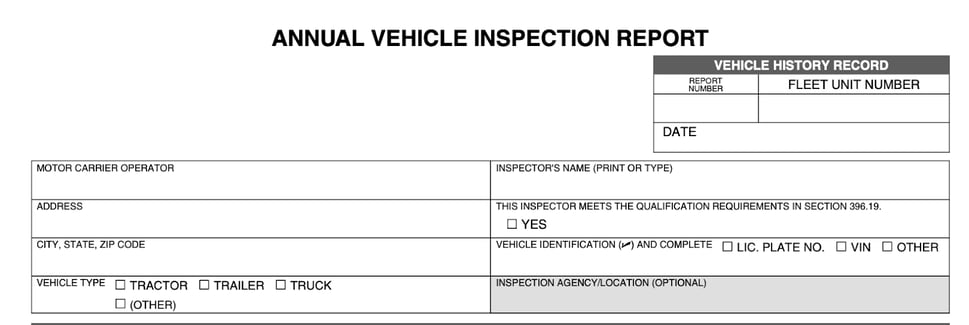
The FMCSA's Annual Vehicle Inspection Report PDF covers all component categories required under 49 CFR 396.
A typical fleet inspection checklist PDF contains fields for vehicle information (license plate, VIN, mileage), a structured list of inspection items organized by category (exterior, interior, engine, brakes), and a section for the inspector's signature and date. Most also include pass/fail columns and space for notes on any deficiency found.
Several U.S. government agencies provide free, downloadable templates that fleet managers can use as a baseline.
The FMCSA publishes an Annual Vehicle Inspection Report PDF that covers all component categories required under 49 CFR 396 and includes columns for marking items as OK, needs repair, or not applicable. For new motor carriers, the FMCSA also provides a separate Annual Periodic Vehicle Inspection Report with inspector certification fields aligned to §396.21.
The U.S. General Services Administration provides a Vehicle/Heavy Equipment Pre-Use Inspection Checklist for federal agencies managing government fleets, and OSHA's Field Safety and Health Management System Manual (Chapter 9) includes a monthly vehicle inspection checklist with mileage-tracking fields. These templates are useful starting points, but most fleet operations will need to customize them for their specific vehicle types, routes, and compliance requirements.
What Downloadable Fleet Inspection Checklist PDFs Cover
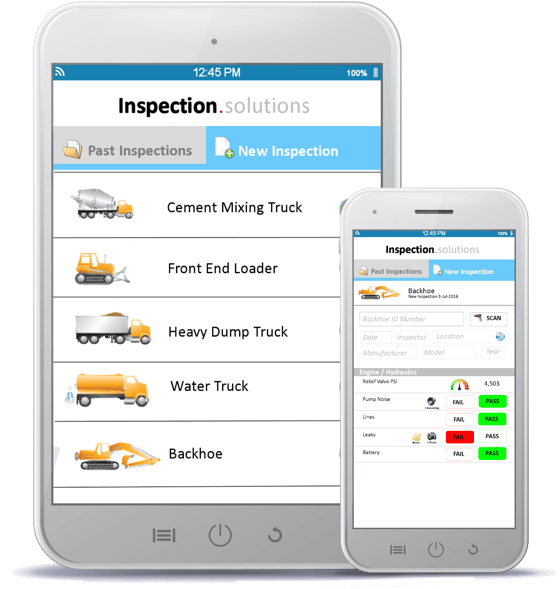
Digital inspection platforms replace paper forms, enabling mobile checklists, real-time defect routing, and offline data capture for fleets.
Paper inspection forms create bottlenecks. They get lost between the cab and the office, are hard to read, and provide zero real-time visibility into fleet health. Digital inspection platforms solve these problems by guiding drivers through mobile checklists, capturing photos and signatures, and routing defects to maintenance teams instantly.
Below are three platforms worth considering, starting with the most flexible option for teams that want to move fast without relying on IT.
1. Alpha TransForm
Alpha TransForm is a no-code app builder that lets business users turn paper inspection forms into mobile apps in minutes. It stands out for its offline-first design, which is critical for fleets operating in areas with unreliable connectivity, such as remote job sites, warehouses, or rural delivery routes.
Inspectors can capture photos, scan barcodes, collect GPS-stamped data, and gather digital signatures, all without a network connection. Data syncs automatically when the device reconnects.
Alpha TransForm also supports conditional logic, alerts, and integration with existing business systems, so a failed inspection item can trigger a work order or notify a maintenance supervisor in real time. For fleet teams looking for a starting point, Alpha Software provides a free Equipment Inspection Checklist Template that can be customized for vehicle inspections.
2. Whip Around
Whip Around is a fleet inspection and maintenance platform built specifically for commercial fleets. It offers templated DOT-compliant inspection forms, real-time defect alerts, mechanic e-signatures, and cloud-based record keeping. It integrates with telematics, GPS, and fuel systems to give fleet managers a consolidated view of vehicle health.
3. Fleetio
Fleetio provides a broader fleet management suite that includes digital DVIRs, preventive maintenance scheduling, fuel tracking, and parts inventory. Its mobile inspection app lets drivers flag issues in real time, and the platform automatically generates work orders from failed inspection items. Fleetio is designed for fleets that want inspections connected to a full maintenance workflow.
How Do Fleet Inspection Automation Tools Compare?
|
Feature |
Alpha TransForm |
Whip Around |
Fleetio |
|
Primary Focus |
No-code form digitization |
Fleet inspection & maintenance |
Full fleet operations suite |
|
Setup Approach |
No-code; business users build customized apps without IT involvement |
Templated DOT-compliant forms with customization |
Pre-built fleet modules with admin configuration |
|
Offline Capability |
Offline-first (stores data, photos, video locally) |
Yes (syncs when reconnected) |
Yes (via Fleetio Go mobile app) |
|
Deployment Speed |
Same-day (upload a paper form and go) |
Free trial; onboarding support included |
Demo-based onboarding |
|
Best Fit |
Teams digitizing paper forms fast across industries |
Commercial fleets focused on inspections and compliance |
Mid-to-large fleets managing the full asset lifecycle |
The Fastest Way to Get Paper Fleet Inspections Off Paper

Alpha TransForm enables fleet managers to digitize paper inspection forms into mobile apps with offline capability and system integration.
Managing vehicle safety effectively depends on using detailed rubrics that force consistent evaluations across every shift and location. While free government PDFs provide a baseline for compliance, switching to digital automation is the best way to prevent lost paperwork and ensure maintenance teams receive defect alerts immediately.
Alpha TransForm lets your team convert existing paper forms into mobile apps on the same day without writing code. Because the platform is built for offline use, drivers can record inspections and capture photos in remote areas where internet access is unavailable. You can start digitizing your fleet processes now to gain better visibility into vehicle health. Talk to a Solutions Consultant to begin.
FAQs
What should a fleet inspection checklist include?
How often should fleet vehicles be inspected?
Are digital fleet inspections accepted by DOT?
Can I customize a fleet inspection checklist for different vehicle types?
What makes Alpha TransForm a strong choice for fleet inspections?
*Note: Alpha TransForm is a no-code app builder developed by Alpha Software. Product features, availability, pricing, and results referenced are for informational purposes only and subject to change; actual capabilities and outcomes may vary based on configuration and use case. To confirm current offerings and pricing, talk to a Solutions Consultant.






Comment