
Learn what fields every incident report needs, get free OSHA, CISA, and CMS templates, and see how Alpha TransForm automates the entire process.

Key Takeaways
- OSHA Form 301, CISA's incident reporting template, and the CMS incident response form are publicly available, downloadable templates that set the standard for required fields.
- Digital tools like Alpha TransForm, SafetyCulture, and Freshservice automate incident reporting by eliminating handwriting errors, lost paperwork, and delayed responses that plague paper-based processes.
- Required fields such as timestamps, location data, witness details, and corrective actions form the foundation of compliant, audit-ready incident reports.
- Alpha TransForm helps operations teams turn paper incident report forms into mobile apps in minutes, with offline capability, photo capture, and automated workflows built in.
What Does a Complete Incident Report Template Need to Include?
A complete incident report template must capture six categories of information: incident identification, people involved, a factual description, injury and damage details, immediate actions taken, and corrective follow-up measures. Missing any of these creates gaps during investigations, insurance claims, and regulatory audits.
Three publicly available templates from OSHA, CISA, and CMS provide tested starting points that reflect current regulatory standards. OSHA Form 301 is the most widely recognized for workplace injuries, while the CISA and CMS templates extend to cybersecurity and healthcare contexts.
For teams still relying on paper forms, digital tools like Alpha TransForm, SafetyCulture, and Freshservice can automate data capture, routing, and trend analysis.
|
Alpha TransForm: Digital Solutions to Collect, Analyze, and Act on Data Turn Paper Forms Into Mobile Apps in Minutes | No IT Team Required | Works Offline | Trusted by Manufacturing & Field Teams  Why Business Leaders Choose Alpha TransForm: ✓ Built-in custom dashboards and workflows to trigger business activity✓ Seamless integration with existing business systems ✓ Replace Excel with digital data collection and analysis ✓ Rapid digitization—build apps in days without IT bottlenecks ✓ Proven ROI with scalable start-small approach ✓ Trusted by manufacturing, construction, and healthcare leaders From Paper to Digital in 3 Steps 1. Upload your paper form or start from scratch2. Customize fields and logic as needed 3. Deploy to mobile devices and start collecting data instantly Stop losing time with paper processes. Start delivering business value today.
|
What Are the Required Fields for Any Incident Report Template?

Every incident report template should capture key fields like identification, people involved, description, injuries, actions, and follow-up.
Regardless of your industry, a well-built incident report template needs to capture a core set of information. Missing even one of these fields can create problems during an investigation, an insurance claim, or a regulatory audit. Here are the essential categories your template should cover.
- Incident Identification: This includes the report number, incident date and time, and the exact location where it occurred. These details establish the timeline that investigators and auditors rely on to reconstruct what happened and determine accountability.
- People Involved: This section covers the names, job titles, departments, and contact information of the injured party, witnesses, and the person filing the report. Complete contact details ensure investigators can follow up quickly and gather additional context.
- Incident Description: A factual, objective narrative of what happened, what the person was doing before the incident, and what object or condition caused the harm. This field should avoid opinions or assumptions and focus strictly on observable facts.
- Injury and Damage Details: Document the nature of any injuries, the body parts affected, the extent of treatment provided, and any property or equipment damage. Specificity here is critical for insurance claims and regulatory filings.
- Immediate Actions Taken: Record first aid administered, emergency services contacted, and any steps taken to secure the area. This establishes that the organization responded appropriately and helps auditors assess the adequacy of the response.
- Corrective Actions and Follow-Up: Capture both short-term fixes and long-term preventive measures, along with who is responsible for each and the expected completion dates. This is what turns a report into a tool for preventing recurrence.
For compliance-heavy industries, you may also need fields for severity classification, supervisor sign-off, and root cause categories. The goal is to capture enough detail to support a thorough investigation without making the form so complex that frontline workers skip fields or abandon the report entirely.
Downloadable Incident Report Examples From Public Institutions
Several government agencies and public organizations publish incident report templates that are free to download and use as starting points. These templates reflect regulatory standards and have been tested across thousands of organizations.
OSHA Form 301: Injury and Illness Incident Report
OSHA Form 301 is the official Injury and Illness Incident Report required by the U.S. Department of Labor. It captures information about the injured employee, what they were doing before the incident, how the injury occurred, the affected body part, and the object or substance involved.
This form must be completed within seven calendar days of learning about a recordable injury or illness and retained at the workplace for five years. You can download it directly from OSHA's recordkeeping forms page. It serves as a solid baseline for any workplace safety incident report, particularly in manufacturing, construction, and field operations.
CISA Incident Management Reporting Template
The Department of Homeland Security's Cyber Security Evaluation Program developed a CRR Supplemental Resource Guide on Incident Management that includes an example incident reporting template in its appendix. While originally designed for cybersecurity events, the template structure covers incident identification, escalation paths, team contact information, and follow-up actions, and it translates well to operational incident reporting across sectors. The full guide is available from CISA's resource library.
CMS Incident Response Report Template
The Centers for Medicare and Medicaid Services publishes an Incident Response Report Template in its Risk Management Handbook. This template is particularly relevant for healthcare facilities and organizations that handle sensitive data, and it can be adapted for general workplace incident documentation. It is available for download from the CMS Information Security Library.
Each of these templates provides a solid foundation. The real question is whether your process for filling them out is fast and accurate enough to hold up under scrutiny.
Which Digital Tools Automate Incident Reporting Without IT Support?
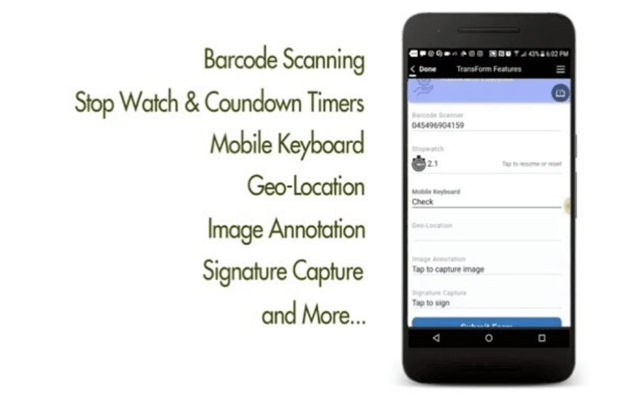
Digital tools like Alpha TransForm, SafetyCulture, and Freshservice automate incident reporting, replacing error-prone paper forms with mobile data capture.
Paper-based incident reports create well-documented problems: illegible handwriting, lost forms, delayed submissions, and data that sits in filing cabinets rather than triggering corrective action. Digital tools solve these issues by capturing data at the point of the incident, automating routing and alerts, and feeding information directly into dashboards for trend analysis. Here are three options worth evaluating.
1. Alpha TransForm
Alpha TransForm is a no-code platform that lets operations teams convert paper incident report forms into mobile apps that collect data including images quickly and accurately. Apps built with the platform work in areas without Wi-Fi or cellular signal, storing data securely and syncing automatically once a connection is available. This is a practical requirement for manufacturing floors, oil fields, construction sites, and warehouses where connectivity is unreliable.
Built-in features including automatic date and time stamps, GPS location tracking, photo capture with markup, and signature collection eliminate manual data entry errors. Business users can build and customize incident reporting apps without waiting on IT, meaning you can go from a paper form to a working mobile app in minutes rather than months. Integration capabilities connect incident data with existing business systems, and analytics dashboards surface trends that paper processes obscure, such as equipment failure patterns, high-risk areas, or time-of-day factors that increase incident frequency.
2. SafetyCulture (iAuditor)
SafetyCulture, formerly known as iAuditor, is a mobile-first operations platform for inspections, incident reports, and safety audits. It offers a template library with thousands of pre-built forms, offline capability, and photo and video capture. SafetyCulture is a strong option for teams that need a broad compliance toolkit, though some users note that report customization and advanced automation features require higher-tier plans or third-party integrations.
3. Freshservice
Freshservice provides a structured incident management system with fields for date and time, severity level, root cause, corrective actions, and stakeholder approvals. It is particularly well-suited for organizations that need to align incident reporting with frameworks like ITIL or ISO 27001.
The platform supports omnichannel capture from email, Slack, Microsoft Teams, and mobile apps, feeding everything into a single dashboard. Freshservice works well for organizations that manage both operational and IT incidents in a single system, though it leans more toward service desk workflows than field-based safety reporting.
Alpha TransForm vs SafetyCulture vs Freshservice: Comparison Table
|
Feature |
Alpha TransForm |
SafetyCulture (iAuditor) |
Freshservice |
|
Primary Use Case |
Field operations, manufacturing, safety |
Inspections, audits, compliance |
IT service management, operations |
|
Offline Capability |
Full offline-first design |
Yes, with auto-sync |
Yes |
|
No-Code App Building |
Yes, business users build apps |
Template-based editor |
Template-based forms |
|
Dashboards & Analytics |
Built-in custom dashboards |
Yes, real-time analytics |
Yes, analytics suite |
|
Integration with Business Systems |
Yes, connects to SQL databases, workflows, and ERP systems |
Third-party integrations |
Yes, broad integrations |
|
Best For |
Teams replacing paper forms and building customizable workflows |
Standardized safety inspections at scale |
IT-heavy organizations needing ticketing and compliance |
Why Alpha TransForm is Best for Incident Report Automation

Alpha TransForm automates incident reporting, enabling faster response times, compliance readiness, and a data-driven safety culture.
When operations leaders switch from paper to building apps with Alpha TransForm, incident reports reach supervisors and safety managers the moment they are submitted, not days later when a stack of forms finally arrives at an office. Corrective actions can be automatically assigned and tracked, so nothing falls through the gap between the incident and the fix.
Compliance readiness improves because every report carries a complete digital trail: timestamped entries, geotagged locations, photographic evidence, and verified signatures that auditors and regulators can review immediately. Teams that previously spent hours re-entering handwritten data into spreadsheets redirect that time toward investigating root causes and preventing recurrence. The result is fewer repeat incidents, lower liability exposure, and a safety program built on data rather than paperwork.
FAQs
What fields are required in an incident report?
Where can I download a free incident report template?
How soon should an incident report be filed after an event?
Can I automate incident reports without an IT team?
What makes Alpha TransForm different from other incident reporting tools?
*Note: Alpha TransForm is a no-code app builder developed by Alpha Software. Product features, availability, pricing, and results referenced are for informational purposes only and subject to change; actual capabilities and outcomes may vary based on configuration and use case. To confirm current offerings and pricing, talk to a Solutions Consultant.






Comment