

Get free food and beverage audit checklist templates with compliance sections. Learn how digital checklists improve safety and efficiency.
Key Takeaways
- Food and beverage audits prevent costly violations, protect public health, and maintain operational excellence through systematic compliance checks.
- A comprehensive audit checklist covers seven critical areas: general compliance, food handling, kitchen preparation, menu control, inventory management, health and safety, and documentation.
- Digital audit checklists eliminate manual errors, enable real-time photo documentation, and reduce administrative workload compared to paper-based systems.
- Alpha TransForm enables digitizing food and beverage audits with mobile access, offline capability, and automated reporting to improve compliance accuracy and speed.
Why Food & Beverage Audits Are Non-Negotiable
Food and beverage operations face intense scrutiny because a single lapse in hygiene, temperature control, or food handling can trigger foodborne illness outbreaks, legal action, and permanent damage to business reputation.
Regular audits aren't just about passing health inspections; they're your frontline defense against operational failures that cost money and trust.
A systematic food and beverage audit checklist transforms compliance from reactive firefighting into proactive management. It standardizes your inspection process, identifies problems before they escalate, and creates documentation that protects you during regulatory reviews or legal challenges.
|
Alpha TransForm: Digital Solutions to Collect, Analyze, and Act on Data Turn Paper Forms Into Mobile Apps in Minutes | No IT Team Required | Works Offline | Trusted by Manufacturing & Field Teams  Why Business Leaders Choose Alpha TransForm: ✓ Built-in custom dashboards and workflows to trigger business activity✓ Seamless integration with existing business systems ✓ Replace Excel with digital data collection and analysis ✓ Rapid digitization—build apps in days without IT bottlenecks ✓ Proven ROI with scalable start-small approach ✓ Trusted by manufacturing, construction, and healthcare leaders From Paper to Digital in 3 Steps 1. Upload your paper form or start from scratch2. Customize fields and logic as needed 3. Deploy to mobile devices and start collecting data instantly Stop losing time with paper processes. Start delivering business value today.
|
The 7 Elements of an Effective Food & Beverage Audit Checklist
 Every effective food and beverage audit checklist must cover these critical operational areas:
1. General Compliance
Verify all health permits, business licenses, and food handler certifications are current and properly displayed. Check that staff have completed the required food safety training and that documentation is accessible for inspector review.
2. Food Handling & Storage
Temperature control is everything. Your checklist should include daily verification of refrigeration units (below 41°F) and freezer temperatures (0°F or below). Inspect food labeling practices, FIFO rotation compliance, and proper separation of raw proteins from ready-to-eat items.
Comprehensive food and beverage audits require systematic documentation across seven critical areas.
3. Kitchen & Food Preparation
Assess the cleanliness and maintenance status of all cooking equipment, prep surfaces, and utensils. Check that cutting boards are color-coded or dedicated to specific food types to prevent cross-contamination. Verify that cooking procedures follow established time and temperature guidelines.
4. Menu & Ingredient Control
Match what's on your menu to what you're actually serving. Verify allergen information is accurate and clearly communicated to both staff and customers. Review adherence to portion control and recipe standardization across shifts.
5. Inventory & Supplier Management
Track inventory accuracy and waste rates to identify patterns that signal deeper problems. Audit supplier credentials and verify they meet your safety standards. Maintain records of delivery temperatures, product quality issues, and any ingredient-related recalls.
6. Health & Safety
Beyond food safety, your checklist must cover workplace safety. Inspect fire suppression systems, emergency exits, and evacuation routes. Verify first aid kits are fully stocked and accessible. Identify slip and trip hazards, and confirm that all staff know emergency procedures.
7. Documentation & Record Keeping
Maintain temperature logs, cleaning schedules, maintenance records, and training certificates in an organized, easily retrievable system. During inspections or legal reviews, incomplete documentation is nearly as problematic as the violations themselves.
Free Food & Beverage Audit Checklist Templates You Can Use Today
You can download these food and beverage audit checklists directly from government sources and use them immediately for your food facility audits and compliance assessments.
USDA Good Manufacturing Practices (GMP) Audit Checklist
The USDA Agricultural Marketing Service GMP Audit Checklist provides a comprehensive audit framework covering regulatory compliance (FDA registration, traceability, mock recalls), food safety plan implementation, personnel qualifications and hygiene, supply chain controls, allergen management, equipment maintenance, sanitation procedures, pest control, warehousing and distribution, and facility and grounds standards.
Use this when conducting internal audits of food manufacturing or processing facilities, preparing for USDA audits, evaluating supplier compliance with Good Manufacturing Practices (GMP), verifying that food contact surfaces are properly cleaned and sanitized, or ensuring employees follow documented personnel hygiene policies and receive proper food safety training.
USDA Food Defense Audit Standard
The USDA Agricultural Marketing Service Food Defense Audit Standard provides an audit framework aligned with the FDA FSMA 21 CFR Part 121 requirements for protection against intentional adulteration.
It covers food defense plan development and implementation, personnel qualifications and training requirements, vulnerability assessments (including inside attacker scenarios), mitigation strategies with monitoring and corrective actions, plan reanalysis procedures (minimum every 3 years), and comprehensive record-keeping requirements.
Customizing F&B Audit Templates for Your Operation
 Generic templates provide structure, but customization makes them effective. Start by adding your establishment's specific compliance requirements, including any specialty certifications or local ordinances that apply to your operation.
Adjust inspection frequency based on operational reality. High-volume kitchens may need daily checks of critical control points, while inventory audits may occur weekly. Add fields for corrective actions and follow-up verification.
When an audit identifies a problem, your checklist should include who's responsible for the fix, the deadline for completion, and how you'll verify that the issue is resolved. Also include space for photos and timestamps. Visual documentation is invaluable during disputes, insurance claims, or regulatory appeals.
Paper Checklists vs. Digital Audits: The Reality Check
Many restaurants still rely on paper checklists clipped to kitchen walls or stuffed into manager binders. Paper feels familiar and doesn't require technology investment, but it creates serious operational disadvantages.
Practical audit checklists require customization to match your establishment's specific compliance
requirements, operational volume, and local regulations.
Paper checklists suffer from illegible handwriting, missing signatures, lost forms, and incomplete sections. They require manual transcription into spreadsheets for trend analysis, doubling the administrative workload and introducing transcription errors.
Digital audit checklists eliminate these problems in busy kitchens and add capabilities that paper can’t match. Mobile kitchen inspection apps enable real-time photo capture of equipment and prep areas, GPS tagging for multi-location operations, and automated timestamps for every check.
Completed audits sync to a central dashboard so chefs and managers can access historical data instantly. Digital systems can also use conditional logic to guide kitchen staff through the right food safety steps based on station or task, reducing the risk of missed critical checks.
How Alpha TransForm Digitizes Food Safety Audits
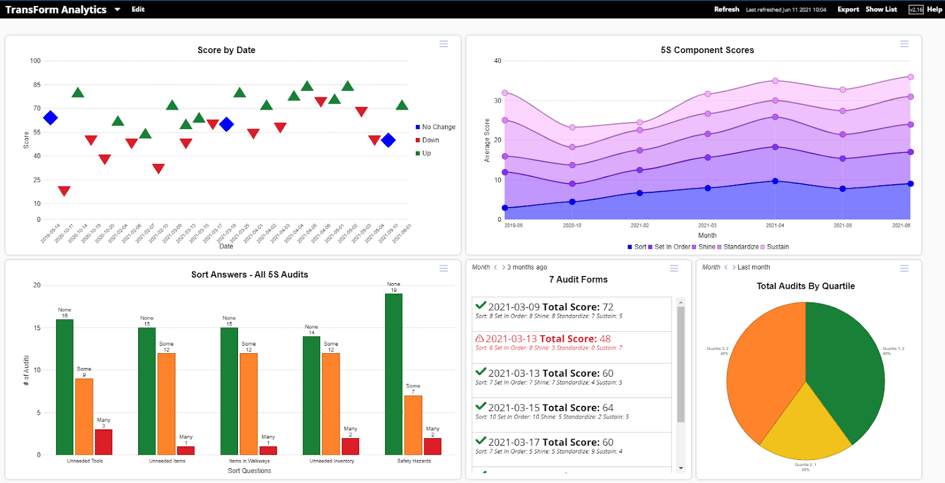 Alpha TransForm is a no-code app builder that turns your paper audit checklists into mobile inspection apps without requiring IT resources or technical expertise. Built for operations managers and field teams, it prioritizes the outcomes that matter most: rapid digitization, reliable offline operation, and clear return on investment.
No-Code Mobile App Building
Upload your existing paper checklist or start with a food safety template shared above, then customize fields for checkboxes, dropdown menus, photo capture, barcode scanning, and digital signatures. The platform is designed for business users, not developers, so you can create and modify audit apps in minutes or hours.
Alpha TransForm converts paper food safety checklists into mobile inspection apps that work offline and provide real-time compliance reporting.
Offline-First Architecture
Restaurants often have connectivity dead zones in walk-in coolers, storage areas, or older building sections. Our offline capability lets inspectors complete entire audits without internet access, then automatically syncs data once the connection is restored.
Built-In Workflows & Conditional Logic
Configure your audit app to automatically flag critical violations, assign corrective actions to specific staff members, and trigger email alerts when compliance deadlines approach. Conditional logic streamlines the inspection process by focusing on relevant checks for each operation area.
Photo, GPS & Timestamp Documentation
Capture F&B audit violation photos directly within the app, automatically tagged with GPS coordinates and timestamps. This creates defensible documentation that proves when and where issues were identified and corrected.
Real-Time Reporting & Dashboards
Alpha TransForm generates instant reports showing violation trends, recurring issues, and compliance rates across multiple locations. Custom dashboards help you prioritize corrective actions and demonstrate compliance improvements to stakeholders.
Frequently Asked Questions (FAQs)
What should be included in a food & beverage audit checklist?
A comprehensive food and beverage audit checklist includes seven essential sections: general compliance, food handling and storage, kitchen and food preparation, menu and ingredient control, inventory and supplier management, health and safety, and documentation and record-keeping.
How often should restaurants conduct internal food safety audits?
Audit frequency depends on the operation size and complexity. High-volume restaurants should conduct daily checks of critical control points, such as temperature monitoring, weekly comprehensive kitchen audits, and monthly full-facility reviews.
Smaller operations might conduct comprehensive audits weekly and perform daily spot checks in critical areas. Increase audit frequency following any food safety incident, staff turnover, or menu changes.
Are digital audit checklists better than paper forms for restaurants?
Digital audit checklists offer significant advantages over paper forms. They eliminate manual data entry and transcription errors and enable real-time photo documentation with timestamps and GPS coordinates.
They also provide instant access to historical audit data during inspections, support automated workflows for corrective action tracking, and generate compliance reports without extra administrative work.
While paper forms may seem more straightforward initially, digital checklists deliver measurable improvements in compliance accuracy and administrative efficiency.
How does Alpha TransForm improve food and beverage audit compliance?
Alpha TransForm transforms paper food safety audits into efficient mobile apps without requiring IT resources or coding skills. Our no-code app builder enables rapid digitization of existing paper checklists with fields for photo capture, barcode scanning, digital signatures, and GPS tagging.
Built-in offline capability ensures inspectors complete food and beverage audits reliably in walk-in coolers and storage areas. Conditional logic and automated workflows flag critical violations, assign corrective actions, and trigger alerts when compliance deadlines approach.
*Note: Pricing and/or product availability mentioned in this post are subject to change. Please check the retailer's website for current pricing and stock information before making a purchase.









Comment