
Find post-trip inspection checklist templates, downloadable government forms, and digital software alternatives to keep your fleet safe and compliant.

Key Takeaways
- Post-trip inspections are federally mandated under the Federal Motor Carrier Safety Administration (FMCSA) regulation 396.11 and must be completed at the end of each driver's workday on every vehicle operated.
- A standard post-trip checklist covers brakes, tires, lights, steering, windshield wipers, mirrors, coupling devices, emergency equipment, and overall vehicle condition.
- Several state and federal agencies offer free downloadable PDF inspection forms that fleets can print and use immediately for Department of Transportation (DOT) compliance.
- Digital inspection tools eliminate lost paperwork, speed up defect reporting, and give fleet managers real-time visibility into vehicle health across operations.
- Alpha TransForm lets operations teams turn paper inspection checklists into mobile apps in minutes, with offline capability and no IT support required.
Why Post-Trip Inspections Matter for Fleet Operations
Post-trip inspections are a federal requirement under 49 CFR 396.11 of the FMCSA. Every commercial vehicle driver must inspect their vehicle and submit a written report at the end of each workday, covering brakes, tires, lights, steering, mirrors, coupling devices, and emergency equipment. These inspections catch mechanical issues like brake wear, tire damage, and fluid leaks before they become roadside breakdowns or safety hazards.
Free downloadable forms from agencies like the FMCSA and the Florida Department of Transportation (FDOT) give fleets a paper-based starting point for compliance, but digital platforms offer significant advantages, including faster defect reporting, real-time maintenance routing, and audit-ready records.
Below, we compare three digital inspection tools: Alpha TransForm, Fleetio, and Whip Around. Among them, Alpha TransForm stands out as the recommended choice for its no-code flexibility, full offline capability, and ability to connect inspection data directly to existing business systems without IT support.
|
Alpha TransForm: Digital Solutions to Collect, Analyze, and Act on Data Turn Paper Forms Into Mobile Apps in Minutes | No IT Team Required | Works Offline | Trusted by Manufacturing & Field Teams  Why Business Leaders Choose Alpha TransForm: ✓ Built-in custom dashboards and workflows to trigger business activity✓ Seamless integration with existing business systems ✓ Replace Excel with digital data collection and analysis ✓ Rapid digitization—build apps in days without IT bottlenecks ✓ Proven ROI with scalable start-small approach ✓ Trusted by manufacturing, construction, and healthcare leaders From Paper to Digital in 3 Steps 1. Upload your paper form or start from scratch2. Customize fields and logic as needed 3. Deploy to mobile devices and start collecting data instantly Stop losing time with paper processes. Start delivering business value today.
|
What a Post-Trip Inspection Checklist Template Covers

A post-trip inspection checklist covers major vehicle systems, from brakes and lighting to tires, mirrors, and emergency equipment.
A well-structured post-trip inspection checklist walks the driver through every major vehicle system in a logical sequence. Most templates begin with basic identifiers such as the date, driver name, vehicle number, and odometer reading, then proceed to the component-level checks required by the FMCSA.
The core items found on a standard post-trip inspection template include:
- Brake system: service brakes, parking brake, and trailer brake connections.
- Lighting and reflective devices: headlights, tail lights, brake lights, turn signals, and clearance lights.
- Steering mechanism: visual check of fluid levels, linkage components, and overall responsiveness.
- Tires and wheels: inflation, tread depth, and signs of damage or debris.
- Windshield wipers: operational condition and ability to clear the windshield effectively.
- Mirrors: properly positioned and in good condition on both sides of the vehicle.
- Horn: confirmed working and audible.
- Emergency equipment: fire extinguisher, reflective triangles, and any other required safety items.
- Coupling devices (for trailer-equipped vehicles): latches, landing gear, and cargo securement.
- Remarks and certification: space to describe specific defects in detail, plus a driver signature line to certify the inspection was completed.
If any defects are found during these checks, drivers are required to submit a Driver Vehicle Inspection Report (DVIR), which triggers the repair-and-certification cycle before the vehicle can be dispatched again.
Downloadable Post-Trip Inspection Forms
Several government agencies and public transportation authorities publish free inspection forms that fleets can download, print, and put into service right away.
The FMCSA offers its own Driver's Vehicle Inspection Report form through its Safety Planner resource library, which serves as the standard federal template for documenting post-trip defects and certifying vehicle condition.
The FDOT provides a comprehensive Pre-trip/Post-trip Inspection Form that covers everything from headlights and brake systems to wheelchair lifts and fire suppression equipment, making it especially useful for transit fleets.
The Massachusetts Registry of Motor Vehicles publishes a Post-Trip Inspection form for 7D operators that includes a child-check verification step, which is critical for passenger transport services. Additionally, the Maricopa Association of Governments (MAG) in Arizona provides a Pre- and Post-Trip Inspection Checklist with a simple check-and-X format for marking inspected and defective items.
These forms are solid starting points, but paper has obvious limitations. Forms get lost, handwriting is hard to read, and there is no easy way to route defect reports to maintenance teams in real time.
Digital Alternatives for Post-Trip Inspections

Digital inspection tools like Alpha TransForm replace paper forms with cloud-based, mobile-friendly compliance workflows.
Software tools solve the problems that paper creates. Instead of filing cabinets full of inspection forms, digital platforms store every report in the cloud, alert managers to failed items instantly, and automatically create audit-ready records. Here are three strong options:
1. Alpha TransForm
Alpha TransForm is a no-code platform we built to let operations teams turn any paper inspection form into a fully functional mobile app in minutes. What sets it apart from fleet-specific tools is its flexibility. With us, you are not locked into a pre-built inspection workflow. Instead, you upload your existing form or build one from scratch, add features like photo capture, GPS tagging, timestamps, barcode scanning, and digital signatures, then deploy it to drivers' phones or tablets immediately.
An app built with our platform can work fully offline, which is essential for drivers completing inspections in yards, warehouses, or remote locations without reliable cell service. Data syncs automatically when connectivity returns. They can also connect to your existing business systems, so inspection data can feed directly into dashboards, trigger maintenance alerts, or generate compliance reports without manual re-entry.
2. Fleetio
Fleetio is a dedicated fleet management platform with a built-in inspections module. Drivers complete digital DVIRs through the Fleetio Go mobile app, and failed items can be converted into maintenance work orders with a few taps. The platform includes analytics dashboards, GPS-based inspection verification to prevent pencil-whipping, and integrations with fuel cards and telematics providers.
3. Whip Around
Whip Around focuses specifically on fleet inspection and maintenance workflows. Drivers use the mobile app to complete customizable pre- and post-trip inspection forms, attach photos of defects, and submit reports that sync to a cloud dashboard in real time.
Managers receive instant notifications for failed items and can generate compliance reports for DOT audits. The platform also includes work order management and preventive maintenance scheduling.
Digital Post-Trip Inspection Tools: At-a-Glance Summary
|
Feature |
Alpha TransForm |
Fleetio |
Whip Around |
|
Offline Capability |
Full offline with auto-sync |
Offline inspections via mobile app |
Offline submission syncs when online |
|
Custom Inspection Forms |
Fully customizable across any form type, not limited to inspections |
Customizable templates for inspection |
Customizable DOT-compliant forms |
|
Photo Capture |
Yes, with annotation |
Yes |
Yes |
|
GPS & Timestamps |
Built-in |
GPS verification included |
Location tracking |
|
Maintenance Integration |
Connects to existing business systems |
Built-in work orders |
Built-in work orders |
|
Dashboards & Reporting |
Custom dashboards included |
Analytics dashboards |
Compliance reporting |
Alpha TransForm: The Smart Choice for Inspection Digitization
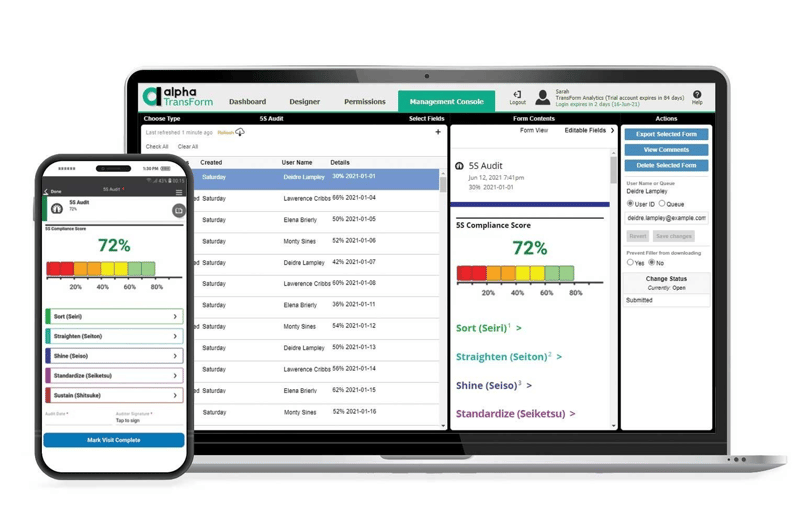
Alpha TransForm lets operations teams digitize inspection checklists into mobile apps that run offline, with photo capture, GPS tagging, and real-time dashboards.
With Alpha TransForm, you can upload your current checklist and add photo capture, GPS tagging, digital signatures, and conditional logic, then push it directly to your drivers' devices the same day. Unlike fleet-only tools, Alpha TransForm isn't limited to inspections. The same platform seamlessly digitizes your Gemba walks, 5S audits, equipment checks, and any other form-based process your team relies on daily.
Everything works fully offline, so your drivers can complete inspections anywhere, from loading docks to remote field locations, without worrying about signal strength. Check out our Equipment Inspection Checklist template to see how quickly a paper form becomes a powerful mobile app. Start small with a single inspection form, scale at your own pace, and enjoy a clear path to ROI, no IT bottlenecks required.
FAQs
What is required in a post-trip inspection by DOT?
How long does a post-trip inspection take?
What happens if a driver skips a post-trip inspection?
Can I use a digital app instead of paper for DVIRs?
How does Alpha TransForm help with post-trip inspections?
*Note: Alpha TransForm is a no-code app builder developed by Alpha Software. Product features, availability, pricing, and results referenced are for informational purposes only and subject to change; actual capabilities and outcomes may vary based on configuration and use case. To confirm current offerings and pricing, talk to a Solutions Consultant.






Comment