
Discover the 3 best event staff management software solutions. Compare features and pricing to find the right tool for scheduling and field operations.

Key Takeaways
- Event staff management software eliminates manual scheduling headaches, reduces no-shows, and streamlines time tracking for venues, agencies, and production teams.
- Core features to evaluate include mobile check-in capabilities, real-time communication tools, staff availability tracking, and payroll system integration.
- Pricing models vary from per-user monthly fees to volume-based enterprise plans; matching the model to your team size matters.
- Alpha TransForm offers event teams a mobile-first approach to staff operations with offline functionality, instant check-ins, photo capture, and direct system integration that traditional scheduling tools cannot match.
Understanding Event Staff Management Software
Event staff management software helps planners, venues, and staffing agencies coordinate their workforce across multiple events and locations. These platforms replace scattered spreadsheets, group chats, and paper sign-in sheets with centralized systems that handle scheduling, communication, and time tracking in one place.
The operational challenges are familiar: last-minute cancellations leave coverage gaps, manual timesheets create payroll disputes, and staff miss shift updates buried in email threads. Modern event operations demand mobile access for staff to confirm shifts, check in on-site, and report issues as they happen.
|
Alpha TransForm: Digital Solutions to Collect, Analyze, and Act on Data Turn Paper Forms Into Mobile Apps in Minutes | No IT Team Required | Works Offline | Trusted by Manufacturing & Field Teams  Why Business Leaders Choose Alpha TransForm: ✓ Built-in custom dashboards and workflows to trigger business activity✓ Seamless integration with existing business systems ✓ Replace Excel with digital data collection and analysis ✓ Rapid digitization—build apps in days without IT bottlenecks ✓ Proven ROI with scalable start-small approach ✓ Trusted by manufacturing, construction, and healthcare leaders From Paper to Digital in 3 Steps 1. Upload your paper form or start from scratch2. Customize fields and logic as needed 3. Deploy to mobile devices and start collecting data instantly Stop losing time with paper processes. Start delivering business value today.
|
Key Features to Look For
- Scheduling & shift management: Role-based assignments that match bartenders, security personnel, ushers, and technical staff to appropriate positions. Calendar views speed up the planning process.
- Staff database & availability tracking: Centralized profiles storing skills, certifications, and availability eliminate back-and-forth communication about who can work specific dates.
- Mobile access & on-site check-in: Mobile apps let workers confirm shifts, view event details, and check in upon arrival. GPS-verified check-ins provide accurate attendance data.
- Communication tools: In-app messaging, SMS notifications, and broadcast features keep everyone informed without relying on external channels.
- Time tracking & payroll integration: Automatic timesheet generation based on check-in data reduces administrative burden. Export capabilities streamline payment processing.
- Reporting & analytics: Dashboards that surface labor costs, no-show rates, and overtime patterns help you make better staffing decisions.
3 Best Event Staff Management Software in 2026
Alpha TransForm
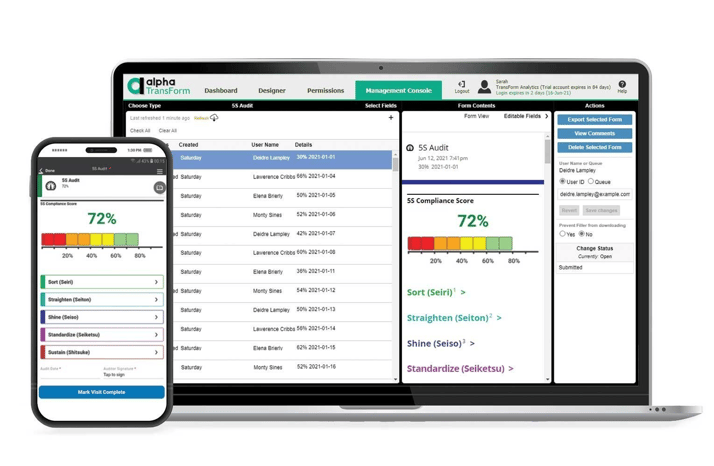
Alpha TransForm enables operations managers to build custom mobile apps for staff check-ins, time tracking, and incident reporting—all without coding knowledge.
Our Alpha TransForm platform takes a different approach to event staff management by focusing on mobile data collection and field operations. Rather than forcing teams into rigid scheduling interfaces, our platform enables operations managers to build custom apps for check-ins, time tracking, safety checklists, and incident reporting without coding knowledge.
Key Features:
- Mobile apps that work offline—staff can check in, complete forms, and submit data even in venues with poor connectivity, with automatic sync when signal returns.
- Photo capture with markup annotations for documenting equipment issues, safety concerns, or incident reports.
- Barcode scanning for equipment tracking and credential verification.
- GPS and timestamp capture for verified attendance records.
- Digital signatures for shift confirmations and compliance documentation.
- Conditional logic that adapts forms based on role, location, or event type.
- Built-in dashboards that display check-in rates, hours logged, and operational metrics in real time.
- Direct integration with ERP systems, payroll platforms, and operational databases.
Pricing Overview:
Our pricing follows a simple per-user model with unlimited forms included. At $30 per user monthly, teams gain access to the full feature set without additional charges for creating new apps or workflows.
Best For:
Event teams that need reliable mobile data collection for staff check-ins, time tracking, safety compliance, and incident documentation. Particularly valuable for venues and production companies operating in locations with unreliable network coverage.
Deputy
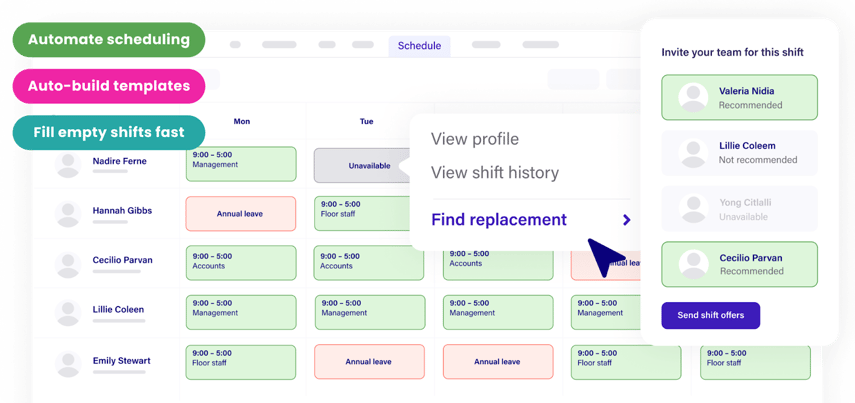
Deputy is a workforce management platform offering auto-scheduling, shift swapping, break compliance tracking, and payroll integration for businesses scheduling hourly workers. (Image courtesy of Deputy)
Deputy serves as a workforce management platform designed for businesses scheduling hourly workers across multiple locations.
Key Features:
- Auto-scheduling that matches available staff to open shifts based on skills and availability.
- Shift swapping with manager approval.
- Break compliance tracking for labor law requirements.
- Timesheet integration with major payroll providers, including Gusto, ADP, and QuickBooks.
- Geofencing to control where employees can clock in and out.
- Flexible Weekly Plan designed specifically for short-term events like conferences and festivals.
Pricing:
Deputy offers three main tiers: Lite at $5/user/month covers basic scheduling and timesheets; Core at $6.50/user/month adds auto-scheduling, demand forecasting, and geofencing; and Pro at $9/user/month includes custom access levels, SSO, and 24/7 support. A minimum monthly spend of $30 applies. Enterprise pricing is available for larger operations, and a free trial lets you test the platform before committing.
Best For:
Established staffing agencies and venue operators prioritizing automated shift scheduling with tight payroll integration. Their Flexible Weekly Plan also suits businesses running short-term events.
Connecteam
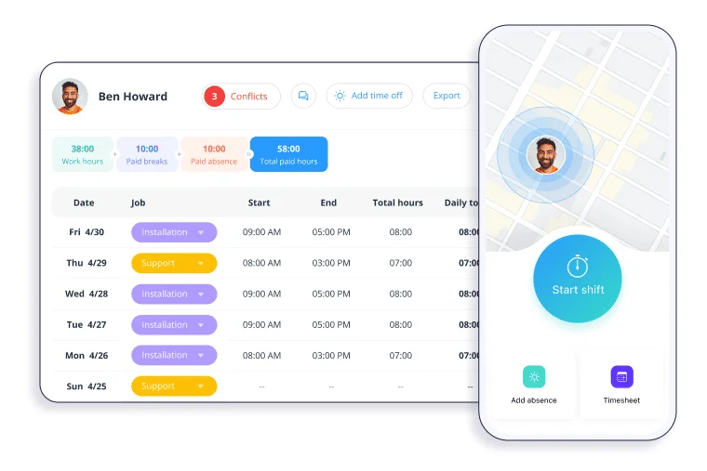
Connecteam is an employee management app for deskless workers that combines scheduling, communication, GPS time tracking, and task management.
Key Features:
- Shift scheduling with templates, recurring shifts, and open shift claiming.
- In-app chat, updates feed, and announcement channels.
- GPS time clock with geofencing for mobile check-in and check-out.
- Forms, checklists, and task management.
- Training courses, document management, and time-off tracking.
Pricing:
Connecteam offers a Small Business Plan that is free for up to 10 users with access to key features. For larger teams, pricing is structured across three hubs (Operations, Communications, HR), each starting at $29/month for up to 30 users on the Basic plan, $49/month for Advanced, and $99/month for Expert. Additional users beyond 30 are charged per user. A 14-day free trial is available with no credit card required.
Best For:
Small to mid-sized event teams wanting an affordable, all-in-one platform. The free Small Business Plan makes it particularly attractive for independent planners and small crews moving away from spreadsheets.
Alpha TransForm vs Deputy vs Connecteam: Comparison Table
|
Software |
Best For |
Key Strengths |
Pricing Model |
Offline Capability |
Ideal Team Size |
|
Alpha TransForm |
Mobile field operations |
Offline forms, photo capture, GPS, custom apps |
$30/user, unlimited forms |
Full offline functionality |
Small to enterprise |
|
Deputy |
Large-scale scheduling |
Auto-scheduling, payroll integration |
Tiered per-user |
Limited |
Medium to enterprise |
|
Connecteam |
Budget-conscious teams |
Affordable, simple interface |
Free tier available, tiered paid plans |
Limited |
Very small to small |
Note: Competitor pricing information is approximate and subject to change. For Alpha TransForm's current pricing and capabilities, talk to a Solutions Consultant.
How to Choose the Right Tool
By operational priority: If your primary challenge is scheduling complexity and payroll integration, Deputy offers automated scheduling features. If budget constraints drive decisions and your connectivity is reliable, Connecteam provides an accessible starting point. If you need reliable mobile data collection that works offline: for check-ins, safety documentation, incident reports, and equipment tracking, Alpha TransForm delivers capabilities that traditional scheduling tools cannot match.
By team size: Small teams often start with simpler platforms and migrate as complexity grows. Growing operations benefit from solutions that scale without dramatic cost increases. Enterprise teams require robust integration capabilities and administrative controls.
By venue conditions: Events happen in warehouses, outdoor venues, basements, and locations where cellular coverage fails. Teams operating in variable connectivity environments need offline-first solutions that capture data reliably, regardless of signal strength.
Why Alpha TransForm Delivers for Event Operations
Our Alpha TransForm platform’s patented offline technology enables event staff to document check-ins, complete safety walkthroughs, and report equipment issues regardless of connectivity.
Event staff management extends beyond scheduling shifts. Field teams need to document check-ins, complete safety walkthroughs, report equipment issues, and capture compliance records, often in venues where network connectivity is unreliable at best.
Alpha TransForm addresses these operational realities with patented offline technology that keeps data collection running regardless of signal strength. Your staff can check in, complete required forms, and submit documentation without waiting for connectivity. Data syncs automatically when devices reconnect, ensuring nothing gets lost.
Our no-code platform enables operations managers to build and modify apps themselves, eliminating IT bottlenecks that delay deployment. Pre-built templates for common workflows get teams operational in under 30 minutes. Custom dashboards transform collected data into actionable insights, tracking attendance rates, flagging issues, and providing the visibility managers need to run smooth events. For event teams ready to move beyond basic scheduling into comprehensive field operations, Alpha TransForm provides the mobile-first foundation that delivers results.
FAQs
What is event staff management software?
How much does event staff management software cost?
What features matter most for event operations?
Can event staff software work without internet connectivity?
How does Alpha TransForm handle event staff check-ins & time tracking?
Note: Alpha TransForm is a no-code app builder developed by Alpha Software. Product features, availability, pricing, and results referenced are for informational purposes only and subject to change; actual capabilities and outcomes may vary based on configuration and use case. To confirm current offerings and pricing, talk to a Solutions Consultant.






Comment