
Find essential citizen complaint form fields, downloadable government PDF templates, and digital alternatives like Alpha TransForm for faster complaint management.

Key Takeaways
- A well-designed citizen complaint form captures the who, what, when, where, and how of every grievance to ensure fast resolution.
- Standard fields include complainant contact information, incident details, supporting evidence, and a declaration or signature section.
- Government agencies like the City of Hemet, CA, the Los Angeles Housing Department, and the Milwaukee Police Department offer downloadable PDF complaint form templates.
- Digital complaint forms reduce processing delays, eliminate lost paperwork, and provide real-time tracking for both citizens and administrators.
- Alpha TransForm enables government and operations teams to turn paper complaint forms into mobile apps in minutes, with offline capability and no IT dependency.
Citizen Complaint Forms: What to Include & How to Go Digital
A citizen complaint form needs to capture the right information upfront so staff can investigate and resolve issues without unnecessary back-and-forth. The essential fields fall into four categories: complainant contact information; incident details (date, time, location, and narrative); supporting evidence (such as photos or documents); and a declaration with a signature.
Several government agencies, including the City of Hemet, the Los Angeles Housing Department, and the Milwaukee Police Department, offer downloadable PDF complaint form templates that can serve as a starting point. However, paper and static PDFs come with limitations, including manual data entry, no real-time tracking, and no automated routing.
Digital alternatives solve these bottlenecks. Here, we compare three platforms, Alpha TransForm, Jotform, and GovPilot, across features like offline capability, no-code form building, photo and GPS capture, and dashboard reporting to help government and operations teams modernize complaint intake.
|
Alpha TransForm: Digital Solutions to Collect, Analyze, and Act on Data Turn Paper Forms Into Mobile Apps in Minutes | No IT Team Required | Works Offline | Trusted by Manufacturing & Field Teams  Why Business Leaders Choose Alpha TransForm: ✓ Built-in custom dashboards and workflows to trigger business activity✓ Seamless integration with existing business systems ✓ Replace Excel with digital data collection and analysis ✓ Rapid digitization—build apps in days without IT bottlenecks ✓ Proven ROI with scalable start-small approach ✓ Trusted by manufacturing, construction, and healthcare leaders From Paper to Digital in 3 Steps 1. Upload your paper form or start from scratch2. Customize fields and logic as needed 3. Deploy to mobile devices and start collecting data instantly Stop losing time with paper processes. Start delivering business value today.
|
Fields in a Citizen Complaint Form

A well-designed citizen complaint form balances capturing essential details with keeping the filing process simple for residents.
The strength of any complaint form is in the fields it includes. Too few, and staff lack the information needed to act. Too many, and citizens abandon the form. The goal is to strike a balance that captures everything necessary for investigation and follow-up while keeping the experience straightforward for the person filing the complaint.
1. Complainant Information
This section identifies the person filing the complaint. It typically includes full name, mailing address, phone number, and email address. Some forms also capture date of birth and preferred method of contact.
2. Incident Details
It should capture the date, time, and location of the incident, along with the names or descriptions of individuals involved. A narrative field asking the complainant to describe "who, what, when, where, and how" gives staff the context they need to begin an investigation. Dropdown menus for complaint categories (noise, property violation, personnel conduct, service delay, etc.) automatically route the form to the correct department.
3. Supporting Evidence & Documentation
A space for uploading or attaching evidence strengthens the complaint. This could include photographs, video files, receipts, correspondence, or witness statements. Forms that allow file attachments and photo capture tend to produce higher-quality submissions that are easier to investigate.
4. Declaration & Signature
Most official complaint forms conclude with a declaration section where the complainant affirms that the information provided is accurate to the best of their knowledge. This is often accompanied by a signature field and date. In digital forms, electronic signature capture and automatic timestamps serve the same purpose while also creating an auditable record.
Downloadable PDF Complaint Forms
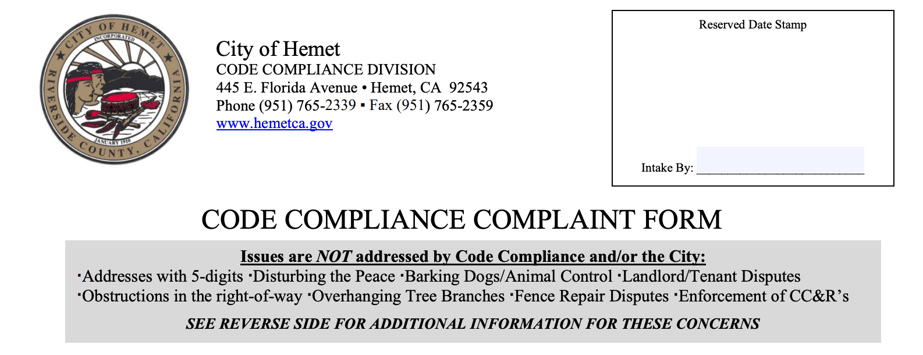
Government agencies, such as the City of Hemet, provide standardized PDF complaint forms for residents to report code violations.
Several government agencies offer standardized PDF complaint forms that can be downloaded, printed, or completed digitally. Here are three examples from public institutions:
1. City of Hemet, CA — Code Compliance Complaint Form
This municipal form is used by residents to report code violations, including abandoned vehicles, trash, and outdoor storage, overgrown vegetation, unpermitted construction, illegal businesses, and substandard housing. It captures the complainant's contact information, the location and type of violation via category checkboxes, a narrative description, and a signature. The reverse side outlines the city's investigation and enforcement process. It is available as a fillable PDF on the City of Hemet website.
2. Milwaukee Police Department — Citizen Complaint Form (PI-31)
This municipal form is used to file complaints against law enforcement officers. It captures personal demographics, officer details, incident specifics, and witness information. The form is available on the City of Milwaukee website.
3. Los Angeles Housing Department — Code Enforcement Complaint Form
This city-level form allows residents to report housing code violations, including electrical, fire safety, heating, plumbing, sanitation, structural, and zoning issues. It collects the complainant's name and contact details, the location of the violation by room or area, and the violation type. It is available as a downloadable PDF on the LAHD website.
These PDFs serve as a useful starting point, but they come with well-known limitations: manual data entry, no real-time tracking, risk of forms getting lost in transit, and no automated routing to the right department. That is where digital alternatives come in.
Digital Alternatives for Citizen Complaint Collection

Digital tools like Alpha TransForm, Jotform, and GovPilot help governments modernize citizen complaint intake beyond paper and PDFs.
Moving complaint forms from paper and static PDFs to digital platforms solves many of the bottlenecks that slow down resolution. Below are three digital tools that government teams and operations leaders can use to modernize complaint intake.
1. Alpha TransForm
Alpha TransForm is a no-code app builder that lets operations and government teams turn any paper form into a fully functional mobile app in minutes, without relying on IT. For citizen complaint workflows, this means a staff member or department lead can upload an existing complaint form (or start from scratch), add fields such as photo capture, GPS location tagging, timestamps, electronic signatures, and conditional logic, and deploy the app to mobile devices immediately.
With Alpha TransForm apps, field staff, inspectors, and personnel in areas with poor connectivity (rural offices, field locations, community events) can collect complaint data without an internet connection. The data syncs automatically once connectivity is restored. Built-in dashboards let supervisors monitor complaint volume, response times, and resolution status in real time.
2. Jotform
Jotform is an online form builder that provides a library of pre-built complaint form templates for government agencies, businesses, and nonprofits. Users can customize fields, add conditional logic, and collect electronic signatures through a browser-based editor.
Jotform also supports PDF conversion, allowing agencies to turn static forms into fillable online versions. It integrates with tools like Google Drive and Dropbox for file storage. However, while Jotform supports offline data collection through its Jotform Mobile Forms app, forms must be pre-downloaded, and some widgets require an active internet connection.
3. GovPilot
GovPilot is a government management platform that includes a Report-a-Concern module for citizen complaint intake. Citizens can submit complaints via the local government website or the GovAlert mobile app, and the system automatically routes them to the appropriate department.
GovPilot also includes GIS mapping, inspection tools, and data reporting. It is specifically designed for municipalities and county governments. The platform is a more comprehensive (and more costly) solution geared toward organizations ready to digitize their entire government operation.
Digital Citizen Complaint Tools: At-a-Glance Comparison
|
Feature |
Alpha TransForm |
Jotform |
GovPilot |
|
Offline Capability |
Full offline-first with smart signal detection and auto-sync |
Available via mobile app for pre-downloaded forms; some widgets require connectivity |
Mobile app (GovAlert) available; primarily cloud-based |
|
Form Building |
No-code; business users upload paper forms or build from scratch |
Drag-and-drop browser editor with templates |
Pre-built government workflow modules |
|
Photo & Location Capture |
Built-in photo capture with annotation, GPS tagging, and timestamps |
GPS and photo capture are available through the mobile app fields |
Photo upload and geo-tagging through the GovInspect and GovAlert apps |
|
Dashboards & Reporting |
Custom dashboards with workflow triggers and real-time alerts |
Submission reports and data tables; visualization via Jotform Tables |
Cross-departmental dashboards with GIS map overlays |
|
Who Builds the Forms |
Business users and department leads — no IT required |
Any user via the self-service browser editor |
Pre-configured by GovPilot with agency onboarding |
Why Alpha TransForm for Digital Complaint Solutions
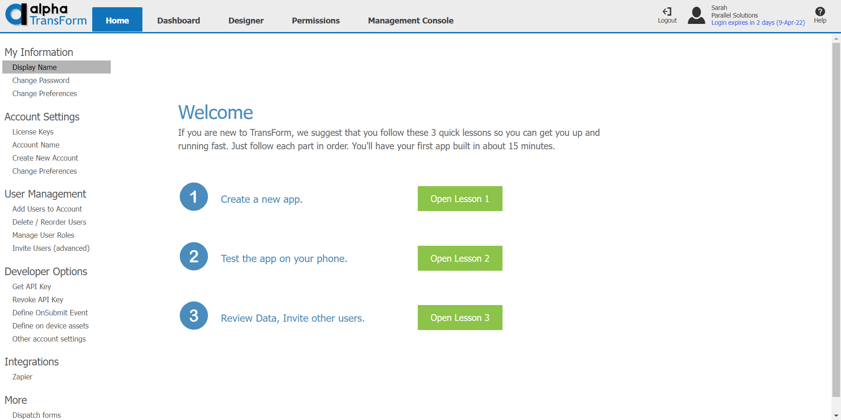
Alpha TransForm helps agencies turn citizen complaints into structured, trackable records for faster resolution and greater accountability.
Every unresolved complaint chips away at public confidence. Citizens expect acknowledgment, transparency, and timely follow-through, and the tools your team uses determine if you can deliver on that expectation.
Alpha TransForm gives agencies a direct path from intake to accountability. Complaints become structured, trackable records the moment they are submitted, giving supervisors clear visibility into what needs attention and where bottlenecks form. That visibility turns reactive complaint handling into proactive service improvement. Agencies ready to see the platform in action can take a look at our app templates, including the Police Stop Report App, which shows how public service data collection works on Alpha TransForm.
FAQs
What fields should a citizen complaint form include?
Can I file a citizen complaint anonymously?
What is the difference between a PDF complaint form and a digital complaint form?
How long does it take to process a citizen complaint?
What makes Alpha TransForm a good choice for managing citizen complaints?
*Note: Alpha TransForm is a no-code app builder developed by Alpha Software. Product features, availability, pricing, and results referenced are for informational purposes only and subject to change; actual capabilities and outcomes may vary based on configuration and use case. To confirm current offerings and pricing, talk to a Solutions Consultant.






Comment