
Learn the essential fields for a machine downtime log template, grab a free spreadsheet, and explore digital tools like Alpha TransForm for real-time tracking.

Key Takeaways
- A complete machine downtime log should capture equipment ID, downtime category, start/stop times, root cause, and corrective action to drive meaningful analysis.
- A free downloadable template from the WHO offers a quick starting point for paper-based tracking.
- Digital downtime logging tools, such as those offered by Alpha TransForm, SafetyCulture, and Limble CMMS, eliminate manual entry errors and feed data directly into dashboards for faster decision-making.
- Choosing the right digital option depends on offline reliability, ease of setup, integration with existing systems, and the ability for non-technical staff to manage it.
- Alpha TransForm lets manufacturing and field teams turn any paper downtime log into a mobile app in minutes, with offline-first functionality and built-in dashboards.
Every Minute of Downtime Costs You Money — Here's How to Track It
Unplanned machine downtime is one of the most expensive problems in manufacturing. When a press stops, a conveyor jams, or a CNC spindle overheats, the losses go far beyond the idle minutes; they cascade into missed shipments, overtime labor, and scrap material. Yet many plants still track these events on clipboards, paper logs, or disconnected spreadsheets that no one reviews until the damage is done.
A well-structured machine downtime log is the first step toward understanding where production time disappears and why. This article covers the essential fields every downtime log should include, free PDF templates you can download today, and three digital alternatives that take tracking from reactive paperwork to real-time visibility.
|
Alpha TransForm: Digital Solutions to Collect, Analyze, and Act on Data Turn Paper Forms Into Mobile Apps in Minutes | No IT Team Required | Works Offline | Trusted by Manufacturing & Field Teams  Why Business Leaders Choose Alpha TransForm: ✓ Built-in custom dashboards and workflows to trigger business activity✓ Seamless integration with existing business systems ✓ Replace Excel with digital data collection and analysis ✓ Rapid digitization—build apps in days without IT bottlenecks ✓ Proven ROI with scalable start-small approach ✓ Trusted by manufacturing, construction, and healthcare leaders From Paper to Digital in 3 Steps 1. Upload your paper form or start from scratch2. Customize fields and logic as needed 3. Deploy to mobile devices and start collecting data instantly Stop losing time with paper processes. Start delivering business value today.
|
Essential Fields in a Machine Downtime Log Template

A well-designed machine downtime log template balances thorough data capture with ease of use for frontline workers.
The value of a downtime log depends entirely on the data it captures. Too few fields and you get vague records that can't inform decisions. Too many operators skip entries because the form takes too long to complete. The fields below strike a practical balance that supports root-cause analysis without burdening frontline workers.
1. Date and shift should appear at the top of every entry so you can spot patterns tied to specific crews or time periods.
2. Machine or equipment ID (including asset number and location) tells you exactly which asset was affected, which is critical when you operate dozens of similar units across multiple lines.
3. Downtime start time and end time are non-negotiable — without precise timestamps, calculating total downtime minutes and comparing events across shifts becomes guesswork.
4. Every log also needs a downtime category field, typically a dropdown or checkbox list that classifies the event as mechanical failure, electrical fault, operator error, material shortage, planned maintenance, or changeover. Paired with a root cause description (a short free-text field), this combination lets you run Pareto analysis to find your top offenders.
5. Finally, include a corrective action taken field and a reported by / resolved by field so there is accountability and a record of the fix. Optional but useful additions include a photo or attachment field, a priority or severity rating, and a follow-up maintenance work order number.
Free Downloadable Spreadsheet Template
If you need to start logging downtime today and want a ready-made format, below is a free template you can download, print, or customize.
WHO Equipment Maintenance Logbook
The World Health Organization (WHO) provides a free Equipment Maintenance Logbook template in Excel format through its Laboratory Quality Stepwise Implementation (LQSI) tool. Originally designed for laboratory settings, the template includes columns for equipment identification, date, maintenance description, technician, and follow-up actions. Its structured layout is easily adaptable for production-floor downtime logging; simply add columns for downtime start/stop times and reason codes to tailor it for manufacturing use.
Why Do Paper and PDF Downtime Logs Fall Short?
Free templates are a reasonable starting point, but they carry real limitations that grow as your operation scales. Paper logs and static spreadsheets depend on someone remembering to fill them out, writing legibly, and then manually entering data into another system for analysis. Information stays siloed on a clipboard or in one person's inbox until someone adds it, often days or weeks after the event.
There is no way to trigger an alert when a machine goes down, no automatic timestamp, and no dashboard that tells a plant manager at a glance which line is bleeding the most time. For teams that need faster insights and less manual effort, digital downtime-tracking tools are the logical next step.
3 Best Digital Machine Downtime Log Solutions
1. Alpha TransForm
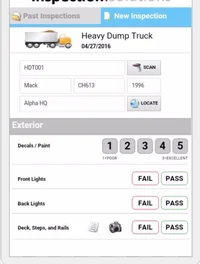
Alpha TransForm is a no-code app builder that converts paper downtime logs into mobile apps with offline capability and ERP integration.
Alpha TransForm is a no-code app builder designed for manufacturing and field operations teams that need to replace paper forms without waiting on IT. Teams can upload existing paper downtime logs (or start from a blank screen) and turn it into a mobile app with fields for timestamps, photo capture, barcode scanning, GPS location, dropdown reason codes, conditional logic, and digital signatures.
Apps built with Alpha TransForm work fully offline in warehouses, plant floors, and remote sites, then sync automatically when connectivity returns. Built-in dashboards and workflow alerts mean the right people see downtime data the moment it is submitted, not days later.
Alpha TransForm integrates with existing business systems and ERP platforms, so downtime records flow directly into your maintenance and operations workflows. You can explore our equipment inspection app template as a starting point and customize it for downtime logging.
2. SafetyCulture
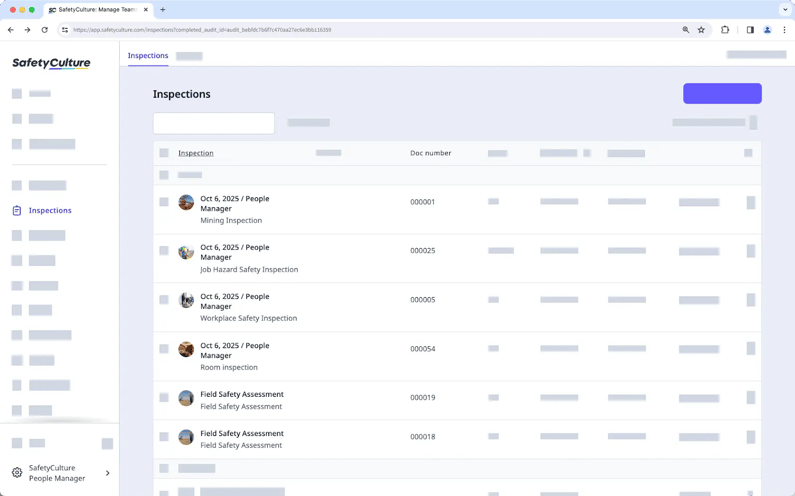
SafetyCulture is a workplace operations platform offering inspection templates, real-time alerts, and mobile downtime logging with offline capability.
SafetyCulture (formerly iAuditor) is a workplace operations platform with strong inspection and audit capabilities, including downtime tracking. The platform offers thousands of pre-built inspection templates, real-time alerts, and analytics dashboards. Operators can log downtime events on mobile devices, attach photos, and assign corrective actions directly from the app. SafetyCulture works offline and syncs when reconnected.
It is well-suited for teams that combine downtime tracking with broader safety and compliance workflows, though it relies on a template-based approach that may require workarounds for highly customized logging needs.
3. Limble CMMS
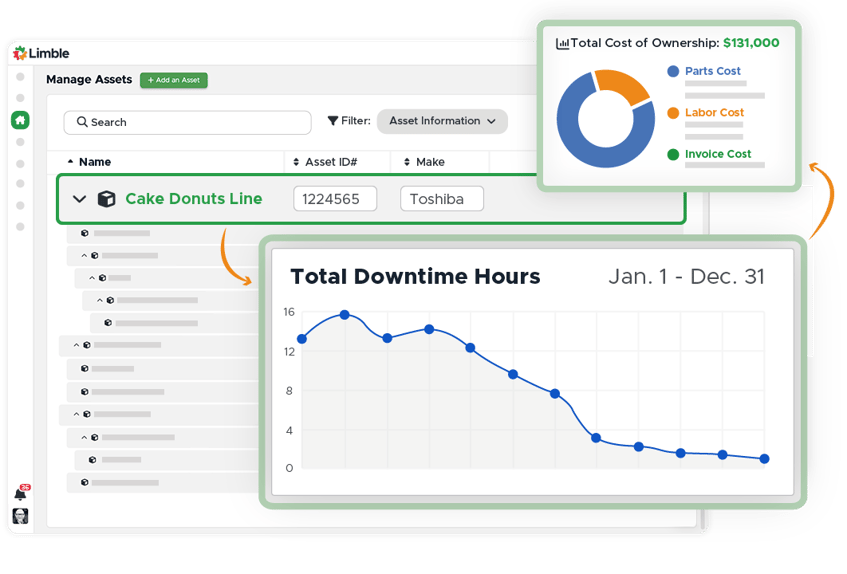 Limble CMMS integrates downtime tracking with maintenance management, offering asset history, work orders, and trend reporting.
Limble CMMS is a computerized maintenance management system that includes downtime tracking as part of its broader maintenance toolkit. Teams can log downtime events, link them to work orders, track asset history, and generate reports that show downtime trends over time.
It is a strong choice for organizations that want downtime tracking tightly integrated with preventive maintenance scheduling and parts inventory. However, it is primarily a CMMS, so teams looking for a flexible tool to digitize a variety of paper forms beyond maintenance may find its scope narrower than a no-code platform.
Digital Downtime Log Solutions: At-a-Glance Summary Table
|
Feature |
Alpha TransForm |
SafetyCulture |
Limble CMMS |
|
Primary Focus |
No-code mobile app builder for any form |
Inspection & operations platform |
Maintenance management (CMMS) |
|
Offline Capability |
Full offline-first (patented) |
Offline with sync |
Limited offline |
|
Custom Downtime Forms |
Fully customizable, no-code |
Template-based with customization |
Pre-built within CMMS |
|
Photo / Barcode / GPS |
Yes (built-in) |
Yes |
Partial |
|
Dashboards & Alerts |
Built-in custom dashboards |
Analytics dashboards |
Maintenance-focused reports |
|
Integration with ERP / Business Systems |
Yes |
Yes (via integrations) |
Yes (via integrations) |
|
IT Dependency |
None. Business users build and deploy |
Low |
Low |
Why Alpha TransForm is Best for Digital Downtime Tracking

Alpha TransForm's no-code platform digitizes downtime tracking fast, with offline-first reliability and real-time dashboard insights.
Manual downtime tracking often leads to data gaps and delayed responses that hurt your bottom line. Alpha TransForm enables teams to convert paper logs into functional mobile applications in just a few days. This system allows teams to capture timestamps, photos, and barcodes, eliminating the need for a specialized technical department.
The offline-first architecture ensures that operators can record data in remote locations or shielded plant floors without a constant internet connection. Information syncs to centralized dashboards immediately upon reconnection to give managers accurate production data. Contact a solutions consultant at Alpha TransForm to start digitizing your operational workflows and reducing wasted production time.
FAQs
What is a machine downtime log?
How do I calculate total downtime from a log?
What are the most common causes of machine downtime?
Can I use a downtime log for OEE calculations?
What makes Alpha TransForm different from other downtime tracking tools?
*Note: Alpha TransForm is a no-code app builder developed by Alpha Software. Product features, availability, pricing, and results referenced are for informational purposes only and subject to change; actual capabilities and outcomes may vary based on configuration and use case. To confirm current offerings and pricing, talk to a Solutions Consultant.






Comment