
Learn how corrective action reports work in manufacturing, explore real examples and downloadable PDF templates, and compare top CAR automation options.

Key Takeaways
- A corrective action report (CAR) documents the root cause of a manufacturing issue, the steps taken to fix it, and measures to prevent recurrence.
- Common CARs in manufacturing address assembly-line defects, workplace safety incidents, and supplier non-conformance issues.
- Government institutions such as the Defense Acquisition University and USDA offer free downloadable CAR and corrective action plan PDF templates.
- Automation tools replace paper-based CAR processes with mobile data capture, real-time alerts, and dashboards that speed up issue resolution.
- Alpha TransForm lets manufacturing teams digitize corrective action reports into mobile apps in minutes, with offline capability and no IT dependency.
What Is a Corrective Action Report and Why Does It Matter?
A corrective action report (CAR) is the formal record that manufacturing teams use to document a problem, trace it to its root cause, and outline the steps needed to fix it permanently. In environments governed by ISO 9001, FDA regulations, or internal quality standards, CARs are essential for demonstrating that your facility identifies issues, responds systematically, and prevents recurring problems. Without a structured CAR process, defects recur, audit findings pile up, and the costs of rework and scrap grow quietly in the background.
This article walks through three practical CAR examples, highlights downloadable PDF templates from public institutions, and compares the best automation options for teams ready to move beyond paper and spreadsheets.
|
Alpha TransForm: Digital Solutions to Collect, Analyze, and Act on Data Turn Paper Forms Into Mobile Apps in Minutes | No IT Team Required | Works Offline | Trusted by Manufacturing & Field Teams  Why Business Leaders Choose Alpha TransForm: ✓ Built-in custom dashboards and workflows to trigger business activity✓ Seamless integration with existing business systems ✓ Replace Excel with digital data collection and analysis ✓ Rapid digitization—build apps in days without IT bottlenecks ✓ Proven ROI with scalable start-small approach ✓ Trusted by manufacturing, construction, and healthcare leaders From Paper to Digital in 3 Steps 1. Upload your paper form or start from scratch2. Customize fields and logic as needed 3. Deploy to mobile devices and start collecting data instantly Stop losing time with paper processes. Start delivering business value today.
|
3 Common Corrective Action Report Examples in Manufacturing
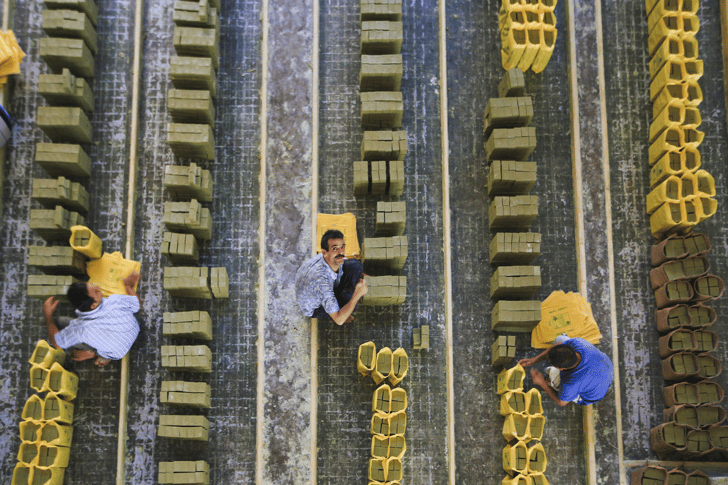
Three common corrective action report examples in manufacturing include product defects, safety incidents, and supplier non-conformance.
Understanding when and how a CAR is used becomes easier with concrete scenarios. Below are three examples that reflect the most frequent triggers for corrective action in manufacturing settings.
1. Assembly Line Product Defect
A food packaging facility notices a spike in seal failures during a routine quality check. The CAR documents the defect rate, identifies the root cause as a worn heat-seal bar on one machine, and prescribes an immediate replacement and a revised preventive maintenance schedule. The report also assigns a quality engineer to verify seal integrity over the following 30 days, closing the loop on effectiveness.
2. Workplace Safety Incident
A warehouse team reports two near-miss forklift incidents in the same aisle within a week. The corrective action report uses a fishbone diagram to identify contributing factors: poor lighting, cluttered pathways, and a lack of floor markings. Corrective actions include installing additional lighting, reorganizing the aisle layout, and scheduling weekly safety briefings. The CAR assigns an operations manager to track incident rates over the next quarter.
3. Supplier Non-Conformance
An automotive parts manufacturer receives a batch of fasteners that fail dimensional inspection. The CAR records the specific non-conformance, notifies the supplier with a formal Supplier Corrective Action Request (SCAR), and requires the supplier to submit their own root cause analysis and corrective plan. Internally, the report adds a secondary incoming inspection step for that supplier's materials until the issue is verified as resolved.
Corrective Action Report PDF Templates
If you need a starting point for structuring your own CAR process, several government agencies publish free templates that align with recognized quality and compliance standards. Here are two worth downloading.
1. The Defense Acquisition University (DAU) offers a blank corrective action report template in PDF format. Published on a .gov domain, this template is structured around documenting the non-conformance, root cause findings, corrective actions taken, and verification of effectiveness. It is especially useful for manufacturers working on government contracts or defense-related supply chains, where documentation standards are strict and audit-ready formats are non-negotiable.
2. The USDA's Federal Grain Inspection Service (FGIS) publishes a corrective action plan document in PDF format designed for facilities handling regulated agricultural products. This template walks users through each section, including the finding description, root cause analysis, corrective and preventive actions, implementation timelines, and verification steps. It serves as a solid reference for any manufacturing team that needs a clear, compliance-focused structure for their CAR documentation.
Which Automation Tools Work Best for Corrective Action Reports?
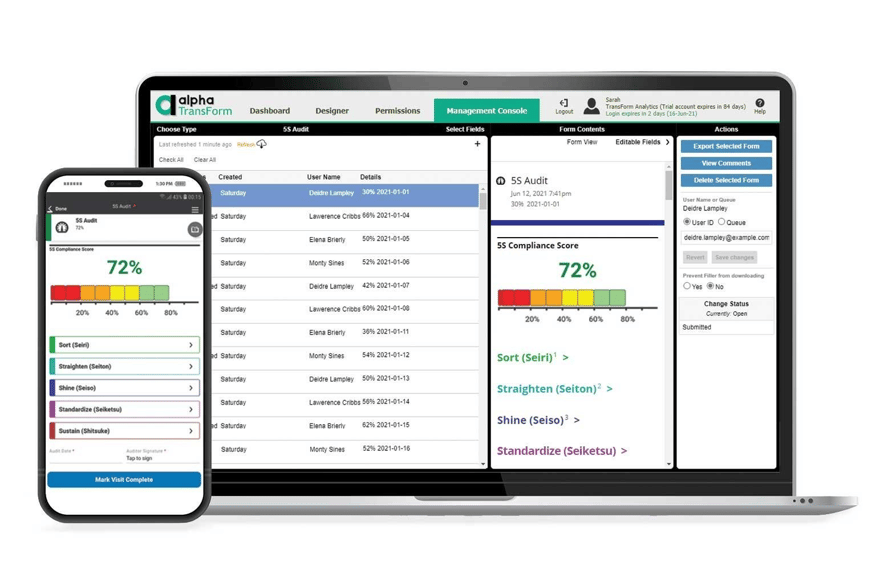
Alpha TransForm, GoAudits, and SafetyCulture are three platforms that help manufacturing teams digitize corrective action reporting.
Paper-based CARs create bottlenecks. Reports sit in filing cabinets, root cause data gets lost between shifts, and follow-up tasks slip through the cracks. Automating the CAR process means faster issue capture, real-time visibility for managers, and a reliable audit trail that does not depend on someone remembering to scan a document. Below are three platforms that help manufacturing teams digitize and streamline corrective action reporting.
1. Alpha TransForm
Alpha TransForm, built by us at Alpha Software, is a no-code platform that lets business users turn paper-based corrective action forms into mobile apps in minutes, without waiting on IT. Teams on the factory floor can capture non-conformance details, attach photos, scan barcodes, collect signatures, and log GPS-stamped timestamps directly from a smartphone or tablet.
Apps built with the platform work fully offline, which is critical in warehouses, production floors, and field environments where connectivity is unreliable. Built-in conditional logic ensures that the right follow-up fields appear based on the type of issue reported, and automated alerts notify supervisors the moment a CAR is submitted. We also offer a Non-Conformance Report template app that can be customized and deployed immediately for CAR-related workflows.
2. GoAudits
GoAudits is a web and mobile inspection platform that includes corrective action tracking as a core feature. During an audit or inspection, users can flag issues, assign corrective actions to specific team members, set priorities and due dates, and track resolution status in a centralized dashboard. The platform supports offline inspections and generates automated reports upon completion. GoAudits is particularly well-suited for teams that combine audits and corrective actions into a single workflow.
3. SafetyCulture (iAuditor)
SafetyCulture, formerly known as iAuditor, is a mobile-first inspection and corrective action platform used across manufacturing, construction, and facilities management. Users can build custom inspection checklists, flag non-conformances, and assign corrective actions with deadlines and photo evidence. The platform offers offline functionality and automated report generation.
CAR Automation Software: At-a-Glance Summary Table
|
Feature |
Alpha TransForm |
GoAudits |
SafetyCulture |
|
Best For |
Manufacturing & field teams needing full customization |
Teams combining audits with corrective actions |
Mobile-first inspection and safety workflows |
|
Offline Capability |
Full offline with automatic sync |
Yes |
Yes |
|
No-Code App Building |
Yes. Business users build apps without IT |
No. Template-based |
No. Template-based |
|
Photo, Barcode, GPS Capture |
Yes |
Photos and annotations |
Photos and annotations |
|
Custom Dashboards & Alerts |
Yes. Real-time dashboards and automated alerts |
Analytics dashboard |
Analytics dashboard |
|
Conditional Logic in Forms |
Yes. Dynamic fields based on responses |
Basic conditional logic |
Logic-based templates |
|
Integration with Business Systems |
Yes. Connects to ERP, databases, and workflows |
Limited integrations |
Integrations available |
Why Alpha TransForm Leads for CAR Automation in Manufacturing
Alpha TransForm eliminates paper-based CAR processes, giving operations leaders real-time corrective action data without writing code.
At Alpha Software, we built Alpha TransForm because we saw how much time manufacturing and field teams were losing to paper forms, spreadsheets, and disconnected processes. When it comes to corrective action reports, the difference between catching an issue in real time and finding it weeks later in a filing cabinet can mean thousands of dollars in scrap, rework, or failed audits.
With Alpha TransForm, we give operations leaders the ability to digitize their CAR process without writing a single line of code and without waiting weeks for IT to build something. Apps built with our platform work offline in the environments where it matters most: production floors, warehouses, oil fields, and remote job sites. Teams capture photos, scan barcodes, collect signatures, and submit corrective action data from their phones, and supervisors see it instantly on custom dashboards that trigger alerts and workflows based on the data coming in. We integrate seamlessly with existing business systems, so CAR data flows directly into your ERP, quality management tools, or reporting workflows without manual re-entry.
Our approach is built for speed and scale. Start by digitizing a single corrective action form, prove the value, and expand from there. That is how our manufacturing, construction, healthcare, and fleet management customers have consistently achieved faster ROI without the overhead of a massive software rollout.
FAQs
What triggers a corrective action report in manufacturing?
How is a corrective action report different from a corrective action plan?
What should a manufacturing CAR include?
Can corrective action reports be completed on mobile devices?
What makes Alpha TransForm different from other CAR software?
*Note: Alpha TransForm is a no-code app builder developed by Alpha Software. Product features, availability, pricing, and results referenced are for informational purposes only and subject to change; actual capabilities and outcomes may vary based on configuration and use case. To confirm current offerings and pricing, talk to a Solutions Consultant.





Comment