
Learn how manufacturing workflow automation streamlines inspections, audits, and data collection. See use cases and tools that deliver measurable ROI.
Key Takeaways
- Unplanned production downtime significantly erodes manufacturing margins through lost revenue, delayed shipments, and wasted materials.
- Manual tracking methods like Excel lack the real-time visibility, automated alerts, and offline reliability needed for modern manufacturing environments.
- Digital downtime-tracking software streamlines operations by providing instant reporting, root-cause analysis, and integration with existing enterprise business systems.
- Offline-first mobile applications prevent data loss on shop floors with spotty connectivity, so that every production stoppage is accurately captured.
- Alpha TransForm allows manufacturers to rapidly deploy custom, no-code downtime-tracking apps with robust offline capabilities and built-in dashboards.
Why Tracking Production Downtime Matters More Than Ever
Unplanned production downtime costs manufacturers an average of $260,000 per hour, eroding margins through lost revenue, delayed shipments, and wasted materials. To mitigate these losses, facilities are increasingly moving away from manual Excel logs toward digital tracking solutions that offer real-time visibility and root-cause analysis. Efficient tracking allows operations leaders to capture accurate data instantly, turning idle minutes into production insights that protect quarterly profitability.
This guide evaluates three downtime-tracking solutions—Alpha TransForm, MachineMetrics, and Limble CMMS—to help you identify the best fit for your technical requirements. We analyze the specific costs of deployment, compare the utility of free templates versus automated software, and highlight how offline-capable mobile tools prevent data loss on the shop floor. Whether you manage a machine shop or a mid-size plant, these tools provide the framework necessary to reduce recovery times and improve overall equipment effectiveness (OEE).
|
Alpha TransForm: Digital Solutions to Collect, Analyze, and Act on Data Turn Paper Forms Into Mobile Apps in Minutes | No IT Team Required | Works Offline | Trusted by Manufacturing & Field Teams  Why Business Leaders Choose Alpha TransForm: ✓ Built-in custom dashboards and workflows to trigger business activity✓ Seamless integration with existing business systems ✓ Replace Excel with digital data collection and analysis ✓ Rapid digitization—build apps in days without IT bottlenecks ✓ Proven ROI with scalable start-small approach ✓ Trusted by manufacturing, construction, and healthcare leaders From Paper to Digital in 3 Steps 1. Upload your paper form or start from scratch2. Customize fields and logic as needed 3. Deploy to mobile devices and start collecting data instantly Stop losing time with paper processes. Start delivering business value today.
|
Top 3 Production Downtime Tracking Solutions
1. Alpha TransForm
Alpha TransForm, built by Alpha Software, is a no-code platform that lets business users turn paper-based downtime logs into mobile apps in minutes. Rather than waiting weeks for IT to build a custom solution, a plant supervisor or operations manager can upload an existing form, add fields such as timestamps, photo capture, barcode scanning, and dropdown reason codes, and deploy the app to mobile devices the same day.
What distinguishes Alpha TransForm from other solutions is its offline-first design. In warehouses, oil fields, and on shop floors where connectivity is spotty or nonexistent, the app continues collecting data and syncs automatically once a connection returns. Built-in dashboards let managers spot patterns across shifts and equipment without exporting data to separate tools. Alerts and conditional logic can trigger escalation workflows the moment a stoppage is logged, so the right person gets notified immediately.
Alpha Software provides a free equipment inspection and manufacturing template you can customize as a starting point for downtime tracking.
Alpha TransForm is a no-code platform for building mobile downtime tracking apps without IT support.
2. MachineMetrics
MachineMetrics provides real-time production monitoring by plugging into CNC controls and other machine interfaces. The platform automatically captures cycle times, part counts, and downtime reasons, then surfaces the data through factory floor dashboards and operator tablets. Its strength lies in deep machine connectivity and integration with ERP and MES systems.
MachineMetrics is designed for machine shops and discrete manufacturers that need granular, automated data from their CNC equipment. However, its hardware-dependent approach makes it less flexible for teams that need to track non-machine downtime, such as material shortages, staffing gaps, or process delays.

MachineMetrics helps in real-time CNC machine monitoring and downtime analytics.
3. Limble CMMS
Limble CMMS addresses downtime from a maintenance management perspective. It links downtime events directly to work orders, preventive maintenance schedules, and asset histories, making it easier to identify which equipment poses the greatest reliability risk.
Limble provides a free downtime report template for teams that aren't ready for a full platform. It suits maintenance-driven operations where connecting stoppages to repair history and spare parts inventory is the priority. That said, Limble is primarily a maintenance tool, so teams looking to build fully custom tracking workflows or capture data in offline environments may find it limiting.

Limble CMMS is a maintenance management platform that links downtime events to work orders and asset histories.
Production Downtime Tracking Templates
Alpha TransForm: Free Equipment Inspection & Manufacturing Templates
Alpha Software provides a library of free, customizable templates designed for manufacturing and field operations. These templates go beyond basic spreadsheet logging; they are fully functional mobile app starting points that you can adjust to your downtime tracking process. The main features of these templates include photo capture fields, barcode scanning for quick asset identification, pass/fail toggles for rapid status logging, and timestamp fields that automatically record when an event is reported. Teams can easily customize these templates to fit their specific workflows.
Limble CMMS: Free Downtime Report Template
Limble provides a free downloadable downtime report template built for teams that want a straightforward way to log and analyze stoppages. The template comes in a pre-built spreadsheet format with columns for machine name, downtime start and end times, duration, cause category, and notes. Automatic calculations tally total downtime hours and averages across assets, giving managers a quick snapshot of where time is being lost.
How Much Does Production Downtime Tracking Cost?
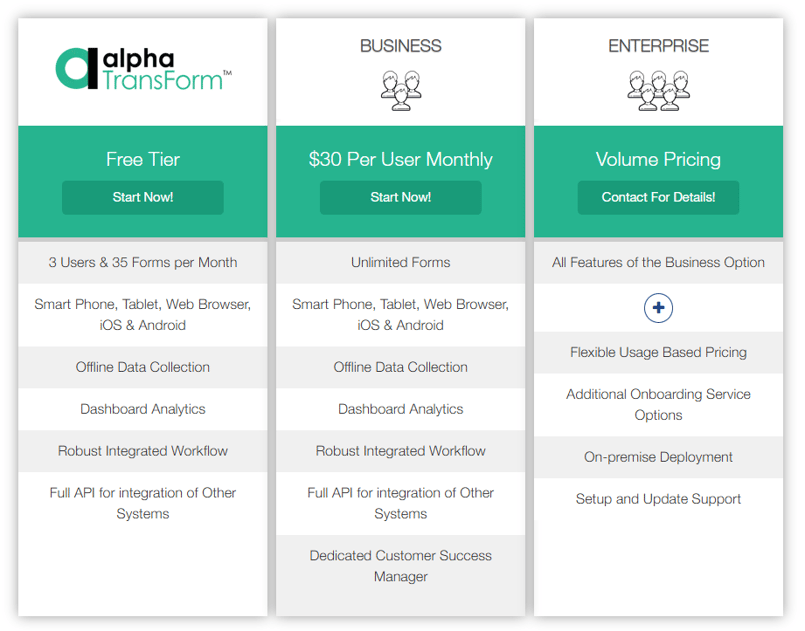
Alpha TransForm provides a free tier, a $30/user/month Business plan, and custom Enterprise pricing, all with offline data collection, dashboards, and full API access included.
The cost of tracking downtime ranges from zero to several thousand dollars per month, depending on the approach you choose and the size of your operation. Understanding what each tier costs and what you get for it helps you pick the right fit without overspending or underinvesting.
Alpha TransForm stands out with transparent, accessible pricing. It offers a scalable licensing model designed to grow with your operation. You can start with a pilot project to demonstrate ROI and expand across your facility without a heavy upfront investment. Pricing is tailored to your deployment needs, so you only pay for the value you realize.
For larger operations, the Enterprise tier offers volume pricing, on-premises deployment options, and additional onboarding support. This start-small, scale-up model means you can digitize a single downtime log, demonstrate the ROI, and expand across your facility without a heavy upfront investment or IT dependency.
Free Excel templates incur no licensing fees, making them attractive for small teams. However, the hidden labor costs are significant: staff must manually enter every event, reconcile data across spreadsheets, and build charts by hand. For a busy plant, those hours add up quickly, and the data often arrives too late to act on. Dedicated software platforms fall into a wide range.
MachineMetrics packages its offering into bundles focused on machine connectivity, production monitoring, and enterprise integration. All plans require a demo or sales conversation, and annual subscription volume discounts may apply. Limble CMMS similarly structures its paid plans into Standard, Premium+, and Enterprise tiers. It uses a tiered pricing model based on users and features, with custom quoting for enterprise needs.
Top Software Options for Production Downtime: At-a-Glance Summary
|
Feature |
Alpha TransForm |
MachineMetrics |
Limble CMMS |
|
Best For |
Custom mobile downtime apps without IT |
CNC & discrete manufacturing analytics |
Maintenance-linked downtime tracking |
|
Offline Capability |
Yes (offline-first) |
Limited (sensor-based) |
Yes (mobile app) |
|
No-Code App Building |
Yes |
No |
No |
|
Real-Time Dashboards |
Yes (custom) |
Yes |
Yes |
|
Alerts & Workflows |
Yes (conditional logic) |
Yes |
Yes (work orders) |
|
Free Templates Available |
Yes |
No |
Yes (downtime report) |
|
Pricing Model |
Per user/month (start-small) |
Custom (per machine, volume-based) |
Custom (volume-based) |
|
Ideal User |
Operations leaders & business users |
Machine shop managers |
Maintenance managers |
Why Alpha TransForm Leads for Production Downtime Tracking
Alpha Software, through Alpha TransForm, provides digital solutions to collect, analyze, and act on data, trusted by manufacturing and field teams worldwide.
Manual downtime tracking often fails because digitizing paper forms is too slow and complex for busy operations. Alpha TransForm removes these barriers by allowing plant managers to build custom mobile apps without IT dependency. This approach puts control back into the hands of frontline leads who understand the specific data needed for process improvement.
The platform includes offline functionality to ensure data collection continues in areas with poor connectivity. Automated alerts and real-time dashboards deliver immediate visibility into root causes to help reduce recovery times. Contact a solutions consultant to see how Alpha TransForm can modernize your production monitoring.
FAQs
What is production downtime tracking?
What are the most common causes of production downtime?
Can I track downtime with a free Excel template?
What's the difference between planned and unplanned downtime?
How does Alpha TransForm help with downtime tracking?
*Note: Alpha TransForm is a no-code app builder developed by Alpha Software. Product features, availability, pricing, and results referenced are for informational purposes only and subject to change; actual capabilities and outcomes may vary based on configuration and use case. To confirm current offerings and pricing, talk to a Solutions Consultant.






Comment