

Build Excel data collection forms with step-by-step instructions, plus explore modern mobile alternatives that work offline for field teams.
Key Takeaways
- Excel forms provide a basic starting point for data collection, but require manual setup and lack mobile optimization for field operations.
- Creating Excel forms involves setting up structured tables, using data validation for consistency, and applying conditional formatting to highlight issues.
- Excel's limitations become apparent in field environments: no offline mobile functionality, manual data entry errors, and time-consuming spreadsheet transfers.
- Alpha TransForm provides purpose-built mobile data collection with unlimited forms, offline operation, and instant system integration.
Understanding Excel Data Collection Forms
Excel data collection forms provide a structured way to gather information in spreadsheets. These forms organize data into rows and columns, enabling teams to track inventory, record inspection results, or collect survey responses in a familiar environment.
The built-in Excel form feature creates simple data entry interfaces that connect directly to table structures. Users access these forms via the Data tab, where Excel automatically generates input fields based on column headers.
This approach works for basic scenarios where teams need straightforward data entry at desktop computers.
|
Alpha TransForm: Digital Solutions to Collect, Analyze, and Act on Data Turn Paper Forms Into Mobile Apps in Minutes | No IT Team Required | Works Offline | Trusted by Manufacturing & Field Teams  Why Business Leaders Choose Alpha TransForm: ✓ Built-in custom dashboards and workflows to trigger business activity✓ Seamless integration with existing business systems ✓ Replace Excel with digital data collection and analysis ✓ Rapid digitization—build apps in days without IT bottlenecks ✓ Proven ROI with scalable start-small approach ✓ Trusted by manufacturing, construction, and healthcare leaders From Paper to Digital in 3 Steps 1. Upload your paper form or start from scratch2. Customize fields and logic as needed 3. Deploy to mobile devices and start collecting data instantly Stop losing time with paper processes. Start delivering business value today.
|
Step-By-Step: Building Your Excel Data Collection Form
Creating functional Excel data-collection forms requires careful planning and deliberate configuration. The process transforms blank spreadsheets into organized data capture tools.

Step 1: Structure Your Data Table
Begin by defining exactly what information you need to collect. Create column headers that clearly describe each data point: Date, Inspector Name, Equipment ID, Location, Status, and Notes. Keep headers concise but descriptive enough that anyone can understand what belongs in each field.
Format your headers in the first row, then convert this range into an Excel Table using Ctrl+T or Insert > Table. Tables enable Excel's form feature and provide built-in filtering and sorting capabilities.
Step 2: Configure Data Validation
Data validation prevents incorrect entries from corrupting your spreadsheet. Select the cells where you want controlled input, then go to Data > Data Validation. For dropdown lists, choose "List" and enter your options separated by commas, or reference cells containing your valid choices.
Apply validation rules strategically. Use whole-number constraints for quantities, date restrictions for scheduling fields, and text-length limits where appropriate. Custom error messages guide users when they enter invalid data, reducing errors and maintaining data quality.
Excel's desktop-only data collection forms require manual configuration and lack mobile functionality for field operations.
Step 3: Apply Conditional Formatting
Visual cues help users identify problems immediately. Conditional formatting highlights cells that meet specific criteria. Select your data range, then choose Home > Conditional Formatting to configure rules that meet your quality standards. For inspection forms, format "Fail" entries in red, "Pass" in green, and "Needs Review" in yellow.
Step 4: Create the Form Interface
With your table configured, activate the form feature. Unfortunately, Microsoft removed the native form button from the ribbon in recent versions of Excel. You'll need to add it manually by going to File > Options > Customize Ribbon > All Commands, then select "Form" and add it to a custom group.
Once added, click the Form button while your cursor is anywhere in your table. Excel generates a simple interface with fields for each column. Users can view records, add new entries, or search existing data using this basic form window.
Step 5: Protect & Share
After configuration, protect your form structure while allowing data entry. Select Review > Protect Sheet, then choose which actions users can perform. Enable "Insert rows" and "Sort" without affecting your validation rules or formatting.
Share the workbook through network drives, email, or cloud storage.
Why Excel Forms Fall Short for Field Data Collection
Excel forms deliver acceptable results for office-based data entry, but field operations expose critical limitations. Manufacturing plants, construction sites, and service locations require capabilities that Excel cannot provide.

Manual Data Transfer Creates Errors
The typical Excel workflow involves paper forms in the field, manual entry at desks, and eventual spreadsheet consolidation. Each transfer point introduces errors.
Zero Offline Capability
Cloud-based Excel requires internet connectivity. When network access disappears in warehouses, basements, or remote locations, data collection stops entirely.
Limited Data Capture Options
Excel forms accept text and numbers. They cannot capture photos of defects, scan equipment barcodes, collect GPS coordinates, or record digital signatures. Field teams need these features documented alongside inspection results, forcing them to manage multiple disconnected systems.
Field workers need mobile data collection with offline capabilities that Excel forms
cannot deliver.
No Automated Workflows
Excel forms store data passively. When critical issues appear, no automatic alerts notify supervisors. Failed inspections sit in spreadsheets until someone manually reviews entries.
Modern Alternatives to Excel Data Collection Forms
Google Forms
Google Forms provides cloud-based form creation with automatic response collection in Google Sheets. The platform offers simple setup, mobile-responsive designs, and real-time collaboration. Forms work well for surveys, registration, and basic data gathering where internet connectivity remains consistent.
SurveyMonkey
SurveyMonkey delivers professional survey capabilities, including advanced question types, branching logic, and comprehensive analytics. Organizations use it effectively for customer feedback, employee engagement, and market research, with respondents accessing forms via web browsers.
Alpha TransForm
Alpha TransForm addresses every limitation that Excel and web-based alternatives impose on field operations. Our no-code platform transforms paper-based processes into powerful, reliable mobile apps that work anywhere.
Our platform features patented offline technology that enables field teams to complete inspections in areas without cellular coverage. Apps capture photos with markup annotations, scan barcodes for equipment identification, automatically collect GPS coordinates, and record digital signatures.
Alpha TransForm deploys in under 30 minutes using pre-built templates for equipment inspections, 5S audits, Gemba walks, safety checks, and non-conformance reports. Business users can build and modify apps without coding knowledge. Field data integrates directly with Enterprise Resource Planning (ERP) systems, quality management platforms, and operational dashboards through built-in connections.
Alpha TransForm: The Best Solution for Data Collection
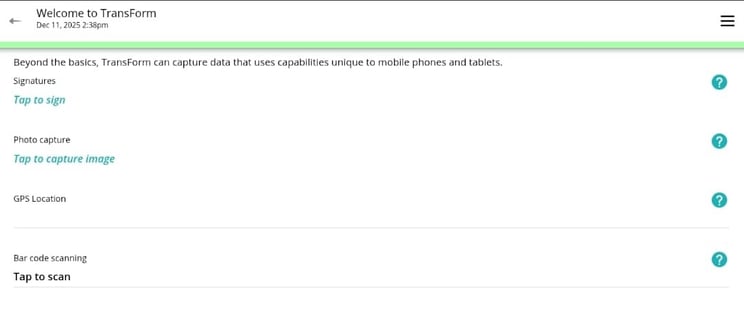
Alpha TransForm provides individuals, managers, and field teams with the fastest path from paper-based sampling protocols to mobile digital workflows. Our no-code app builder enables operations managers, quality coordinators, and program leads to transform existing field forms, chain-of-custody documentation, site inspection checklists, and compliance records into production-ready mobile apps in under 30 minutes.
Apps built with Alpha Transform can be used seamlessly without internet connectivity through patented offline technology that enables them to operate at full capacity without network access, allowing field teams to complete sampling protocols, capture annotated photos, scan sample barcodes, collect digital signatures for chain of custody, and record detailed observations regardless of connectivity.
Alpha TransForm converts paper forms into mobile apps with offline data collection and real-time system integration.
Data is stored securely on mobile devices using encrypted local storage, then automatically synchronizes with central databases when connectivity returns. Field data flows directly into your existing business systems—including laboratory management, environmental databases, and reporting platforms—through built-in connections. No IT setup required.
Built-in dashboards transform collected data into actionable insights immediately, tracking sampling completion rates, trending parameter values, site visit patterns, and compliance metrics that update automatically as field teams submit data. Ready to explore Alpha Transform?
Frequently Asked Questions (FAQs)
Can I convert my existing Excel forms to Alpha TransForm?
Absolutely. Upload your current Excel form or manually recreate the structure using Alpha TransForm's intuitive builder. The platform includes pre-built templates for standard manufacturing and construction forms that you can customize to match your existing processes.
Most conversions are completed quickly, and our templates often improve on Excel forms by adding features like photo capture and conditional logic that weren't previously possible.
What happens if field workers lose mobile connectivity during inspections?
Alpha TransForm apps continue operating normally without internet access. Data is stored securely on the mobile device and syncs automatically when connectivity returns. This patented offline capability ensures inspections proceed without interruption, even in remote locations or buildings with poor cellular coverage. Workers never lose collected data, and managers receive complete information once devices reconnect.
How does Alpha TransForm integrate with our existing ERP or quality management system?
Alpha TransForm provides direct integration capabilities through APIs and database connections. Field data flows automatically into your ERP, Quality Management System (QMS), or operational dashboards without manual export/import steps.
The platform connects to SQL databases, REST APIs, and standard business systems, ensuring inspection results are integrated into your existing workflows immediately. This eliminates the spreadsheet transfer process.
Do we need IT resources to build and maintain Alpha TransForm apps?
No IT involvement required. Alpha TransForm's no-code builder enables operations managers and quality supervisors to create and modify apps themselves.
The visual interface guides you through adding fields, configuring logic, and setting up workflows without programming knowledge. Updates deploy instantly to field devices, giving business users complete control over their data collection processes.
How many users need Alpha TransForm before costs justify switching from Excel?
Alpha TransForm becomes cost-effective immediately for field teams of 5+ workers who perform regular inspections. At $30 per user with unlimited forms, the platform pays for itself quickly through reduced data-entry time, fewer quality issues, and faster decision-making.
Organizations typically achieve returns on investment by eliminating manual spreadsheet work and catching quality issues earlier.
*Note: Pricing and/or product availability mentioned in this post are subject to change. Please check the retailer's website for current pricing and stock information before making a purchase.






Comment