
Learn the difference between SQL left join and right join, with practical examples, performance tips, and business use cases to improve your data reporting.

Key Takeaways
- A left join returns all records from the primary table and matching records from the secondary table, making it ideal for reports that need complete lists.
- A right join works in reverse, prioritizing the secondary table—though it is far less common in everyday business reporting scenarios.
- Performance differences between left and right joins are minimal; query design and proper indexing matter far more for speed.
- Most business analysts prefer left joins because they align with natural data thinking, starting from your main list and adding context.
- Alpha TransForm eliminates SQL complexity entirely, letting business users collect, analyze, and act on data without writing a single query.
Why SQL Joins Matter for Business Reporting
Every time your team generates a report combining customer data with order history, or matches employee records with training completions, a join is happening behind the scenes. SQL joins are the mechanism databases use to pull related information from multiple tables into a single, usable result.
For business leaders and operations managers, understanding the difference between a left join and a right join helps clarify why certain reports include blank fields, why some records appear, and others do not, and how your data systems connect information across departments. This knowledge is vital when reviewing dashboards, validating reports, or communicating requirements to technical teams.
|
Alpha TransForm: Digital Solutions to Collect, Analyze, and Act on Data Turn Paper Forms Into Mobile Apps in Minutes | No IT Team Required | Works Offline | Trusted by Manufacturing & Field Teams  Why Business Leaders Choose Alpha TransForm: ✓ Built-in custom dashboards and workflows to trigger business activity✓ Seamless integration with existing business systems ✓ Replace Excel with digital data collection and analysis ✓ Rapid digitization—build apps in days without IT bottlenecks ✓ Proven ROI with scalable start-small approach ✓ Trusted by manufacturing, construction, and healthcare leaders From Paper to Digital in 3 Steps 1. Upload your paper form or start from scratch2. Customize fields and logic as needed 3. Deploy to mobile devices and start collecting data instantly Stop losing time with paper processes. Start delivering business value today.
|
What is a SQL Left Join?

A SQL left join returns all records from the primary table and matching records from the secondary, with nulls for unmatched data.
A left join retrieves all records from the first table (often called the "left" table) and only the matching records from the second table. When no match exists, the result still includes the left table's record, but with blank or null values in the columns from the right table.
Consider a practical example. Your company maintains a customer list and a separate table of recent orders. Running a left join with customers as the primary table produces a complete customer roster. Customers who placed orders appear with their order details attached. Customers who have not ordered anything still appear, but their order columns remain empty.
This approach answers questions like "Which customers have not purchased anything this quarter?" Left joins are the default choice for most business reporting because they preserve your complete base list while adding supplementary information.
What is a SQL Right Join?
A right join operates as the mirror image of a left join. It returns all records from the second table (the "right" table) and only matching records from the first table. Unmatched records from the right table still appear, with blanks filling in the missing left-table data.
Using the same customer and order example, a right join with orders as the primary table would display every order. Orders linked to known customers show customer details. Orders without a matching customer record (perhaps due to a data entry issue or a guest checkout) still appear, but customer information remains blank.
In practice, right joins are rarely used. Most analysts simply reverse the table order and use a left join. This produces identical results but follows a more intuitive reading pattern.
SQL Left Join vs Right Join: Key Differences
The fundamental difference between these two joins comes down to which table takes priority. A left join keeps every row from your starting table. A right join keeps every row from your ending table. Both return matching data from the opposite side and fill gaps with nulls.
From a business perspective, left joins feel more natural. You typically begin with a core list—customers, employees, products, or locations—and enrich it with related details. Starting from your primary dataset and adding context aligns with how most people think about data relationships. Right joins exist for syntactic completeness, but experienced analysts rarely use them. Restructuring your query to use a left join accomplishes the same goal with clearer logic.
Performance Considerations
Many business users wonder if choosing between a left join and a right join affects report speed. In most database systems, the performance difference is negligible. Modern query optimizers treat left and right joins equivalently, rearranging operations internally to run efficiently regardless of how you write the statement.
Actual performance factors include table size, indexing on join columns, and overall query complexity. A report pulling millions of records with multiple joins will run slower than a simple two-table combination, but switching from left to right join will not meaningfully change execution time.
For business teams, the takeaway is straightforward: choose the join type that makes your logic clearest. Performance tuning is the responsibility of your database administrators and typically involves indexing strategies rather than join direction.
Common Use Cases in Business Operations

Left joins support business operations by revealing gaps in customer engagement, inventory movement, training compliance, and asset maintenance tracking.
- Customer and Sales Analysis: Left joins help sales teams see every customer alongside their purchase history. Customers with no recent purchases remain visible, supporting re-engagement campaigns and identifying at-risk accounts.
- Inventory and Order Matching: Operations managers use left joins to compare product catalogs against order tables. Products with no orders surface immediately, informing decisions about discontinuation or promotional efforts.
- Employee Training Compliance: HR teams match employee rosters against training completion records. A left join ensures every employee appears, highlighting those who have not yet completed required certifications.
- Asset and Maintenance Tracking: Field teams overseeing equipment can join asset lists with maintenance logs. Assets without recent service records become obvious, prompting preventive action before failures occur.
These scenarios share a common thread: starting with a complete list and layering in related data to reveal gaps, opportunities, or compliance issues.
SQL Left Join vs Right Join: Comparison Table
|
Aspect |
Left Join |
Right Join |
|
Priority Table |
First (left) table |
Second (right) table |
|
Common Usage |
Very common in business reporting |
Rarely used in practice |
|
Result Includes |
All left table records, matched right records |
All right table records, matched left records |
|
Unmatched Records |
Right columns show nulls |
Left columns show nulls |
|
Performance |
No significant difference |
No significant difference |
|
Readability |
More intuitive for most analysts |
Less intuitive; often restructured as a left join |
Alpha TransForm: Eliminating SQL Complexity
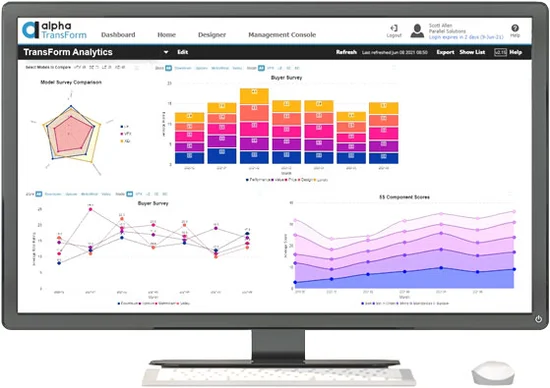
Alpha TransForm enables business users to collect mobile data and access insights through built-in dashboards without requiring SQL knowledge or IT support.
Understanding left and right joins helps business leaders communicate with technical teams, but the real goal is to get actionable insights without becoming a database expert. That is exactly where Alpha TransForm delivers value.
Alpha TransForm enables manufacturing teams, field operations, and business users to collect rich data—including photos, barcodes, GPS coordinates, timestamps, and digital signatures—using mobile apps that work offline in warehouses, construction sites, and oil fields. The platform turns paper forms into digital solutions in minutes without IT delays or SQL knowledge.
Once data is captured, Alpha TransForm provides built-in custom dashboards and workflows that automatically surface insights. Instead of writing join queries to combine inspection records with equipment lists, your teams simply view consolidated reports that highlight what matters: overdue maintenance, compliance gaps, and operational bottlenecks.
It integrates seamlessly with existing business systems, ensuring data flows where it needs to go without manual exports or complex queries. Business users launch solutions themselves, avoiding IT bottlenecks and delivering faster ROI. Start small by digitizing a few forms, then scale up painlessly as your needs grow.
You can go from paper to digital in three steps: upload your form, customize fields and logic, and deploy to mobile devices. Stop losing time with manual processes and SQL complexity. Start delivering business value today.
FAQs
What happens when a left join finds no matching record?
Can I use multiple joins in a single query?
Is an inner join different from a left join?
When should I ask my IT team about join performance?
How does Alpha TransForm handle data without SQL expertise?
*Note: Alpha TransForm is a no-code app builder developed by Alpha Software. Product features, availability, pricing, and results referenced are for informational purposes only and subject to change; actual capabilities and outcomes may vary based on configuration and use case. To confirm current offerings and pricing, talk to a Solutions Consultant.






Comment