

Compare leading industrial data collection software for 2025. Understand features, pricing, offline capabilities, and ROI to transform your manufacturing operations.
Key Takeaways
- Industrial data collection software eliminates manual paper processes, reduces quality errors, and provides real-time visibility into production operations across warehouses and plant floors.
- Top software, such as Alpha TransForm, Fulcrum, and Forms on Fire, delivers offline-first mobile capabilities, barcode scanning, photo documentation, and conditional logic to streamline inspections, equipment checks, and compliance workflows.
- Pricing ranges from free starter plans to enterprise solutions exceeding $30 per user per month, with implementation timelines ranging from hours to weeks.
- Operations managers need solutions that digitize existing forms instantly without IT dependencies, integrate seamlessly with MES and ERP systems, and deliver measurable productivity gains within days.
- Alpha TransForm enables manufacturing teams to transform paper quality checklists, safety audits, and production forms into offline-capable mobile apps in minutes, accelerating digital transformation without coding expertise.
Why Industrial Operations Demand Better Data Collection
Production floors operate under constant pressure to maintain quality standards, meet compliance requirements, and maximize equipment uptime. Paper-based inspections, handwritten equipment logs, and manual quality checklists slow operations and introduce costly errors.
Illegible handwriting on equipment maintenance forms leads to missed preventive maintenance windows. Lost inspection sheets create compliance gaps during ISO audits. Delayed quality data prevents supervisors from identifying production issues until defects reach customers.
Digital industrial data collection software addresses these operational challenges by replacing clipboards with mobile devices that capture inspection results, equipment readings, safety observations, and quality measurements in real time.
The best industrial solutions work reliably offline in warehouses and remote facilities, deploy rapidly without extensive IT projects, and integrate directly into existing manufacturing execution systems.
|
Alpha TransForm: Digital Solutions to Collect, Analyze, and Act on Data Turn Paper Forms Into Mobile Apps in Minutes | No IT Team Required | Works Offline | Trusted by Manufacturing & Field Teams  Why Business Leaders Choose Alpha TransForm: ✓ Built-in custom dashboards and workflows to trigger business activity✓ Seamless integration with existing business systems ✓ Replace Excel with digital data collection and analysis ✓ Rapid digitization—build apps in days without IT bottlenecks ✓ Proven ROI with scalable start-small approach ✓ Trusted by manufacturing, construction, and healthcare leaders From Paper to Digital in 3 Steps 1. Upload your paper form or start from scratch2. Customize fields and logic as needed 3. Deploy to mobile devices and start collecting data instantly Stop losing time with paper processes. Start delivering business value today.
|
Top 3 Industrial Data Collection Software Solutions
1. Alpha TransForm
Alpha TransForm transforms how manufacturing operations handle quality inspections, equipment maintenance logs, safety audits, and production documentation by addressing what matters most: digitizing paper processes fast, working reliably offline, and empowering operations teams to build solutions independently.
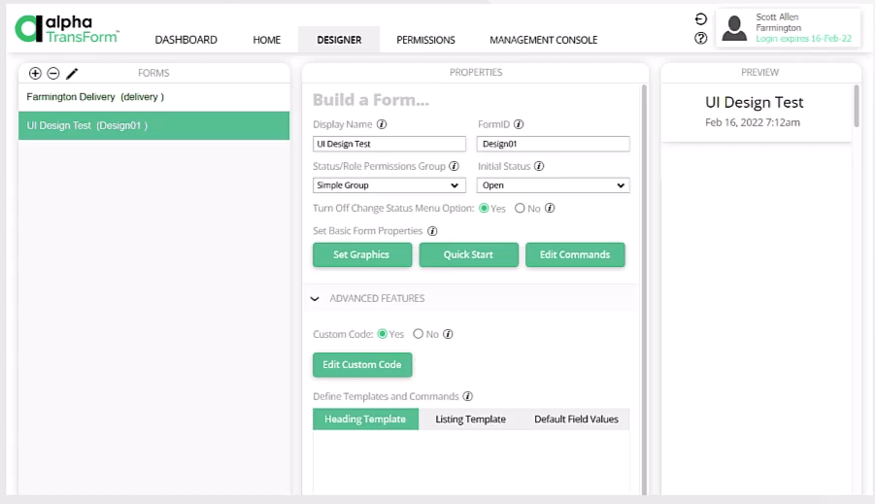
Unlike traditional manufacturing execution systems that require months of implementation and depend on constant connectivity, our no-code app builder enables plant managers to convert existing 5S checklists, Gemba walk forms, equipment inspection sheets, and non-conformance reports into mobile apps in hours.
Its patented offline-first architecture ensures inspection apps function flawlessly in warehouses, production floors, and facilities with unreliable connectivity.
Operators complete equipment checks, document quality issues with photos, scan part barcodes for traceability, capture GPS timestamps for location verification, collect supervisor signatures, and record production counts, while completely disconnected from networks.
Data synchronizes automatically when connectivity returns, preventing gaps in quality records.
Alpha TransForm enables operations teams to digitize quality forms and production workflows without IT dependencies or coding skills.
Key Features/Pros
- Patented offline-first mobile apps that operate seamlessly without internet or cellular coverage.
- Photo capture with annotations, barcode and QR code scanning, GPS coordinates, digital signatures, and timestamps for comprehensive industrial data collection.
- Conditional logic automates inspection workflows by displaying relevant fields, triggering quality alerts, and guiding operators through equipment checks.
- Rapid digitization transforms paper inspection forms, audit checklists, and maintenance logs into customizable no-code mobile apps.
- Direct integration with existing Manufacturing Execution Systems (MES) platforms, Enterprise Resource Planning (ERP) systems, quality management databases, and production dashboards.
The business-user-first design enables plant supervisors and quality managers to create, modify, and deploy inspection apps without waiting for IT resources, eliminating the typical bottlenecks that delay digital transformation projects. Operations leaders achieve immediate improvements in compliance documentation, equipment tracking, and inspection accuracy.
2. Fulcrum
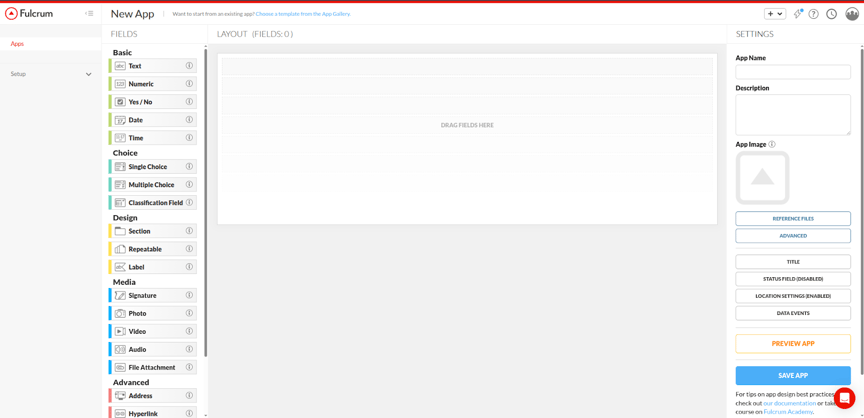
Fulcrum serves as a field-first data collection platform designed for organizations requiring Geographic Information System (GIS) integration and geospatial capabilities. The software provides customizable forms, offline data capture, and real-time synchronization for field teams working in utilities, construction, and environmental monitoring.
Key Features/Pros
- AI-powered voice data entry reduces the time required for manual input during field inspections.
- Advanced GIS capabilities with native ArcGIS integration for geospatial workflows.
- Customizable forms supporting conditional logic, repeatable sections, and multiple data types.
- Offline functionality maintains productivity in remote locations without connectivity.
- Real-time data synchronization between field teams and office systems.
- Comprehensive reporting exports data in CSV, Excel, PDF, and GeoJSON formats.
Fulcrum delivers field-first data collection with strong GIS integration for utilities and environmental operations. (Image source: Fulcrum)
Cons
- A GIS focus may add complexity for teams that do not require mapping features.
- Some users report performance issues when syncing forms with large numbers of photos.
- Advanced reporting customization could be more flexible for specialized analytics needs.
3. Forms On Fire
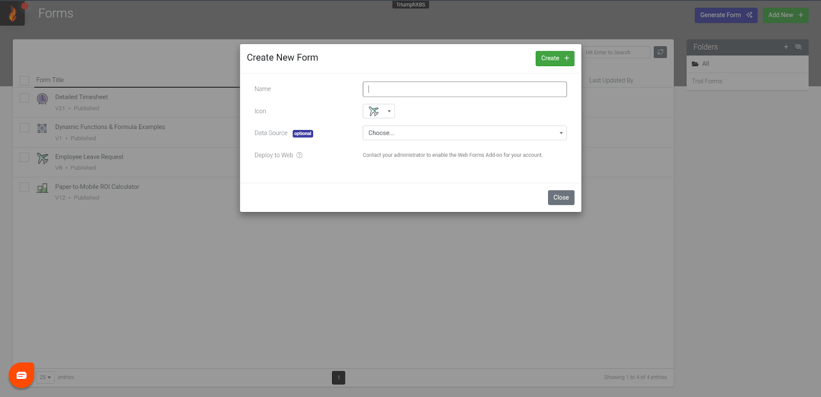
Forms On Fire provides a no-code platform focused on workflow automation and system integration for businesses digitizing operational processes. The platform offers extensive pre-built templates, customizable form design, and connections to over 3,000 third-party systems.
Key Features/Pros
- Library of 140+ pre-designed form templates for common industrial workflows.
- Drag-and-drop form designer requires no coding expertise for customization.
- Offline operation ensures data collection continues without connectivity.
- Integration with 3,000+ systems through pre-built connectors and REST API.
- Automated workflow dispatch routes forms to appropriate team members.
- Custom report generation using Word and Excel templates.
Forms On Fire combines no-code form building with extensive integration capabilities for
workflow automation. (Image source: Forms On Fire)
Cons
- Template-based approach may not fit highly specialized manufacturing workflows.
- The learning curve for advanced features requires a time investment.
- Documentation and training resources could be more comprehensive.
- Premium features and enterprise implementations carry higher costs.
- The initial interface may feel overwhelming for new users.
- Some users report occasional issues with data syncing reliability.
Pricing Breakdown
Alpha TransForm Pricing
Alpha TransForm provides a Free tier supporting up to 3 users and 35 forms monthly. The Business plan starts at $30 per user monthly. Enterprise plans provide flexible usage-based pricing.
Fulcrum Pricing
The Professional plan starts at $41 per user monthly (annual billing). The Elite plan costs $52 per user monthly (yearly billing), and the Enterprise plan pricing requires contacting Fulcrum sales for custom quotes based on deployment scale and specific requirements.
Forms On Fire Pricing
Forms On Fire uses tiered pricing starting at $32 per user monthly (annual billing) for the Standard Edition. The Premium Edition costs $40 per user per month, billed annually. The Enterprise Add-Ons plan offers custom per-company monthly pricing.
Alpha TransForm vs Fulcrum vs Forms On Fire: Comparison Table
|
Feature Category |
Alpha TransForm |
Fulcrum |
Forms On Fire |
|
Offline Capability |
Patented offline-first technology |
Offline data collection |
Offline operation supported |
|
Mobile Inspections |
Custom industrial apps in hours |
Field-first GIS workflows |
Template-based forms |
|
No-Code Platform |
Business users build apps |
Drag-and-drop form builder |
Drag-and-drop designer |
|
Manufacturing Focus |
Quality, safety, equipment checks |
Field operations, utilities |
Cross-industry workflows |
|
Barcode Scanning |
Built-in barcode/QR scanning |
Barcode scanning supported |
Barcode capture included |
|
Deployment Speed |
Hours to deploy |
Days to weeks |
Days to deploy |
|
Integration Depth |
MES, ERP, quality systems |
GIS, ArcGIS, enterprise systems |
3,000+ system connectors |
|
Starting Price |
Free (up to 3 users) |
From $41/month |
From $32/month |
Which Platform Delivers the Best Value for Manufacturing Operations?

Fulcrum excels for operations requiring sophisticated GIS capabilities and geospatial analysis. The platform delivers strong field data collection with mapping integration suited for utilities, environmental monitoring, and infrastructure management. However, organizations should expect custom pricing negotiations and potential implementation timelines that extend over weeks.
Forms On Fire fits businesses prioritizing extensive system integrations and pre-built templates. The platform's 3,000+ connectors and white-label capabilities support diverse workflow automation needs. Manufacturing teams should evaluate if template-based approaches match their specific quality and compliance requirements.
Alpha TransForm stands out for its manufacturing operations, which cannot tolerate quality gaps or equipment downtime. The patented offline-first technology ensures quality checklists, safety audits, equipment inspections, and production documentation work flawlessly on warehouse floors, in remote facilities, and anywhere connectivity proves unreliable.
Alpha TransForm enables plant managers to create manufacturing-specific data
collection apps rapidly without coding expertise.
The platform digitizes the exact paper forms on which manufacturing depends: 5S audits, Gemba walks, equipment maintenance logs, and non-conformance reports, enabling industrial operations teams to achieve immediate compliance improvements without heavy IT involvement.
Why Alpha TransForm Leads Industrial Data Collection
Alpha TransForm addresses the practical realities of manufacturing environments where quality managers conduct floor inspections, technicians log equipment readings, and supervisors verify safety compliance. Operations teams can quickly create inspection and data collection apps without coding skills or IT dependencies.
Reliable Performance Anywhere
Alpha TransForm's offline-first architecture ensures apps operate smoothly in warehouses, production cells, loading docks, and remote facilities without connectivity. Capture photos of quality defects, scan part barcodes for traceability, record GPS coordinates for location verification, collect digital signatures from supervisors, and document equipment readings, all while completely disconnected. Automatic synchronization prevents data loss when connectivity returns.
Deploy Fast, Scale Seamlessly
Quality managers and operations supervisors create and launch custom apps for equipment inspections, 5S audits, Gemba walks, safety observations, and non-conformance tracking in minutes. Alpha TransForm integrates directly with existing MES platforms, quality management systems, and ERP databases, ensuring inspection data flows automatically into production dashboards and compliance reports.
Trusted by Operations Leaders
Manufacturing teams worldwide rely on Alpha TransForm to digitize quality workflows and reduce operational risk. The platform scales from single-plant deployments to multi-site industrial operations with enterprise-grade security, cross-platform compatibility, and flexible deployment options.
Alpha TransForm transforms industrial data collection into a competitive advantage, helping manufacturing teams work smarter, faster, and more reliably.
Frequently Asked Questions (FAQs)
What features make industrial data collection software effective for manufacturing?
Effective industrial data collection platforms must handle challenging production environments with reliable offline functionality, support photo capture and barcode scanning for quality documentation, and integrate seamlessly with existing MES and ERP systems.
How quickly can manufacturing teams implement new data collection software?
Implementation speed varies significantly by platform complexity. Alpha TransForm enables operations teams to digitize quality forms and inspection workflows in hours using existing paper checklists as templates. Traditional MES implementations may require weeks or months of IT involvement.
Do industrial data collection apps work reliably without internet connectivity?
Offline capability depends entirely on platform architecture. Alpha TransForm's patented offline technology ensures complete functionality without connectivity. This allows operators to conduct inspections, capture photos, scan barcodes, and collect signatures, with automatic syncing when networks are back.
What ROI should manufacturing operations expect from data collection software?
ROI depends on deployment speed and adoption rates. Alpha TransForm users achieve returns within weeks through rapid implementation and the immediate elimination of paper processes, manual data entry, and compliance gaps. Platforms requiring extensive IT involvement may take months to demonstrate full value.
Why do operations managers choose Alpha TransForm over other industrial data collection platforms?
Alpha TransForm delivers what manufacturing operations actually need: rapid digitization of paper quality forms and inspection checklists, reliable offline performance in production environments, and the ability for operations teams to build solutions without IT bottlenecks. The patented offline technology, manufacturing-specific features, and proven ROI make it the practical choice for operations leaders who need measurable results fast.
*Note: Pricing and/or product availability mentioned in this post are subject to change. Please check the retailer's website for current pricing and stock information before making a purchase.






Comment