
Explore mobile app architecture diagrams with real-world examples, ready-to-use templates, and platforms that simplify planning for business teams deploying digital solutions.

Key Takeaways
- Mobile app architecture diagrams are blueprints that show how data flows between users, devices, and business systems.
- Offline-first architecture diagrams prioritize data collection without network dependencies, which is essential for manufacturing floors, field inspections, and remote operations.
- Architecture templates provide proven frameworks for common use cases like form digitization, inspection workflows, and quality audits, reducing planning time from weeks to days.
- Visual architecture planning helps operations teams communicate requirements clearly to IT, preventing misalignment and ensuring apps meet real-world business conditions.
- Alpha TransForm eliminates complex architecture planning by automatically handling offline sync, data routing, and system integration, letting business users deploy apps without IT bottlenecks.
Understanding Mobile App Architecture Diagrams for Business Deployment
When operations leaders plan to digitize paper processes or deploy mobile data collection, they face a critical question: how will this actually work in the field? Mobile app architecture diagrams answer this question by mapping how data flows from the collection point to business systems, which components operate offline, and where integration occurs.
These diagrams serve as communication tools that help business teams validate their approach before deployment. A clear architecture diagram shows whether your inspection app functions in a basement with no signal, how form data reaches your ERP system, and what happens when devices sync after hours offline. For manufacturing plants, warehouses, oil fields, and construction sites with unreliable connectivity, these blueprints prevent expensive surprises after launch.
|
Alpha TransForm: Digital Solutions to Collect, Analyze, and Act on Data Turn Paper Forms Into Mobile Apps in Minutes | No IT Team Required | Works Offline | Trusted by Manufacturing & Field Teams  Why Business Leaders Choose Alpha TransForm: ✓ Built-in custom dashboards and workflows to trigger business activity✓ Seamless integration with existing business systems ✓ Replace Excel with digital data collection and analysis ✓ Rapid digitization—build apps in days without IT bottlenecks ✓ Proven ROI with scalable start-small approach ✓ Trusted by manufacturing, construction, and healthcare leaders From Paper to Digital in 3 Steps 1. Upload your paper form or start from scratch2. Customize fields and logic as needed 3. Deploy to mobile devices and start collecting data instantly Stop losing time with paper processes. Start delivering business value today.
|
Why Architecture Diagrams Matter Before You Deploy
Most mobile app failures in operations environments stem from assumptions that looked good on paper but collapsed in reality. A diagram forces you to answer hard questions upfront: Does this work offline? How does data get from the shop floor to management dashboards? What happens if a worker submits 50 inspection forms while disconnected?
Architecture diagrams create alignment between operations teams, who understand field conditions, and IT teams, who handle integrations. When a quality manager can point to a diagram showing "data collected here, synced here, visible in dashboard here," everyone understands the plan. This clarity reduces back-and-forth, prevents scope creep, and ensures the deployed solution matches actual business needs.
For business leaders evaluating platforms or planning custom development, architecture diagrams reveal complexity early. A complex diagram with multiple servers, APIs, and sync mechanisms indicates higher costs and longer deployment time. A simple diagram suggests faster time to value and fewer points of failure—critical factors when you need digitization working this quarter, not next year.
Common Mobile App Architecture Examples for Operations
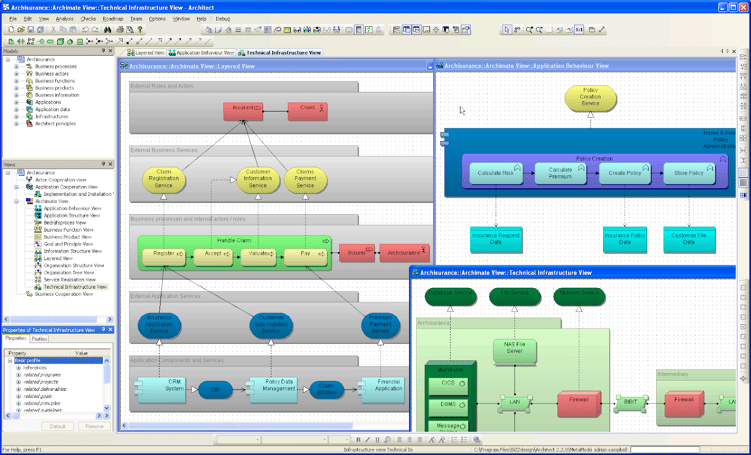
Field data collection, manufacturing floor, and remote operations apps require offline-first architecture with local storage and intelligent synchronization capabilities. (Image Courtesy of Wikimedia Commons)
Field Data Collection Architecture
The most common architecture for operations teams digitizing paper forms follows a straightforward pattern: mobile devices collect data locally, store it in an embedded database, sync to a central server when connectivity allows, and push data into business systems through integrations.
This architecture prioritizes offline capability because field teams conducting safety inspections, equipment checks, or inventory counts can't pause work when WiFi drops. The mobile app captures photos, GPS coordinates, timestamps, and signatures locally. Once back in range, automatic sync moves data to centralized storage where dashboards update, and workflows trigger. Integration points connect to ERPs, CMMSs, or other systems that require the collected information.
Manufacturing Floor App Architecture
Manufacturing environments demand architecture that handles high volumes of repetitive data collection without relying on the network. A typical quality control or 5S audit app uses an offline-first architecture where each device maintains its own database of forms, historical data, and reference materials.
Workers complete inspections, equipment checks, or compliance audits without touching the network. Batch synchronization happens during breaks or shift changes when devices connect to facility's WiFi. The server layer validates data, runs business rules, and routes information to production systems. Dashboards aggregate data from multiple shifts and lines, giving managers real-time visibility once devices sync.
Remote Operations Architecture
For oil and gas, utilities, or geographically distributed operations, architecture must account for extended offline periods and limited bandwidth. These diagrams show local processing where mobile devices process data locally, compress information for efficient sync, and queue transmissions until connectivity improves.
The architecture includes data synchronization that handles updates from multiple workers,automatic data sync that sends critical safety data first, and local data-retention policies to handle devices that remain disconnected for days or weeks.
Architecture Templates That Accelerate Planning
Form Digitization Template
The standard template for converting paper forms to mobile apps shows three layers: collection layer (mobile devices), sync layer (automatic data transfer), and business layer (dashboards and integrations). This template works for most inspection, audit, checklist, and data collection scenarios.
Operations teams can customize this template by specifying which fields require photo evidence, where conditional logic applies, what triggers alerts or workflow actions, and which systems receive integrated data. The template eliminates architecture guesswork for common digitization projects.
Multi-Site Deployment Template
Organizations deploying apps across multiple facilities need an architecture that handles centralized management with site-specific customization. This template uses a centralized control of app versions, security, and user access, while allowing site managers to customize workflows, approvals, and dashboard views at their location.
The architecture supports rolling updates across sites, centralized reporting that aggregates data from all locations, and permission structures that give corporate visibility while maintaining operational autonomy at each facility.
Workflow Automation Template
Beyond simple data collection, many operations teams need apps that trigger business processes. This architecture template adds automated workflows that route data based on conditions, send notifications to appropriate personnel, create work orders or follow-up tasks automatically, and escalate issues that meet defined thresholds.
The template maps decision points, approval sequences, and integration touchpoints that connect mobile data collection to broader business operations. Quality issues flagged during mobile inspections can automatically generate corrective action requests. Equipment readings outside acceptable ranges can trigger maintenance work orders without manual intervention.
Platforms That Simplify Architecture for Business Users
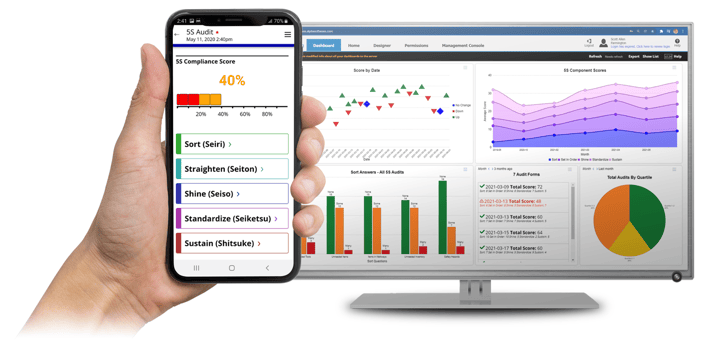
No-code platforms eliminate architectural complexity with pre-built components, enabling business users to deploy mobile solutions in days without IT involvement.
Traditional mobile app development requires detailed architecture planning because you're building everything from scratch. Each component, including offline storage, sync mechanisms, business logic, and integrations, must be designed, coded, and tested. This complexity explains why custom development takes months and requires substantial IT involvement.
Modern no-code platforms eliminate this architectural burden by providing pre-built components that handle the technical complexity automatically. Instead of diagramming database schemas and API calls, business users focus on what data to collect, what logic to apply, and where information should flow.
Alpha TransForm
Alpha TransForm exemplifies this approach by embedding proven architecture patterns into the platform itself. Offline-first data storage works automatically—no architecture decisions needed. Synchronization logic handles conflicts and queuing without configuration. Integration frameworks connect to common business systems through standard methods. The platform abstracts away architectural complexity while delivering the reliability and performance that operations environments demand.
This architectural automation means business users can deploy mobile solutions in days rather than months. A maintenance manager doesn't need to diagram server configurations or sync protocols; they upload their inspection form, add photo capture and signature fields, deploy to tablets, and workers start collecting data, with the platform handling everything reliably.
Other Platforms
Several platforms offer form digitization and mobile data collection capabilities. However, many of these platforms were designed for office environments with reliable connectivity, meaning they assume constant network access. When evaluating platforms, operations leaders should examine how each handles offline scenarios: whether workers can complete forms in a basement or a remote location, and if the app becomes unusable without WiFi. Platforms that require constant connectivity create complications during deployment and frustrate field teams who need solutions that work in real-world conditions.
Why Alpha TransForm Eliminates Architecture Complexity
 Alpha TransForm provides automated architecture with offline-first design, automatic sync, and pre-built integrations, eliminating IT bottlenecks for business users.
Alpha Software built Alpha TransForm specifically for business users who need mobile solutions deployed fast without IT bottlenecks. The platform handles all technical decisions automatically, letting operations teams focus on business outcomes rather than technical diagrams.
When business teams digitize a paper process with Alpha TransForm, the technical setup just works. Offline data collection functions reliably in basements, warehouses, and remote sites because offline-first capability is built into every app. Synchronization happens automatically when devices reconnect—no configuration required. Photo capture, barcode scanning, GPS, timestamps, and signatures work out of the box without architectural planning.
Alpha TransForm's integration framework connects to your existing business systems—ERP, CMMS, quality management, and inventory systems—through proven patterns implemented hundreds of times across manufacturing, construction, healthcare, and field service organizations. Business users specify what data goes where; Alpha TransForm handles the technical complexity.
Custom dashboards and workflows let you act on collected data immediately. Trigger alerts when equipment readings fall outside acceptable ranges. Route inspection failures to quality managers. Generate compliance reports automatically. The platform supports these business rules without requiring technical expertise.
Manufacturing and field operations teams choose Alpha TransForm because it delivers proven ROI with a start-small approach. Digitize critical forms, validate the value, then scale to additional processes. No massive architectural planning required, just practical solutions that work in demanding environments where reliability matters.
FAQs
What should a mobile app architecture diagram include for field operations?
How do offline-first architecture diagrams differ from standard mobile apps?
Do I need custom architecture for form digitization projects?
What are the risks of complex mobile app architectures?
How does Alpha TransForm handle architecture automatically for business users?
*Note: Alpha TransForm is a no-code app builder developed by Alpha Software. Product features, availability, pricing, and results referenced are for informational purposes only and subject to change; actual capabilities and outcomes may vary based on configuration and use case. To confirm current offerings and pricing, talk to a Solutions Consultant.






Comment